PDF to Markdown: how browser conversion actually works.
How positioned PDF text becomes Markdown headings, lists, and paragraphs; how automatic OCR handles scanned PDFs; and where manual cleanup can still improve the result.

A PDF is a stubborn thing to read by machine. It records where every glyph sits on a page, in what font and size — but not that one line is a heading and the next three are a paragraph. The PDF to Markdown converter rebuilds that lost structure heuristically. It always tries the complete document with pdf.js first; only a result with no usable text falls back to Tesseract.js OCR. That recognition runs locally in a browser Worker rather than calling an upload-based OCR API. This post covers what the tool can do, then opens the hood on how conversion actually works.
What PDF-to-Markdown conversion preserves
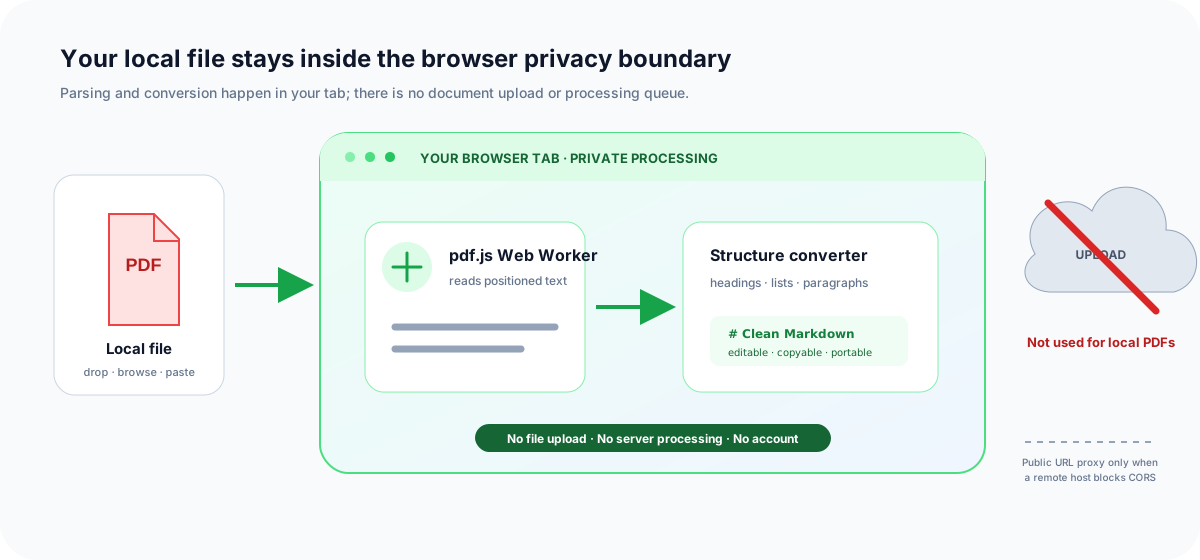
Everything below happens on the page you have open — there is no upload step, no processing queue on a server, and no account.
Add a PDF any way you like
- Drop, browse, or paste. Drag files in, click to browse, or paste a copied PDF with
Ctrl/Cmd + V. Documents up to 100 MB each are supported. - Batch, safely. Drop a whole folder and the files queue up. They convert one at a time so a big batch never freezes the tab, each showing its own waiting, converting, and done status.
- From a URL — even CORS-blocked hosts. Paste a link and it fetches in your browser. When a host blocks cross-origin downloads, a small same-origin proxy retrieves the public file so the conversion still works. One-click sample PDFs let you try it instantly.
Structure it rebuilds
- Scanned PDFs through automatic OCR fallback. When the complete native conversion is empty, the document is rendered at higher resolution and recognised locally by Tesseract.js. No scanned page is sent to an OCR API.
- Headings reconstructed from font sizes, so chapter and section titles keep their hierarchy.
- Lists — bulleted and numbered lines become proper Markdown lists, with ordered lists keeping their original numbering.
- Cleaner text — repeated page headers, footers, and standalone page numbers are stripped; wrapped and hyphenated lines are stitched back into flowing paragraphs; bold and italic runs are re-emphasized; bare URLs are auto-linked.
Read it, check it, export it
- Side by side. Open the original PDF in a panel beside the Markdown to proofread the result page by page.
- Preview or raw. Flip between a rendered preview and the raw Markdown, or expand the workspace to fullscreen.
- Export. Copy it, download the
.md, print it, or open it in the full Markdown Viewer editor.
How PDF to Markdown chooses the document path
The decision happens once for the complete document, not once per page. The converter runs pdf.js across the whole PDF and rebuilds the native Markdown first. If that result contains usable text, conversion stops there—even when the file also contains covers, screenshots, diagrams, image-only pages, or blank pages. OCR is reserved for the old failure case: the complete native result is empty.
First path: six native-text passes
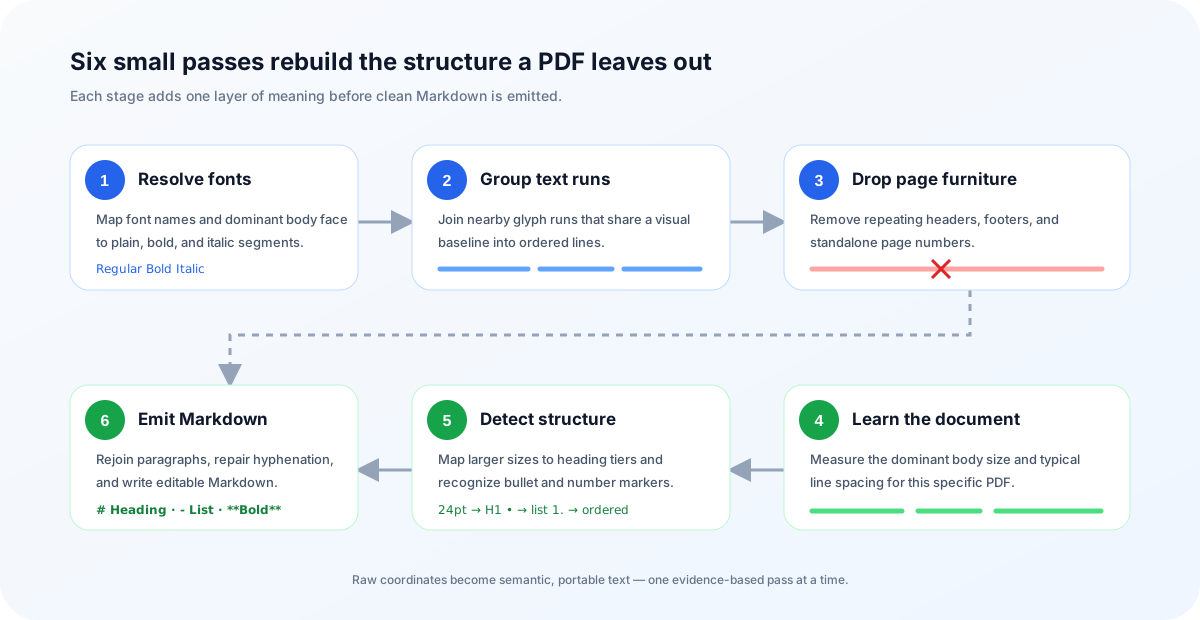
For a digital page, the converter feeds on the text content pdf.js extracts: positioned text runs, each a bit of text with a transform matrix (where it sits), a width, and a font reference. From that raw material, six passes rebuild a document.
- Resolve fonts to emphasis. Each font is mapped to an inline format — bold or italic — from its name. The font whose glyphs cover the most text is treated as the plain body face, so a document set entirely in a
…-Boldbody font does not come out all bold. - Group runs into lines. Runs are gathered into visual lines by baseline (vertical) proximity, keeping each run’s formatting as a segment of the line.
- Drop page furniture. Short lines near the top and bottom edges are fingerprinted; anything repeated across most pages — running headers and footers — or matching a page-number pattern is removed.
- Learn the body size and spacing. The most common font size becomes the body baseline, and the typical line spacing is measured — the calibration that makes paragraph detection work across different documents.
- Map sizes to headings; find lists. Sizes larger than the body baseline map to heading tiers (H1–H6), and bullet (
•,-) and numbered (1.) markers are detected as list items. - Rebuild paragraphs, emit Markdown. Consecutive body lines are merged into paragraphs — repairing words split by a hyphen at a line break — then written out as Markdown with inline
**bold**and_italic_and auto-linked URLs.
Fallback path: render, recognise, reconstruct
A fully scanned PDF has no useful glyph coordinates for pdf.js to extract. Only after the first path returns an empty document does Tesseract.js create those signals locally in the browser. The following path does not upload the PDF or call a remote OCR API:
- Confirm document-level failure. Page numbers, repeated furniture, and whitespace are cleaned before the result is checked. If any usable native Markdown remains, OCR never starts.
- Render at OCR resolution. pdf.js paints that scanned document one page at a time to a temporary canvas at twice its normal scale. The larger bitmap gives character edges more pixels without keeping every page in memory.
- Recognise words and boxes. Tesseract.js reads the canvas in a Web Worker and returns words, confidence scores, lines, and bounding boxes. One worker is reused across all scanned pages in the PDF.
- Rebuild Markdown from geometry. Line height, indentation, vertical gaps, bullets, numbering, and aligned columns become heading, paragraph, list, and table signals. Low-confidence noise is dropped.
- Assemble in original order. Each recognised page returns to its original position before the final Markdown is emitted.
The worker and English recognition data load only after the complete pdf.js result is empty. A normal PDF to Markdown job therefore pays no OCR startup or recognition cost simply because some of its pages contain images.
A concrete PDF-to-Markdown example
Suppose a text-based PDF exposes three positioned lines: a 24-point title, an 11-point sentence broken at the page width, and a numbered item. The converter does not copy that visual layout. It infers the document structure and emits portable Markdown:
[24pt] Quarterly Report
[11pt] Revenue grew across all
[11pt] regions this quarter.
[11pt] 1. Review the forecast
# Quarterly Report

Revenue grew across all regions this quarter.

1. Review the forecast
This distinction matters: conversion quality depends on the signals stored in the source PDF, not on how polished the page looks in a PDF reader. A born-digital report with selectable text usually provides good signals. A fully scanned document provides pixels, so an empty native result triggers the OCR fallback before structural conversion begins.
Why font size, not tags
This is the crux of every PDF to Markdown converter. A web page has <h1> and <ul> elements that say what each block is. A PDF has none of that. It has a glyph placed at an x/y coordinate, in a named font, at a size — pure visual layout. The only reliable signal that a line is a heading is that it is bigger than the text around it, so the converter learns each document’s own body size rather than assuming a fixed number.
The same reasoning drives the small repairs that make output readable. A PDF wraps a paragraph across many short lines with no marker to say they belong together, so the converter re-joins body lines using the measured line spacing. When a line ends in conver- and the next starts with sion, it removes the hyphen and fuses the word; across a page break, a paragraph only continues when the sentence was left unfinished.
[24pt] Quarterly Report        →  # Quarterly Report
[11pt] Revenue grew across all   →  Revenue grew across all
[11pt] regions this quarter.        regions this quarter.
Where it runs — and what stays private
The parsing engine is Mozilla’s pdf.js, which reads the document inside a Web Worker in your tab. The conversion logic itself is pure and framework-agnostic — it takes the extracted text and returns a Markdown string, and is unit tested without pdf.js at all. Your file is read locally and converted locally.
The scanned-document fallback adds Tesseract.js, running locally in a browser Worker. Its engine and English language data may be downloaded from a CDN the first time OCR is needed and then cached. Those reusable assets travel over the network; PDF bytes, rendered page images, and recognised text never go to an OCR API.
Fetching a PDF from a CORS-blocked URL routes through a same-origin proxy that retrieves that public file. Your own dropped, pasted, and browsed files are never sent anywhere. Tesseract.js may fetch its engine and language data, but it processes every scan locally in the browser.
When PDF to Markdown works well—and when it does not
The right workflow depends on what the PDF actually contains. Use this quick check before converting:
| PDF type | Best approach | Expected result |
|---|---|---|
| Selectable, single-column text | Convert directly | Headings and paragraphs usually need little cleanup |
| Fully scanned or image-only PDF | Automatic in-browser OCR | Text and basic structure are reconstructed; proofread low-quality scans |
| Text PDF with screenshots or image pages | Convert directly; do not start OCR | Native text stays fast; text inside isolated images is not recognised |
| Multi-column layouts or dense tables | Convert, then compare side by side | Reading order and table structure may need correction |
| Password-protected document | Unlock a copy first | Encrypted content cannot be parsed directly |
The output is meant to be a strong first draft you can tidy in place. OCR quality depends on scan resolution, contrast, rotation, and typography; the editable Markdown and side-by-side PDF make those touch-ups quick.
Frequently asked questions
Is my PDF uploaded to a server?
No. PDF to markdown conversion runs in your browser with Mozilla’s pdf.js and Tesseract.js. The OCR engine and language data may download on first use, but no OCR API receives your PDF, page images, or recognised text.
How does the converter know what is a heading?
A PDF stores glyphs at coordinates, not heading tags. The converter learns the document’s body font size, then maps larger sizes to heading tiers (H1–H6). It also detects bulleted and numbered list markers and rebuilds wrapped lines into paragraphs.
Can it convert a scanned PDF to markdown?
Yes. The converter runs pdf.js across the complete document first. Only an empty native result loads Tesseract.js, which recognises high-resolution page renders locally in the browser without an OCR API.
Why do some PDF URLs need a proxy to fetch?
The browser fetches CORS-friendly URLs directly. When a host blocks cross-origin downloads, a small same-origin proxy fetches the public PDF so the conversion still works — your own local files never go through it.
Try it
Drop a digital or scanned PDF and turn it into clean Markdown — free, private, and processed in your browser.
Open the PDF to Markdown converterReferences
- pdf.js — PDF reader in JavaScript (Mozilla)github.com/mozilla/pdf.js
- MDN: Web Workers APIdeveloper.mozilla.org/en-US/docs/Web/API/Web_Workers_API
- Tesseract.js — OCR for the browsergithub.com/naptha/tesseract.js
- CommonMark — the Markdown specificationspec.commonmark.org
- The PDF to Markdown convertermarkdownviewer.org/pdf-to-markdown