Text-to-Diagram Live Preview
The Mermaid Live Editor converts plain-text syntax into vector flowcharts, sequence diagrams, class models, state machines, ER schemas, and mind maps in real time as you type.
Convert text into flowcharts, sequence diagrams, Gantt charts & ER schemas in the Mermaid Live Editor — featuring Hand-Drawn sketch mode, 10 custom color pickers, 1,900+ Google Fonts, .mmd export, pan & zoom preview, and 4K PNG / SVG export — 100% in your browser.
The Mermaid Live Editor is a free, browser-based diagramming tool that transforms plain-text Mermaid syntax into polished, scalable vector graphics in real time. Instead of manually drawing boxes and dragging arrows in design software, you describe nodes, edges, and relationships in a simple text format — and the Mermaid Live Editor instantly renders a clean vector diagram. It supports flowcharts, sequence diagrams, class models, state machines, ER schemas, Gantt charts, mindmaps, C4 architecture, Git graphs, Kanban boards, pie charts, and user journeys.
Designed for modern software teams, the Mermaid Live Editor combines Hand-Drawn sketch mode (with wobbly pencil lines and Patrick Hand font), 10 custom color pickers, 1,900+ Google Fonts, .mmd file import/export, up to 4K PNG resolution, and shareable URL links with 100% private client-side browser rendering.

The Mermaid Live Editor turns text syntax into polished, scalable vector diagrams in real time. Describe nodes and flows in words, choose custom colors, Hand-Drawn sketch mode, and 1,900+ Google Fonts, and the Mermaid Live Editor draws the flowchart, sequence diagram, or class model for you.
A complete online Mermaid Live Editor for writing, navigating, Hand-Drawn sketching, custom colors, 1,900+ Google Fonts, .mmd export, 4K PNG export, and sharing text-driven diagrams.
The Mermaid Live Editor converts plain-text syntax into vector flowcharts, sequence diagrams, class models, state machines, ER schemas, and mind maps in real time as you type.
Toggle Hand-Drawn mode in the Mermaid Live Editor to render sketchy rough pencil lines, wobbly stroke borders, solid triangle arrows, and handwritten Patrick Hand font for Excalidraw-like diagrams.
Switch between 5 built-in color themes (Default, Neutral, Dark, Forest, Base) or enable 10 custom color pickers in the Mermaid Live Editor for node fill, node text, borders, lines, arrows, and backgrounds.
Search and apply 1,900+ Google Fonts (Inter, Roboto, Fira Code, Patrick Hand, Kalam, Caveat) directly inside the Mermaid Live Editor with zero initial page load overhead.
Navigate complex diagrams in the Mermaid Live Editor with scroll-to-zoom, click-and-drag pan, one-click Auto-Fit framing that maximizes viewport fill, and an optional dot-grid canvas background.
Upload existing .mmd or .txt files and export your Mermaid diagram source code as .mmd files directly from the Mermaid Live Editor for version control and cross-tool sharing.
Export crisp vector SVG files or high-resolution PNG images at 1x, 2x, 3x, or 4x 4K print quality directly from the Mermaid Live Editor workspace.
The Mermaid Live Editor encodes your diagram code into shareable URL links so teammates can view, edit, and collaborate on live diagrams instantly — no account required.
Explore 24+ built-in diagram templates across 10 categories plus a comprehensive Syntax Cheatsheet covering 14 diagram types with one-click snippet insertion inside the Mermaid Live Editor.
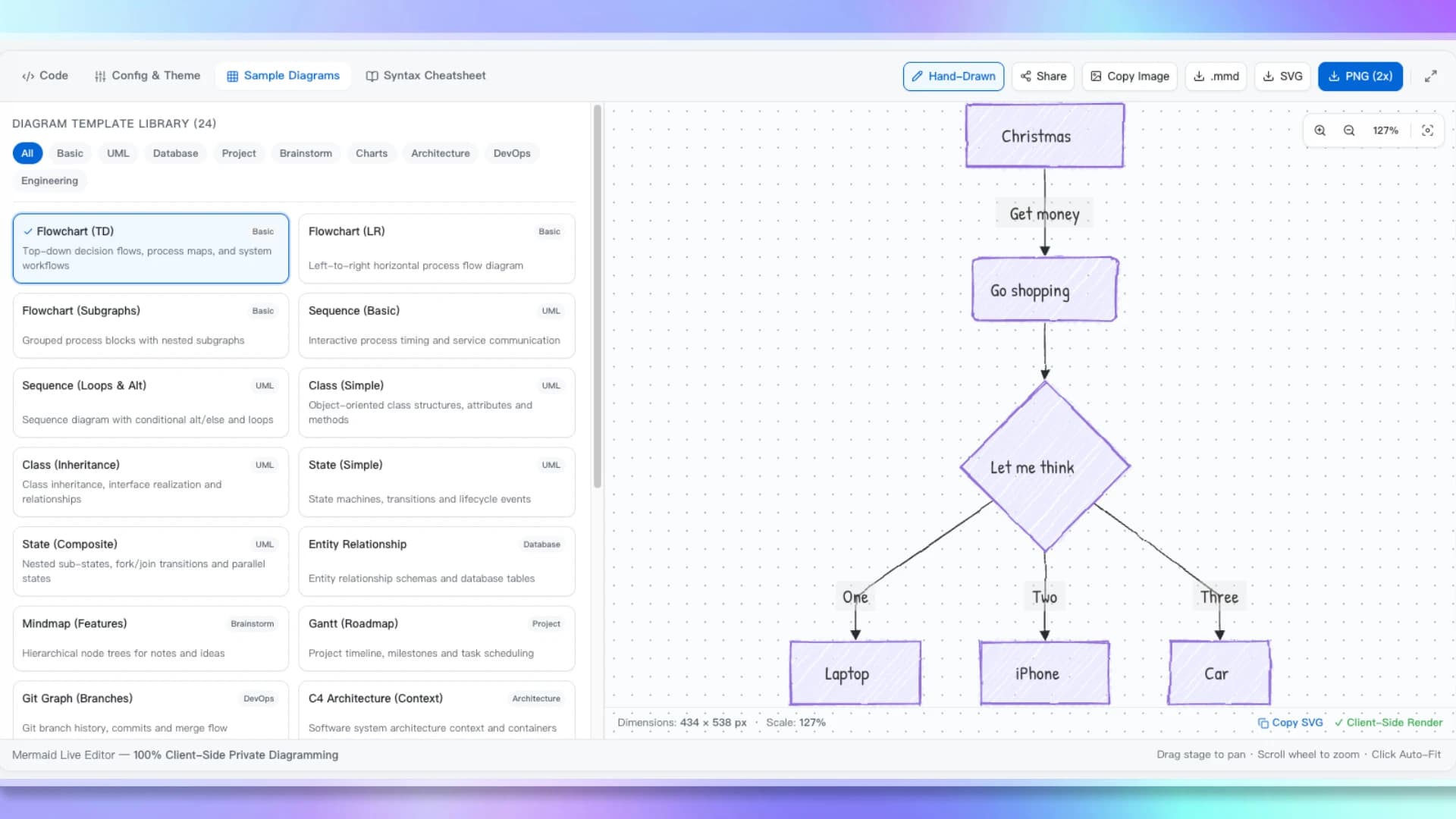
The Mermaid Live Editor combines 24+ templates across 10 categories with Hand-Drawn sketch mode, 5 built-in themes, 10 custom color pickers, 1,900+ Google Fonts, .mmd source export, and a comprehensive 14-block syntax cheatsheet.
Write Mermaid code, customize colors and fonts, and export .mmd, SVG, or 4K PNG diagrams or share links in seconds.
Type syntax into the Mermaid Live Editor, load a preset from the 24+ template library across 10 categories, upload a .mmd file, or insert snippets from the Syntax Cheatsheet tab.
Switch between Classic and Hand-Drawn sketch modes, fine-tune 10 custom color slots, search 1,900+ Google Fonts, and use the interactive pan & zoom canvas to explore your diagram.
Download your Mermaid source as .mmd, export high-res PNG (up to 4x 4K), save SVG, copy images to clipboard, or generate a shareable URL link — all 100% private in the Mermaid Live Editor.
From software architects to product managers, anyone who prefers text-based diagramming uses the Mermaid Live Editor to keep visuals versionable, brand-customized, and in sync.
Design system architecture, microservice sequence flows, and database ER schemas in the Mermaid Live Editor as version-controllable plain text with custom color branding.
Create flowcharts, class models, and mind maps in the Mermaid Live Editor and embed them natively into GitHub READMEs, Notion pages, GitLab wikis, and developer docs.
Use the Mermaid Live Editor to illustrate algorithms, state machines, and data structures in Hand-Drawn sketch mode with custom fonts and colors for slides and assignments.
Generate Gantt timeline roadmaps, user journey maps, and decision trees in the Mermaid Live Editor for sprint planning, retrospectives, and stakeholder presentations.
The Mermaid Live Editor parses, renders, and exports diagrams locally in your browser tab. Confidential architecture and workflow diagrams are never sent to a remote server.
Common questions about customizing, Hand-Drawn sketching, exporting, and sharing diagrams in the Mermaid Live Editor.
Scroll back up, write Mermaid syntax, customize colors and fonts, toggle Hand-Drawn mode, and generate flowcharts, sequence diagrams, and mind maps with .mmd / SVG / 4K PNG export — free and 100% private in the Mermaid Live Editor.