Markmap Mind Map Editor

Visualize your Markdown outlines as interactive SVG mind maps. Zoom, pan, fold branches, filter nodes, and export SVG, 2x PNG & Interactive HTML — 100% in your browser.

Expand:
markmap-lib@0.18.12 · markmap-view@0.18.12Nodes: 0 · Max Depth: 0

What is the Markmap Editor?

The Markmap Editor is a free, web-based tool that transforms ordinary Markdown text into interactive, vector-based mind maps in real time. It parses Markdown headings (#, ##) as primary branch pillars and bullet points (-) as expandable sub-nodes.

  • Instant Client-Side Transformation: See live updates as you type headings, bullet points, math equations, or code blocks.
  • Interactive Branch Folding & Depth Limits: Click node handles to collapse/expand sub-trees or set maximum initial expand levels.
  • Versatile Export Options: Download scalable vector SVG files, 2x high-res PNG images for slides, or standalone Interactive HTML files.
  • Zero Cloud Storage: All processing is done 100% locally inside your browser tab with browser localStorage autosave.
# Title## Section- item one- item two```

From a Plain Markdown Outline to an Interactive Mind Map

The Markmap editor transforms standard Markdown into an interactive, zoomable vector mind map. Headings become branch pillars and nested lists become child nodes — zero extra syntax required.

Markdown Outline
# Release Notes## Highlights- **Live** preview- `code` blocks- Tables & mathMD
Interactive SVG Mind Map
MAP

Full Markmap REPL & Visual Editor Capabilities

Everything you need to create, customize, navigate, and export interactive Markdown mind maps.

Interactive Vector Mind Map SVG

The Markmap editor converts Markdown outlines into interactive vector SVG mind maps with fluid pan & zoom navigation and customizable branch colors.

Full GFM Formatting Toolbar & Line Numbers

The Markmap editor includes a full Markdown formatting toolbar (bold, italics, code, headers, lists, tables, KaTeX math, Mermaid diagrams) with synced line numbers.

Direct 1-Click SVG, 2x PNG & HTML Export

Export high-res 2x PNG images, scalable vector SVG files, standalone offline-ready Interactive HTML documents (with asset embedding), or copy code directly with 1 click.

Collapsible Branch & Level Controls

Click node handles to fold or unfold branches, Alt/Cmd+Click for recursive toggles, or set initial expand level limits (Level 1, 2, 3, 4, or All Expanded) in the Markmap editor.

Solid Color & Color Freeze Modes

Toggle between multi-color rainbow level branching, solid theme colors, or color freeze levels in the Markmap editor to highlight hierarchy levels clearly.

Real-Time Node Filter & Search

Search keywords across your outline — matching nodes are instantly highlighted in the Markmap editor so you can navigate complex mind maps effortlessly.

Advanced Spacing & Animation Options

Fine-tune horizontal node spacing, vertical branch spacing, and layout animation duration using the integrated Options drawer in the Markmap editor.

Import .md Files & Load Remote URLs

Upload local .md files, fetch remote Markdown URLs directly from GitHub or web servers into the Markmap editor, or select from built-in starter templates.

100% Local Browser Privacy & Autosave

All Markmap editor transformations and SVG rendering run 100% client-side in your browser tab. Your notes autosave locally and are never sent to a server.
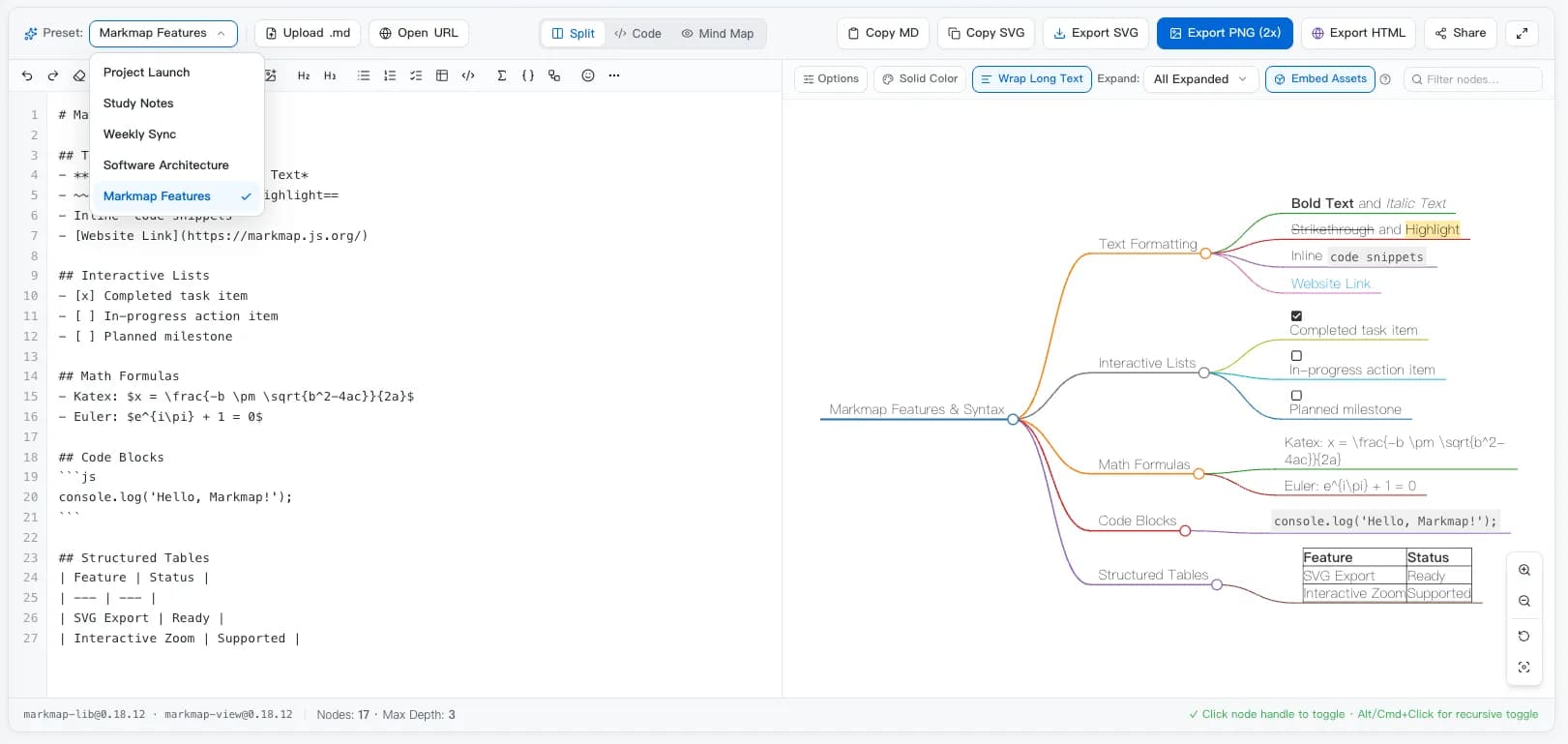
Markmap editor live preview showing Markdown outline on the left and interactive mind map on the right

Your Outline & Mind Map in Live Sync

The Markmap editor keeps your Markdown source code and vector mind map synchronized in real time. Edit a bullet point or heading, and watch the mind map redraw instantly.

  • Headings become main branches, bullet points become leaf nodes
  • Fold or unfold any branch handle with single click or recursive toggle
  • Pan, zoom, keyword search filter, and Auto-Fit canvas framing
  • Import local .md files, fetch remote URLs, and autosave to browser

How to Build a Markmap Mind Map in 3 Easy Steps

No registration, nothing to install — write a Markdown outline, tweak visual settings, and export high-res mind maps in seconds.

1

Write a Markdown outline or load a template

Type headings (#, ##) and bullet lists (-) into the Markmap editor with line numbers and format toolbar, select a starter template, or upload a .md file.

2

Customize view options, colors & expand levels

Toggle solid color vs rainbow themes, adjust text wrapping, set branch expansion depth, filter keywords, and navigate with pan & zoom or Auto-Fit.

3

Export SVG, 2x PNG, HTML, or share a live link

Use 1-click export buttons for crisp SVG vectors, high-res PNG images for slides, standalone interactive HTML files, or shareable URL links for your team.

Who Uses the Markmap Editor

From educators to software engineering teams, anyone who works with structured outlines can convert ideas into interactive visual mind maps.

Students & Note-Takers

Transform textbook chapters and lecture notes in the Markmap editor into interactive study mind maps to revise key concepts and summarize course material.

Product Managers & Roadmaps

Outline feature specifications, sprint goals, and product launch roadmaps in Markdown, then present them with the Markmap editor in team meetings.

Writers & Technical Documentation

Structure articles, technical books, and user guides in the Markmap editor before drafting — reorganize headings while the mind map syncs live.

Software Engineers & Architects

Visualize software architecture, API endpoints, microservice dependencies, and repository README structures with the Markmap editor.

Your Notes Never Leave Your Browser Tab

Unlike online mind mapping tools that store your documents on third-party servers, the Markmap editor parses and renders everything client-side inside your browser.

  • Your Markdown text is transformed into a mind map directly inside your browser tab — it is never transmitted to an external server.
  • The Markmap editor works offline once the page has loaded in your browser.
  • No sign-up, no login, and no user tracking — open the Markmap editor and start visualizing mind maps immediately.
  • Safe for internal engineering notes, confidential project specs, and private research.
100% in your browser

Markmap Editor — Frequently Asked Questions

Everything you need to know about converting Markdown outlines into interactive mind maps.

What is Markmap and how does the Markmap editor work?
Markmap is an open-source tool that converts Markdown outlines into interactive SVG mind maps. In the Markmap editor, you write headings (#, ##) and bullet lists (-) on the left with line numbers and formatting tools, while the mind map renders live on the right.
What customization options are available in the Markmap editor?
You can toggle Solid Color mode, enable text wrapping, set initial expand level limits (Level 1-4 or All Expanded), adjust node spacing and animation duration, search and filter nodes, and switch view modes.
How do I export my mind map from the Markmap editor?
Use the 1-click export buttons to download scalable vector SVG files, 2x high-resolution PNG images, or standalone Interactive HTML pages with offline asset embedding. You can also copy SVG XML or Markdown code with a single click.
Can I fold, unfold, or set initial branch expand levels?
Yes! Click circular node handles to fold or unfold branches, Alt/Cmd+Click for recursive sub-tree toggles, or use the Expand dropdown in the Markmap editor to limit initial rendering depth.
Can I open remote Markdown URLs or local .md files?
Yes. Click Upload .md to load local files, or click Open URL to fetch raw Markdown directly from GitHub repositories or web servers into the Markmap editor.
Are my notes kept private in the Markmap editor?
Yes. All parsing and SVG rendering in the Markmap editor occur 100% locally in your browser using JavaScript. Nothing is uploaded to external servers, and your work automatically saves in browser localStorage.
Does the Markmap editor support math formulas, code & diagrams?
Yes! The Markmap editor supports GFM formatting, task lists ([x]), code blocks, KaTeX math formulas ($x^2$), Mermaid diagrams, and emojis.
Is the Markmap editor free to use?
Yes, the Markmap editor is completely free with no usage limits, no watermarks on exported files, and no registration required.

Create Your Markmap Mind Map Now

Scroll back up, paste your Markdown outline or select a template, and watch it transform into an interactive SVG mind map — free, fast, and 100% private.