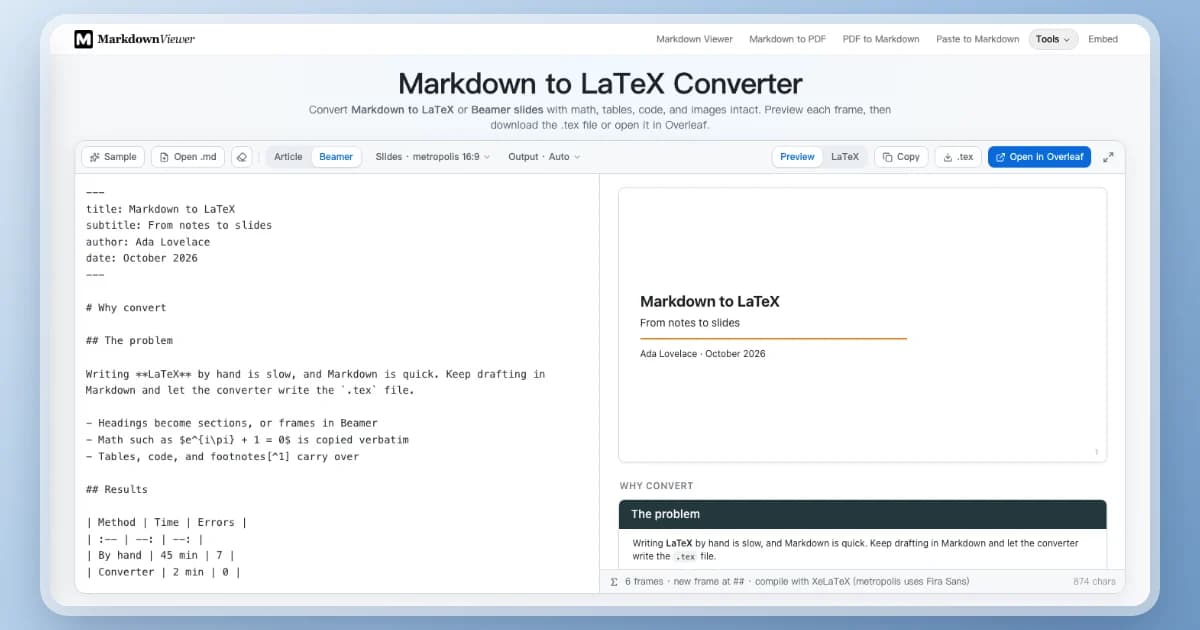
Convert Markdown to LaTeX or Beamer slides with math, tables, code, and images intact. Preview each frame, then download the .tex file or open it in Overleaf.
Drop a Markdown file here or
Convert notes, a README, or AI output into a LaTeX article or a Beamer slide deck.
Converted in your browser — nothing is uploaded
Want to see it first?
What Is the Markdown to LaTeX Converter?
The Markdown to LaTeX converter turns Markdown into a compilable .tex file — a full article, a body you can paste into an existing paper, or a Beamer slide deck — entirely in your browser.
Article or Beamer:Switch between a LaTeX document and Markdown to Beamer slides without editing your source.
Math stays untouched:Inline and display formulas are written to the .tex exactly as you typed them.
Ready for Overleaf:Download the .tex, or send it to Overleaf to compile a PDF without installing TeX.
Markdown source, the Beamer frame preview, and the export buttons.
Markdown to LaTeX That Compiles the First Time
Clean, readable LaTeX with the packages already declared, so the output builds in pdfLaTeX, XeLaTeX, or Overleaf.
ChatGPT Markdown to LaTeX
Paste an answer from ChatGPT or Claude and keep its headings, lists, tables, code, and formulas. \( … \) and \[ … \] delimiters are recognised, so you stop rewriting **bold** into \textbf by hand before it goes into a paper.
Markdown to Beamer Slides
Headings become frames, --- starts a new slide, and frames holding code are marked fragile automatically. Pick a theme, a 16:9 or 4:3 aspect ratio, and the heading level that starts a frame.
Math Passed Through Verbatim
$…$ and $$…$$ are copied into the .tex unchanged, so aligned environments, matrices, and macros you wrote yourself survive the conversion. An align* block is written as an environment, not wrapped in \[ … \].
Booktabs Tables and Listings
GFM tables become booktabs tabular environments with your column alignment and shrink to fit the line; fenced code becomes lstlisting with the language set when listings knows it.
Open in Overleaf
Send the generated LaTeX to Overleaf with the right compiler selected, images included, or download the .tex — zipped together with its images when the Markdown has any.
Private by Default
Markdown to LaTeX conversion runs on your device after the page loads. Nothing is uploaded unless you choose Open in Overleaf, which sends the generated LaTeX to Overleaf.
Markdown to Beamer: How Slides Are Split
The converter follows Pandoc's slide rules, so the same Markdown also works with pandoc -t beamer.
---
title: Quarterly review
author: Ada Lovelace
---

# Results

## Revenue

- Up 12% on last quarter
- Margin $m = 0.31$

## The code

```python
print("fragile frame")
```

---

Questions?
Markdown in
1Title pageQuarterly review · Ada Lovelace
\section{Results}
2RevenueTwo bullets and inline math
3The codeMarked [fragile] for lstlisting
4(untitled)Questions? — after the --- break
Frames out
With the slide level on Auto, the shallowest heading that is followed by content starts each frame.
Headings above that level become \section and \subsection; they do not make frames of their own.
--- on its own line, after a blank line, starts a new frame without a title.
A frame that holds a code block is marked [fragile], or lstlisting would not compile.
A frame that looks too long for the slide is flagged, so you can split it before compiling.
Markdown to LaTeX Syntax Mapping
Every Markdown structure has a standard LaTeX counterpart, and the preamble loads only the packages your document uses.
In Markdown
In LaTeX
In Beamer
YAML title / author / date
\title, \author, \date, \maketitle
Title page frame
# … ####
\section … \paragraph
Sections, frames, or blocks
**bold** _italic_ ~~del~~
\textbf \emph \sout
Same
`code`
\texttt{…}
Same
[label](url)
\href{url}{label}
Same
- item / 1. item
itemize / enumerate
Optionally revealed item by item
- [ ] / - [x]
$\square$ / $\boxtimes$ markers
Same
| a | b |
booktabs tabular
Scaled to the frame width
```python
lstlisting [language=Python]
Frame marked [fragile]

figure + \includegraphics + \caption
Centred image
> quote
quote environment
block
$x$ and $$…$$
Copied verbatim
Same
[^1] footnote
\footnote{…}
Same
---
Horizontal rule
New frame
Convert Markdown to LaTeX in 3 Steps
Go from Markdown notes or an AI draft to a .tex file without installing a converter.
1
Paste Markdown or open a .md file
Start your Markdown to LaTeX conversion with notes, a README, or an AI draft. Add a YAML header for the title, author, and date, or let a single leading # heading become the title.
2
Choose Article or Beamer
Set the document class, paper, and font size, or the theme, aspect ratio, and slide level. The preview shows the page or every frame.
3
Download .tex or open in Overleaf
Compile locally with pdfLaTeX or XeLaTeX — the status bar says which — or let Overleaf build the PDF for you.
Markdown to LaTeX Frequently Asked Questions
Answers about Beamer slides, math, ChatGPT output, Overleaf, images, CJK text, and privacy.
How do I convert Markdown to LaTeX online?
Paste Markdown into the editor or open a .md file, keep Article selected, and check the preview. Then copy the LaTeX, download the .tex file, or open it in Overleaf. No account is needed.
How do I turn Markdown into Beamer slides?
Switch to Beamer. Each heading at the slide level becomes a frame, shallower headings become sections, and a horizontal rule (---) starts a new untitled frame. Download the .tex or open it in Overleaf to get the PDF.
How are slides split into frames?
The converter follows Pandoc. With the slide level on Auto, it uses the shallowest heading level that is followed directly by content: in a document of # sections and ## slides, every ## starts a frame and every # becomes \section. Deeper headings inside a frame become Beamer blocks. You can also fix the level to #, ##, or ###.
Will my LaTeX math survive the conversion?
Yes. Inline and display formulas are set aside before the Markdown is parsed and written back exactly as typed. Display math becomes \[ … \], and a block that is already an environment, such as align*, is written as that environment.
Can I convert ChatGPT Markdown to LaTeX?
Yes. Paste the answer as it is. ChatGPT often writes math as \( … \) and \[ … \]; both are recognised as math, and headings, lists, tables, and code convert as usual. Check any HTML in the answer, since raw HTML tags are dropped.
Can I paste the result into an existing paper?
Yes. Choose Output → Body only. You get the content without a preamble, and a comment at the top lists the packages it needs, such as booktabs or listings, so you can add them to your own preamble.
Does it support Chinese, Japanese, or Korean text?
Yes. When the Markdown contains CJK text, the converter uses the ctex document classes and tells you to compile with XeLaTeX. Open in Overleaf selects XeLaTeX for you. Korean text uses Noto CJK KR fonts on Overleaf; local compilation needs those fonts or Apple SD Gothic Neo.
How do I compile the .tex file to a PDF?
Click Open in Overleaf, or run the engine shown in the status bar locally, for example xelatex main.tex or pdflatex main.tex. The metropolis Beamer theme compiles with either, but looks as designed with XeLaTeX.
What happens to images?
Each image becomes \includegraphics guarded by \IfFileExists, so a missing file prints a framed note instead of stopping the compile. Remote and embedded PNG, JPG, and PDF images are bundled into the zip download and sent to Overleaf. SVG, WebP, and GIF are replaced with a placeholder, because LaTeX cannot include them directly.
Should I use this Markdown to LaTeX converter or Pandoc?
Pandoc is the better choice for pipelines, custom templates, citations, and filters. This converter is for a quick visual conversion without installing anything, and it follows the same slide rules, so the Markdown you write here also works with pandoc -t beamer.
Are Mermaid diagrams converted?
Not yet. A Mermaid block is kept as a comment in the .tex. Export the diagram as PNG from the Mermaid editor and include it as an image.
Can it convert LaTeX back to Markdown?
Not on this page. This tool goes from Markdown to LaTeX only. For the other direction, Pandoc's pandoc -f latex -t markdown handles most documents.
Is the conversion private?
Yes. Editing, preview, and conversion run in your browser, and the .tex and zip are built on your device. The only exception is Open in Overleaf, which sends the generated LaTeX — and the addresses of remote images — to Overleaf.
More Ways to Export Markdown
When the destination is not LaTeX, these converters keep the same Markdown.