Online Markdown Editor & Live Preview

Write GitHub Flavored Markdown with live split-screen preview in our online Markdown editor. Includes LaTeX math, Mermaid diagrams, and automatic browser autosave.

0 words·0 characters·1 lines·~1 min read
✓ Local Privacy Guaranteed — 100% In-Browser Execution
Visual Overview of the Online Markdown Editor

Powerful Split-Screen Workspace & Live Rendering

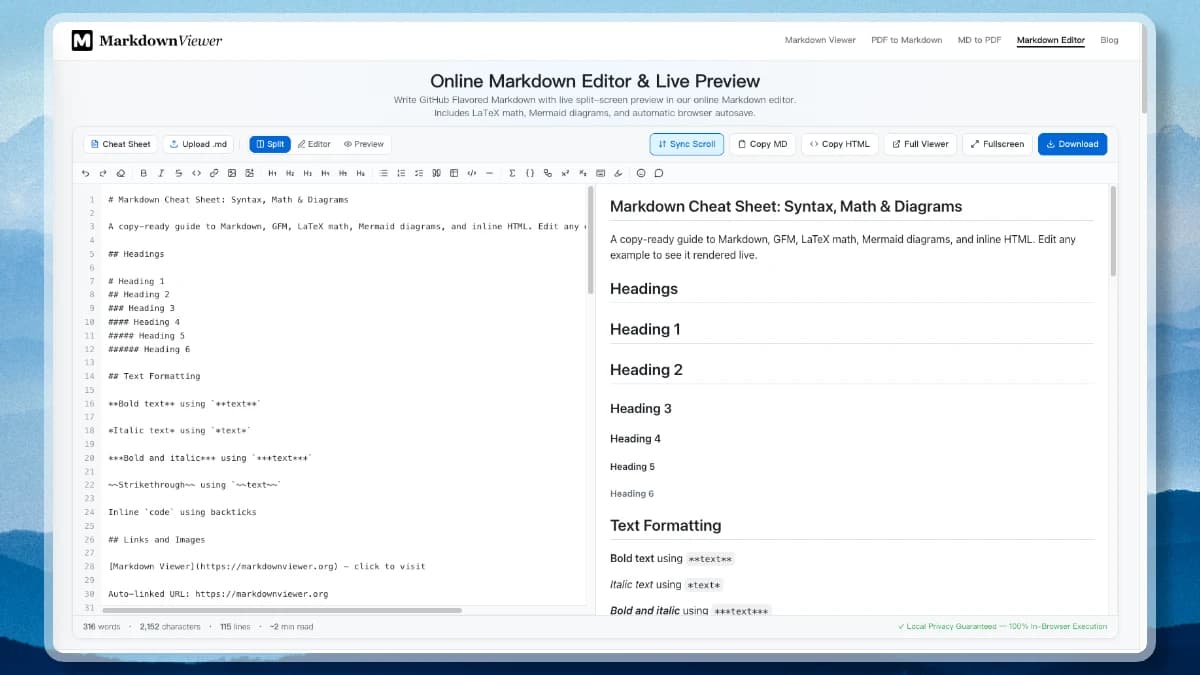
Experience real-time GitHub-style rendering, KaTeX mathematical equations, and Mermaid diagrams inside a clean split-screen Markdown editor workspace.

Online Markdown Editor with Live Preview Interface
Figure 1: Full-featured split-screen Markdown editor workspace with instant HTML preview

Markdown Editor Features Built for Modern Technical Writers

Write clean, structured documentation with real-time feedback and privacy protection using a client-side Markdown editor web application.

Live Split-Screen Preview

Type markdown in the Markdown editor pane and inspect instant rendering on the right with synchronized scrolling and zero lag.

GitHub Flavored Markdown (GFM)

Full Markdown editor support for tables, task lists, strikethrough, autolinks, and fenced code blocks with 190+ language highlighting rules.

LaTeX Formulas & Math

Write inline formulas or display equation blocks using standard KaTeX notation — ideal for technical and academic writing.

Mermaid Text-to-Diagrams

Embed flowcharts, sequence diagrams, class diagrams, and state machines directly inside mermaid fenced code blocks.

Formatting Toolbar & Shortcuts

Insert bold, italic, headings, links, lists, tables, code blocks, math, and Mermaid from the toolbar — with keyboard shortcuts and one-click image upload that inlines pictures as Base64.

Line Numbers & Fullscreen

The Markdown editor shows line numbers for quick navigation, a distraction-free fullscreen mode, and split, editor-only, or preview-only views you can switch on the fly.

Import & Export

Upload a local .md file, download your work as .md, or copy clean rendered HTML — then jump to the Markdown to HTML or Markdown to PDF exporters in one click.

Instant Offline Autosave

Your work automatically saves to localStorage as you type in the Markdown editor. Reopen or refresh your browser window anytime without losing progress.

100% Client-Side & Private

Your document is parsed and rendered locally in your web browser by the Markdown editor. Zero text or uploaded files are sent to remote servers.

How to Use This Online Markdown Editor in 3 Steps

No sign-up required — start writing formatted documentation instantly in your Markdown editor.

1

Write or Paste Markdown

Type text into the Markdown editor pane or paste existing GFM markdown notes.

2

Inspect Live Preview

See real-time rendered HTML preview in the Markdown editor with syntax highlighting, math equations, and Mermaid diagrams.

3

Copy or Download .md

Click "Download .md" to save your Markdown editor file or "Copy HTML" to paste rendered markup into your CMS.

Versatile Use Cases for Our Online Markdown Editor

Whether you are drafting technical documentation, writing math equations, or producing blog posts, our Markdown editor workspace streamlines your writing workflow.

Developers & Technical Writers

Draft API documentation, project README files, and release notes in this Markdown editor with live split-screen GFM preview.

Academic & Math Researchers

Draft papers and lecture notes in your Markdown editor with KaTeX equations directly inside your workspace.

Content Marketers & Bloggers

Write clean structured blog posts in the Markdown editor and export ready-to-publish HTML markup in one click.

Diagram & Workflow Designers

Create sequence diagrams and flowcharts on the fly in the Markdown editor using Mermaid code blocks.

100% Client-Side Privacy & Local Processing Guarantee in Our Markdown Editor

Your document is parsed and rendered entirely inside your web browser. This Markdown editor tool operates with zero server uploads and complete local privacy.

All markdown documents are parsed, rendered, and edited entirely inside your Markdown editor browser tab — nothing is uploaded to a server.
The Markdown editor runs 100% offline using client-side JavaScript once the web page has loaded.
Your sensitive drafts, technical documentation, and internal notes stay 100% private in your local Markdown editor.

Frequently Asked Questions About Online Markdown Editor

Common questions about editing and previewing Markdown with this Markdown editor tool.

How does this online markdown editor work?
Type or paste markdown into the Markdown editor left pane, and the editor renders a GitHub-style preview on the right in real time. Your text automatically saves to browser localStorage, and you can copy raw markdown, copy formatted HTML, or download a .md file with one click.
Is this online markdown editor completely free?
Yes, this online Markdown editor is 100% free with no registration, no account creation, no usage quotas, and no watermarks in your exported files.
Does this Markdown editor work offline?
Yes. Once loaded in your browser tab, this Markdown editor runs all rendering, math processing, and diagram generation client-side in JavaScript without requiring an active internet connection.
How does this compare to StackEdit or Dillinger?
Unlike legacy tools, this Markdown editor includes modern GFM compliance, native LaTeX math typesetting, instant Mermaid diagram rendering, one-click HTML copy, and direct integration with our multi-tab Markdown Viewer — all with zero server telemetry.
What syntax does this Markdown editor support?
It supports full GitHub Flavored Markdown (headings, lists, bold/italic, tables, task lists, strikethrough), code syntax highlighting, KaTeX math expressions, and Mermaid diagrams.
Can I export my document from the Markdown editor?
Yes. You can copy rendered HTML directly from the Markdown editor toolbar or use our specialized Markdown to HTML and Markdown to PDF tools available in the site menu.
Does this Markdown editor keep my files private?
Yes. All markdown parsing and rendering occur 100% locally in your web browser by the Markdown editor. Zero text or uploaded files are transmitted to external servers.
Can I use this online Markdown editor on mobile devices?
Yes. The Markdown editor interface is fully responsive, featuring a compact mobile toolbar, touch-friendly formatting buttons, and one-tap view switches.
Does the Markdown editor have a formatting toolbar and image upload?
Yes. A toolbar inserts bold, italic, headings, links, lists, tables, code blocks, math, and Mermaid diagrams, with keyboard shortcuts for the common ones. You can also upload an image and it is embedded inline as a Base64 data URI, so it travels with your document. The editor shows line numbers and has a distraction-free fullscreen mode.

Start Writing with Our Free Online Markdown Editor

Scroll back up, type or paste your Markdown notes, and see live rendered GFM preview, LaTeX math, and Mermaid diagrams — free with no sign-up.