Markdown Reader — Read MD Files Online

Use this private markdown reader to open local files or a direct URL, switch between documents, and render GFM, code, KaTeX, and Mermaid. Pick one of twelve reading themes, set the column width, and go fullscreen for focused reading on desktop or mobile.

0 words0 chars0 lines

What Is the Markdown Reader?

The Markdown reader is a private, browser-based reading view for .md files. Open one file or a whole batch, keep them in the document list on the left, and read each one rendered exactly as GitHub Flavored Markdown — including tables, task lists, code, KaTeX math, and Mermaid diagrams.
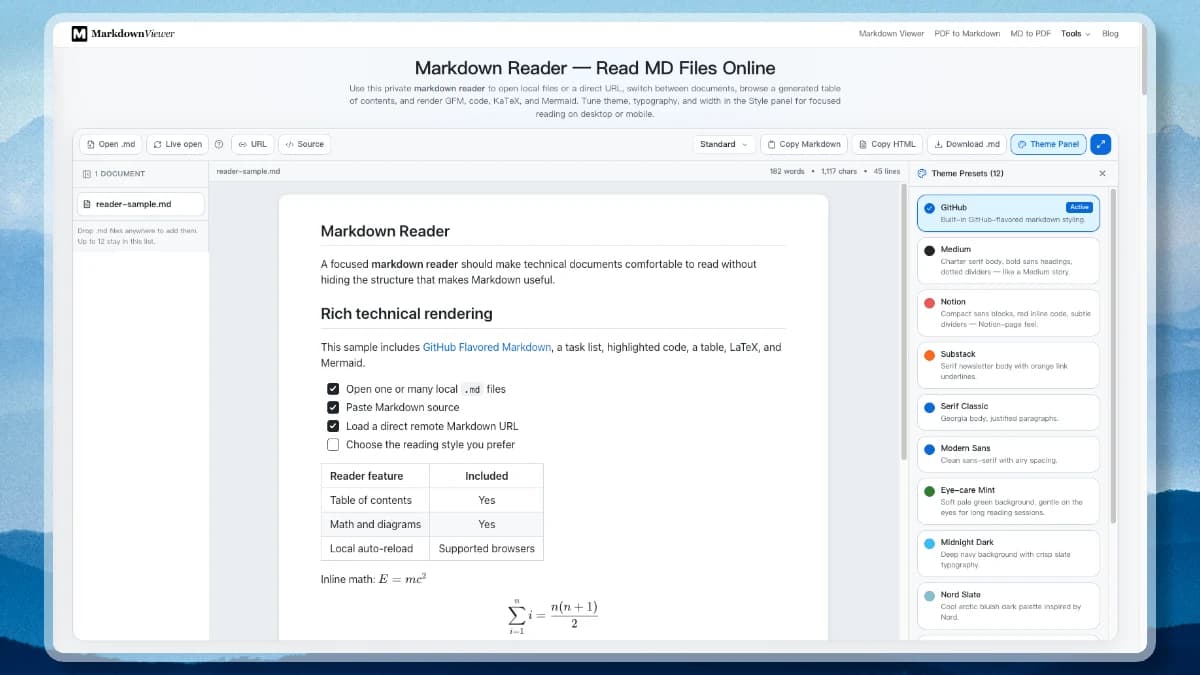
  • Many documents, one workspace: Open up to twelve .md files at once or drop them on the page; every document gets a tab in the left list, and closing a tab leaves the rest untouched.
  • Live reload while you edit: Use Live open in a supported browser and the reader re-reads the file from disk whenever you save it in your own editor, until you press Stop live.
  • A reading view you can tune: Twelve themes change colour and typography together, three column widths control the measure, and fullscreen removes everything except the document.
  • Nothing leaves the browser: Files are read locally, rendering happens on your device, and only a direct URL fetch touches the network.
The Markdown reader with a document list on the left, the rendered Markdown centred in the reading pane, and the theme panel open on the right.
Document tabs, the centred reading pane, and the theme panel.

A Markdown Reader for Real Technical Documents

This reader combines the speed of an online preview with controls normally associated with a dedicated reading app. It handles ordinary notes and richer engineering documentation without turning the page into a heavy project editor.

Open Local Markdown Files

Drop .md files onto the reader or choose Open .md. Local content is read in your browser without an account or document upload, and .markdown, .mdown, .mkd, and .txt work too.

Read a Batch, Switch Instantly

Open up to twelve documents at once. Each gets a tab in the list on the left, you can close any of them, and the set is remembered in this browser until you clear it.

Authorized Live Reload

Choose Live open in a compatible browser to watch one local file. Save in VS Code or Obsidian and the reader re-reads it, counting each reload — Stop live ends the permission.

Direct Remote Markdown URLs

Load a public direct .md or raw README URL through the protected fetch route. Relative links and images resolve against the source URL so a remote README stays navigable.

Twelve Reading Themes

The Theme Panel switches colours and typography together: GitHub, Medium, Notion, Substack, Serif Classic, Modern Sans, Eye-care Mint, Midnight Dark, Nord Slate, Solarized Light and Dark, and Dracula.

Reading Width and Focus Mode

Documents sit centred in a narrow, standard, or wide measure. Fullscreen hands the whole window to the page you are reading, and Esc brings the workspace back.

Math, Mermaid, GFM, and Code

The markdown reader renders KaTeX formulas, Mermaid diagrams, GitHub Flavored Markdown tables and task lists, plus syntax-highlighted fenced code blocks.

Source Beside the Reading View

Toggle Source to read the Markdown next to its rendered form and edit it in place. A live word, character, and line count sits above the reading pane.

Copy or Download What You Read

Copy the Markdown, copy the rendered HTML for a mail client or CMS, or download the .md file. The file on your disk is never modified by the reader.

Use the Markdown Reader in 3 Steps

It starts immediately and requires no account. Choose the source, tune the reading view, then navigate or copy the result.

1

Open, paste, or load Markdown

Start with the sample, open one or several local files, choose authorized live reload for a file you are editing, or load a direct public Markdown URL.

2

Choose a reading theme and width

Open the Theme Panel to pick one of twelve reading presets, then set the column measure to narrow, standard, or wide from the toolbar.

3

Read, edit, or take the content

Enter fullscreen for a distraction-free read, open Source to edit in place, then copy the Markdown, copy the rendered HTML, or download the .md file.

Online Markdown Reader vs Chrome or Firefox Extension

An online reader is ideal when you want to open a chosen file, paste source, or inspect a public raw URL without installing software. A markdown reader extension is better when every Markdown response should render automatically as you browse.

Browser security prevents a normal website from silently browsing arbitrary file:// paths. An extension needs explicit permission such as “Allow access to file URLs.” This tool uses a file picker instead. Live open requests access to only the file you select, and the permission can be stopped from the toolbar.

Choose the smallest permission
PasteNo file permission
Open .mdOne-time browser read
Live openAuthorized handle for one selected file
ExtensionReview file:// and website permissions

Markdown Reader for GFM, Mermaid, LaTeX, and Code

Technical Markdown is more than paragraphs. This reader preserves the structures that make a README, research note, or architecture document useful.

GitHub Flavored Markdown

The markdown reader handles tables, task lists, strikethrough, links, blockquotes, and fenced code. A GitHub README remains recognizable outside the repository page.

KaTeX and Mermaid

The markdown reader turns LaTeX delimiters into readable equations and fenced Mermaid source into SVG diagrams without requiring pre-rendered images.

Highlighted code

The markdown reader detects fenced code languages and applies syntax highlighting while keeping the original source available for inspection and copying.

Reading Something That Is Not Markdown Yet

The reader needs Markdown source. When your document is a webpage, a PDF, or a Word file, convert it first — each converter runs in the browser too — then open the result here and check headings, links, tables, and image alt text.

From a webpage

Copy the article markup and convert it, then read the clean result without navigation, ads, or cookie banners in the way.

HTML to Markdown

From a PDF

Turn a paper or report into headings, lists, and tables you can scroll, search, and copy out of.

PDF to Markdown

From a Word file

Convert a .docx, keep its headings and tables, and extract embedded images alongside the Markdown.

Word to Markdown

Local Markdown Reader Privacy

Local file reading, Markdown rendering, source editing, theme settings, and copying all run in your browser. The markdown reader never uploads a file opened from your device — only the URL loader contacts the site endpoint, because retrieving a public remote document requires a network request.

  • No sign-up and no account required
  • No local file upload and no server copy
  • Live reload re-reads the file you picked, nothing else
  • Documents and style settings stay in this browser only
100% in your browser

Markdown Reader Frequently Asked Questions

Answers about online previews, local files, live reload, file:// access, Chrome and Firefox extensions, Mac and Android apps, GFM, Mermaid, LaTeX, privacy, and reader mode.

What is a Markdown reader?
A Markdown reader turns plain Markdown source into a formatted document for comfortable reading. This one adds twelve reading themes, three column widths, fullscreen focus mode, GFM tables and task lists, code highlighting, KaTeX math, Mermaid diagrams, local files, and direct remote URLs.
How do I use this Markdown reader online?
Open a .md file, drag one onto the tool, paste source in the Source panel, or load a public direct Markdown URL. The reading view updates as you go, and you can change its theme, column width, and fullscreen focus mode from the toolbar.
Can I read several Markdown files at once?
Yes. Open or drop up to twelve files and each one becomes a tab in the document list on the left. Switching tabs re-renders instantly, closing a tab removes only that document, and the list is kept in this browser so it survives a reload.
Which reading themes are available?
Twelve presets that change colours and typography together: GitHub, Medium, Notion, Substack, Serif Classic, Modern Sans, Eye-care Mint, Midnight Dark, Nord Slate, Solarized Light, Solarized Dark, and Dracula. Column width is a separate control, so a serif theme can still be read in a narrow measure.
Can I copy the rendered HTML instead of the Markdown?
Yes. Copy HTML puts the rendered document on the clipboard for an email client, CMS, or slide, while Copy Markdown keeps the source. Download .md saves the document as a file; none of the three changes the file on your disk.
What is the difference between Open .md and Live open?
Open .md imports a local file once into browser memory (supported in all browsers). Live open requests single-file permission via the File System Access API to watch for changes; every time you save the file in your local editor (like VS Code or Obsidian), the reader automatically reloads the view.
Does the Markdown reader upload my local file?
No. A normally opened local file is read with the browser File API and rendered on your device. Live open requests permission for one selected file through the File System Access API. Remote URL loading necessarily asks this site's protected fetch endpoint to retrieve that public URL.
Can the Markdown reader automatically refresh a local file?
Yes, in browsers that support the File System Access API. Click Live open, choose one file, and grant access. The reader checks its last-modified time while the page stays open. If unsupported, Open .md still provides a one-time local preview.
Why can’t an online Markdown reader open every file:// URL?
Web pages are sandboxed and cannot silently browse arbitrary local paths. A browser extension can handle file:// pages only after you explicitly enable file URL access. This web tool instead uses a normal file picker or an authorized single-file handle.
Does the Markdown reader support Mermaid and LaTeX?
Yes. Fenced Mermaid blocks become diagrams, inline and display LaTeX are rendered with KaTeX, and fenced programming code receives syntax highlighting. Invalid diagram or formula source remains diagnosable instead of being sent to a server.
Does the Markdown reader support GitHub Flavored Markdown?
Yes. It supports common GFM features such as tables, task lists, strikethrough, autolinks, fenced code, and standard headings. GitHub-specific application chrome, issue references, or repository permissions are outside the Markdown format itself.
Should I use a Markdown reader Chrome extension?
Use an extension when you want the browser to render .md URLs or file:// pages automatically. Review its requested site and file permissions first. Use this online reader for occasional documents, explicit file selection, URL loading, and no extension installation.
Can a Markdown reader turn a webpage, PDF, or Word file into a clean reading view?
A reader needs Markdown source, so convert first: use the HTML to Markdown converter for copied page markup, PDF to Markdown for a paper, or Word to Markdown for a .docx, then open the result here. Review headings, image alt text, links, tables, and code, because automated extraction can miss page-specific structure.

Open the Markdown Reader

Return to the markdown reader, choose a local file or direct URL, and settle into a responsive reading layout with eye-care themes, math, diagrams, and code.