Paste, Open, or Fetch HTML
Paste source or rich text, open private local .html files, or fetch a public webpage URL. Local input stays in your browser, while relative links and images from fetched pages are resolved before conversion.
Convert HTML to Markdown online with rich-text paste, public webpage URLs, GFM tables, live preview, configurable cleanup, and private batch conversion. Open multiple HTML files, review each result, then download one .md file or the complete Markdown batch as a ZIP.
Tip: copy formatted content from a web page or rich-text editor and paste it here. The original HTML is captured automatically.
An HTML to Markdown converter reads structured webpage markup and rewrites meaningful content as portable Markdown. Headings become # syntax, emphasis becomes **bold** or *italic*, links and images become Markdown references, and standard tables become editable GFM pipe tables.
Use paste for a selected article, Fetch URL for a public webpage, or open multiple local files for batch HTML to Markdown conversion. The file queue keeps every source editable, applies the current cleanup rules to each document, and packages all results into a local ZIP.

This browser tool combines fast online conversion with a multi-file batch queue, ZIP export, rich clipboard input, page-noise filtering, GFM tables, and safe handling for structures Markdown cannot represent.
Paste source or rich text, open private local .html files, or fetch a public webpage URL. Local input stays in your browser, while relative links and images from fetched pages are resolved before conversion.
Select or drop up to 50 HTML files, switch between them in a responsive batch queue, apply the same conversion rules, and download every result together as a Markdown ZIP.
The HTML to Markdown table converter turns ordinary tables into readable GFM pipe syntax. When a table uses rowspan, colspan, or nesting, preserve its original HTML instead of silently losing structure.
Use HTML to Markdown clean mode to remove navigation, sidebars, forms, ads, cookie banners, scripts, styles, and page chrome while retaining article structure for RAG ingestion.
HTML to Markdown output preserves headings, nested lists, task lists, blockquotes, links, images, fenced code, strikethrough, and tables as clean GitHub Flavored Markdown.
HTML to Markdown settings let you choose ATX or Setext headings, dash or asterisk bullets, fenced or indented code, and whether links, images, or complex tables remain.
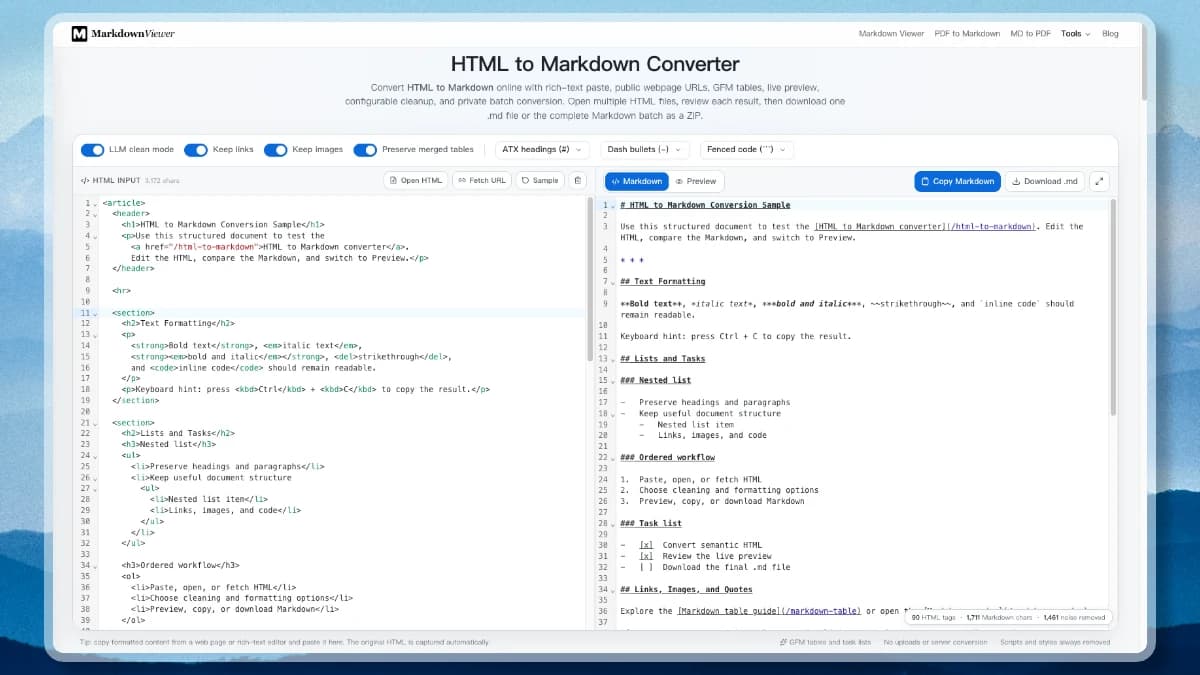
Go from raw HTML, copied web content, a public URL, or a batch of local files to readable Markdown without installing another app.
Start with source code, formatted clipboard content, a public webpage URL, or select multiple .html, .htm, and .xhtml files. Local files appear in a switchable batch queue.
Configure HTML to Markdown cleaning rules: enable LLM mode, keep or remove links and images, preserve merged tables, and select heading, list, and code-block styles.
Review each file as Markdown source or a rendered preview, download the active .md file, or export every converted file in one private ZIP.
Raw pages waste context on navigation, forms, cookie notices, social widgets, CSS, and JavaScript. The HTML to Markdown clean mode removes common boilerplate while keeping headings, lists, links, code, quotes, and tables that carry document meaning.
This is useful before chunking documents for embeddings, preparing RAG sources, archiving research, or adding a web article to an AI prompt. Always review the output: a generic cleaner cannot know whether a site-specific sidebar is noise or essential content.
A reliable HTML to Markdown workflow converts simple tables to GFM pipe syntax and treats complex tables differently because Markdown has no native rowspan, colspan, caption, or nested-table model.
Portable and easy to edit
| Name | Role |
| --- | --- |
| Ada | Engineer |Structure survives the conversion
<table>
<tr><th colspan="2">Total</th></tr>
...
</table>Use the online tool for interactive work. Choose an HTML to Markdown library or CLI when conversion belongs inside a scraper, migration, ingestion pipeline, build process, or reusable automation skill.
| Environment | Tool | Best fit |
|---|---|---|
| JavaScript / Browser | Turndown | Custom rules, browser apps, GFM plugins |
| Node.js | node-html-markdown | High-volume server and batch workloads |
| Python | markdownify | Scrapers, notebooks, Beautiful Soup workflows |
| Python | html2text | Scripts, CLI jobs, readable text conversion |
| Go | html-to-markdown | Extensible rules, CLI, whole-site pipelines |
from markdownify import markdownify
markdown = markdownify(
html,
heading_style="ATX"
)import TurndownService from "turndown"
const service = new TurndownService()
const markdown = service.turndown(html)Pasted source, individual files, and complete HTML batches are parsed, previewed, edited, and converted on your device. Even the multi-file Markdown ZIP is assembled locally—there is no upload queue or document database.
Single and batch HTML conversion runs entirely in this browser tab.
Every converted .md file is packaged without a server round-trip.
Fetch URL retrieves only the public page you request, with private hosts, redirects, time, and size restricted.
Practical answers about online and batch conversion, ZIP downloads, Python and Node.js libraries, tables, privacy, and LLM workflows.
Return to the private converter, paste HTML, fetch a page, or open a batch of local files. Copy one result or download every Markdown file as a ZIP.