Excel to Markdown Table Converter

Convert Excel to Markdown from pasted Excel or Google Sheets cells, XLSX, CSV, or TSV. Escape pipes, align columns, and process spreadsheets privately in your browser.

What Is the Excel to Markdown Converter?

The excel to markdown converter turns a range of spreadsheet cells into a GitHub Flavored Markdown table. Paste from Excel or Google Sheets, or open an .xlsx or .csv file — the workbook is read in your browser and never uploaded.
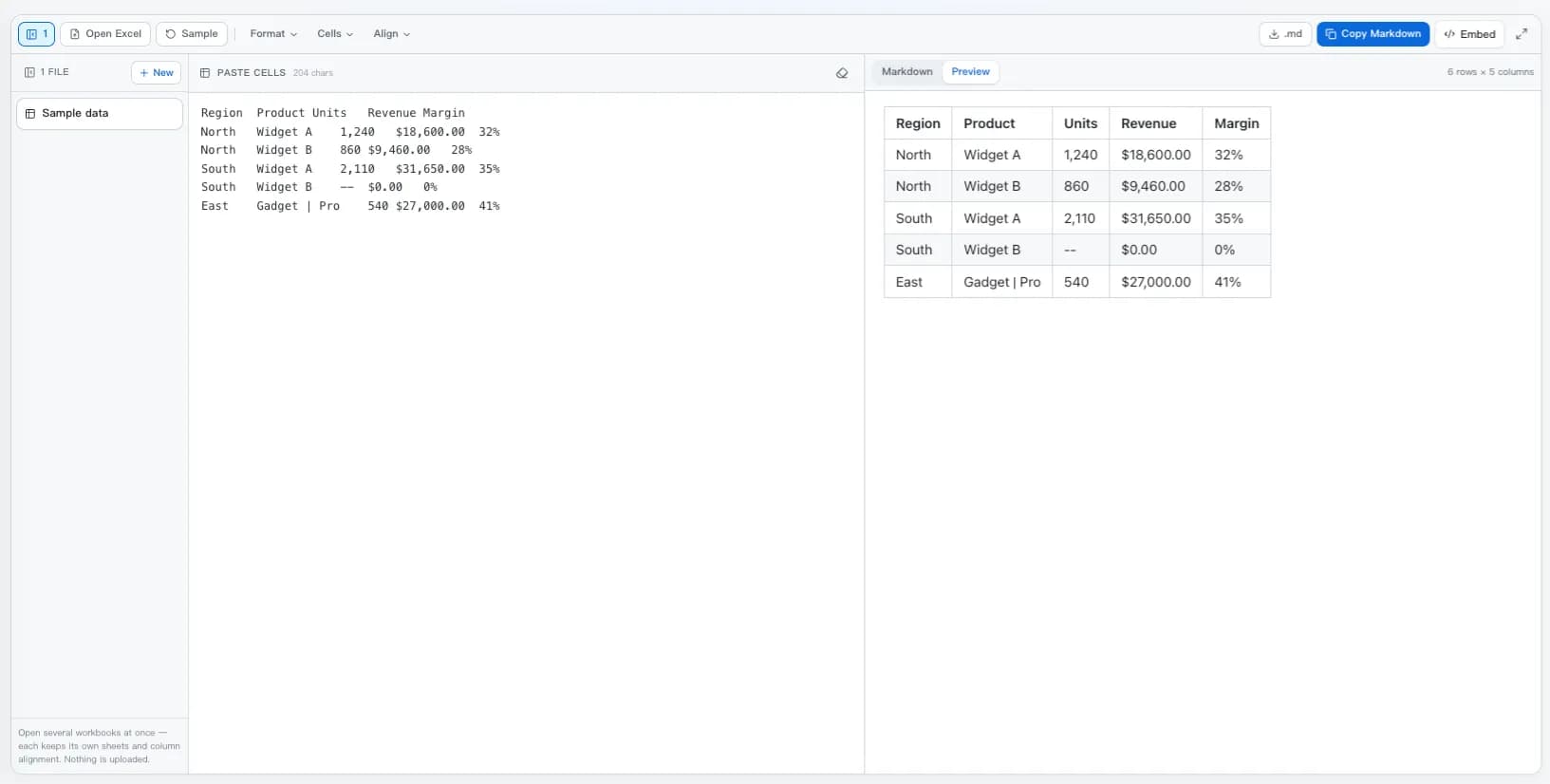
  • Paste, or open the workbook: Excel and Sheets both put tab-separated text on the clipboard, so Ctrl+V is enough. An .xlsx is unzipped locally instead, with every sheet as a tab.
  • The awkward cells handled: Pipes inside a value are escaped, in-cell line breaks become <br>, merged regions repeat, blank out, or stay as HTML, and date-formatted cells are read as dates rather than serial numbers.
  • Three menus, no clutter: Format holds the header row, pipe padding, auto-alignment, blank trimming and escaping; Cells holds line-break and merge handling; Align sets any column to left, centre, or right.
  • Preview first, then copy: The right pane opens on the rendered table so you can check it, with the pipe source one click away and Copy Markdown in the bar above.
The Excel to Markdown converter with spreadsheet cells pasted on the left and the rendered Markdown table on the right, under the Format, Cells, and Align menus.
Pasted cells on the left, the rendered GFM table on the right, option menus above both.

How Excel to Markdown Conversion Works

Whatever you feed it — a clipboard paste, a CSV, or a workbook — is turned into one rectangular grid first. Every switch then acts on that grid, never on the generated text.

  1. 1The input becomes a gridA paste is split on tabs, a CSV has its delimiter sniffed, and an .xlsx is unzipped and read from its sheet XML, including the number formats that tell dates apart from plain numbers.
  2. 2The grid is squared offRagged rows are padded to a rectangle, blank rows and columns at the edges are trimmed, and merged regions are expanded according to the rule you chose.
  3. 3Cells are escaped, not rewrittenA pipe becomes \|, a line break becomes <br>, a space, or its first line. Values themselves are never rounded or reformatted, so the numbers stay exactly as the sheet stored them.
  4. 4The table is written outThe delimiter row carries per-column alignment, pipes are padded when Align pipes is on, and the result is regenerated from the grid every time you change a switch.
Cells copied from Excelin
Region	Product	Units	Revenue
North	Gadget | Pro	1,240	$18,600.00
South	Widget B	--	$0.00
Markdown table outout
| Region | Product      | Units | Revenue    |
| ------ | ------------ | ----: | ---------- |
| North  | Gadget \| Pro | 1,240 | $18,600.00 |
| South  | Widget B     |    -- | $0.00      |

An Excel to Markdown Converter That Handles the Awkward Cells

Anyone can join cells with pipes. The difference shows up in a spreadsheet that has merged headers, a product name containing a pipe, a wrapped address, and a date column.

Paste Straight From a Spreadsheet

Select cells in Excel or Google Sheets, copy, and paste. Both put tab-separated values on the clipboard, so excel to markdown conversion starts the moment the text lands — no file, no upload, no button hunt.

Real .xlsx Workbooks, Every Sheet

Drop a workbook and each sheet becomes a tab you can switch between. Drop several and each stays open in its own row, with the sheet and column alignment you left it on. An .xlsx is a ZIP of XML, so the whole file is opened and read locally rather than posted to a conversion service.

Pipes Escaped Automatically

A cell containing a pipe character would silently split into two columns. Every pipe is escaped on the way out, so a value like 'Gadget | Pro' stays one cell instead of wrecking the row.

Multi-Line Cells Handled

Markdown tables are strictly one line per row. A cell with a line break inside it becomes a <br>, a space-joined sentence, or just its first line — whichever suits the renderer you are targeting.

Column Alignment You Control

Open the Align menu and set any column to default, :---, :---:, or ---: in one click. Or switch on auto-align and every column of pure numbers is right-aligned for you, the way a finance table should read.

Merged Cells, Three Ways

GFM has no rowspan. Repeat the merged value down the range, leave the covered cells blank, or emit an HTML table that keeps colspan and rowspan intact when the structure matters more than the syntax.

Pretty-Printed or Compact Source

Pad the cells so the pipes line up into a readable grid in your editor, or emit minimal source when the file is destined for a diff and the extra whitespace is only noise.

Dates and Numbers That Read Right

Excel stores a date as a serial number like 45000. Cells styled as dates are converted back to readable text instead of dropping a bare integer into your documentation.

Your Data Stays on Your Machine

Salary sheets, customer lists, and unreleased figures never leave the browser. Unzipping, parsing, and rendering all happen locally — there is no server to leak them from.

What Usually Breaks, and What Happens Here

Every one of these is a real way a spreadsheet table arrives broken in a README.

In the spreadsheetNaive resultHere
Cell contains |Row splits into extra columnsEscaped to \|
Cell contains a newlineTable breaks at that rowBecomes <br>
Merged cellsValues silently go missingRepeated, blanked, or HTML
Date columnShows 45000 instead of a dateRead from the cell format
Ragged row lengthsColumns drift out of lineGrid padded to a rectangle
Blank border rowsEmpty leading rows in outputTrimmed to the used range
Numbers as textLeft-aligned money columnsAuto-align sets ---:

Convert Excel to Markdown in 3 Steps

From a selected range to a table in your documentation, without counting dashes.

1

Paste cells or drop files

Start Excel to Markdown by copying a range from Excel or Google Sheets, or drag one .xlsx or a dozen anywhere onto the converter. Every file stays open in the list on the left, and multi-sheet workbooks appear as tabs.

2

Shape the table

Three menus hold every Excel to Markdown switch: Format for the header row, pipe padding, auto-alignment, blank trimming and escaping; Cells for line breaks and merged regions; Align for per-column alignment.

3

Copy the Markdown

The right pane opens on the rendered preview, so you see the finished table first and switch to Markdown when you want the pipe source. Copy the excel to markdown result from the bar, or download it as a .md file for your README, wiki, or notes.

Excel to Markdown Questions

Answers on pasting, .xlsx workbooks, merged cells, alignment, dates, size limits, and privacy.

How do I convert Excel to Markdown?
Select the range in Excel, copy it, and paste into the input box on this page. Excel puts tab-separated text on the clipboard, which is parsed into a grid and rendered as a GFM pipe table straight away. To convert a whole workbook instead, drag the .xlsx file onto the page and pick a sheet.
Do I have to upload my spreadsheet?
No. This excel to markdown converter runs entirely in your browser. An .xlsx file is unzipped and parsed on your own device, so confidential figures never travel anywhere. After the page has loaded it keeps working offline.
What happens to a cell that contains a pipe character?
It is escaped as \| so the table keeps its shape. This is the single most common way a hand-written Markdown table breaks — one product name with a pipe in it turns one row into a mess of extra columns.
How are cells with line breaks inside them handled?
Markdown table rows cannot span lines, so you choose the replacement: a <br> tag, which most renderers including GitHub honour; a space, which reads better in plain text; or keeping only the first line when the rest is noise.
Can it handle merged cells?
Yes, in whichever way suits you. Repeat mode copies the merged value into every cell it covered, which is usually what you want for data. Blank mode leaves them empty. HTML mode emits a real <table> with colspan and rowspan preserved — the only lossless option, at the cost of needing a renderer that permits inline HTML.
Can I set column alignment?
Yes. The Align menu lists every column with buttons for default, left (:---), centre (:---:) and right (---:), plus a reset for the whole table. There is also an auto-align switch in the Format menu that right-aligns any column whose values are all numeric, including currency and percentages.
Does it read multi-sheet workbooks?
Yes. Every visible sheet in the .xlsx becomes a tab, and you convert them one at a time. Hidden sheets are skipped.
Why does my date show up as a number?
Excel stores dates as serial day numbers and relies on a cell format to display them. The converter reads that format and turns styled cells back into readable dates. A cell where someone typed a date but left it formatted as General is genuinely stored as a number, and there is no way to tell the difference — reformat it in Excel and convert again.
Can I convert a .xls or Google Sheets file?
Legacy binary .xls is not supported; open it in Excel and save as .xlsx or .csv first. For Google Sheets, either copy the cells and paste them here, or use File → Download → Comma-separated values and drop the .csv on the page.
What about really large spreadsheets?
Files up to 25 MB are accepted and the first 5,000 rows of a sheet are converted. Beyond that, a Markdown table stops being a sensible way to present data — link to the source file, or generate the table from a script as part of your build.
Is there a command-line alternative?
Yes, and it is the right choice for anything repeatable. Pandoc converts CSV to Markdown, and Python's pandas has to_markdown() for a DataFrame. Use those inside a pipeline; use this page when you just want the table in your clipboard now.
Does the converter change my numbers?
No. Values are read from the file exactly as stored and never rounded or reformatted, apart from date-styled cells being rendered as dates. Alignment and escaping affect presentation only.

Convert Excel to Markdown Now

Scroll back up, paste a range of cells or drop a workbook, and copy a clean Markdown table.