Markdown to Word Converter

Convert Markdown to Word online and download an editable DOCX with headings, tables, code, links, images, and common LaTeX formulas. Open several .md files at once, apply document settings to one file or all of them, print, and export privately in your browser.

AI Research Brief

What Is the Markdown to Word Converter?

The Markdown to Word converter turns Markdown into a real, editable .docx — styled headings, tables, lists, code, links, images, and common LaTeX formulas — entirely inside your browser.
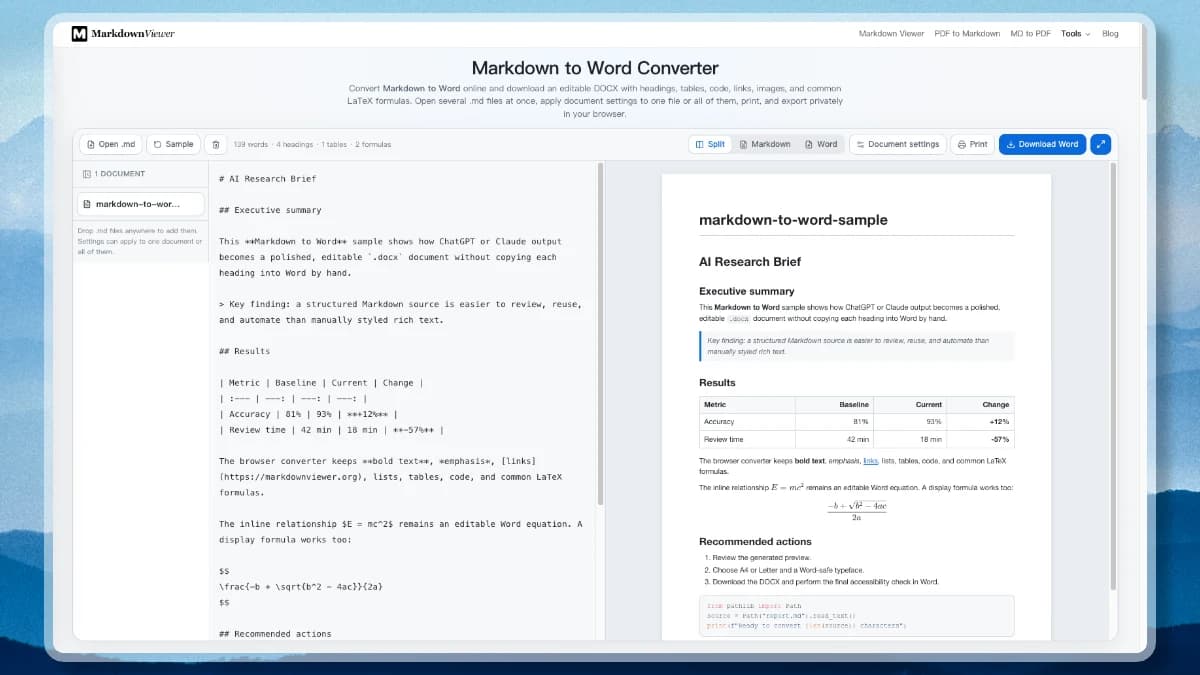
  • A batch of documents at once: Open several .md files or drop them on the page; each one becomes a tab on the left with its own title and Word settings.
  • Settings for one file or all of them: The settings panel controls typeface, body size, page size, margins, Word table of contents, and page breaks, applied to the active document or every open document.
  • Reusable presets: Save a settings combination as a named preset — like the editor's style templates — and load it on your next batch.
  • Preview, print, or export DOCX: Check the page-styled preview, send it to your printer, or download an editable Word file with no upload and no watermark.
The Markdown to Word converter with a document list on the left, Markdown source, a page-styled Word preview, and the document settings panel open on the right.
Document tabs, Markdown source, Word preview, and the settings panel.

Markdown to Word That Produces a Real Document

This is more than a plain-text download. The converter maps useful Markdown structures to editable DOCX elements, gives you practical page controls, and explains the limits that matter for formulas and remote images.

ChatGPT Markdown to Word

Paste structured ChatGPT or Claude output and keep headings, emphasis, links, lists, quotes, tables, and code. Markdown to Word removes the slow cycle of restyling AI answers by hand.

Editable Word Equations

Common inline and display LaTeX becomes editable Word math, including fractions, roots, superscripts, subscripts, Greek symbols, and operators. The Markdown to Word preview uses KaTeX for fast visual checking.

Real Word Tables

GFM pipe tables become native DOCX tables with a styled header row, ruled cells, and the column alignment your delimiter row asked for. Cell emphasis and links survive instead of being flattened into a screenshot.

Highlighted Code Blocks

A fenced block keeps its language colouring in Word — keywords, strings, and comments carry the same palette as the preview — inside a framed, line-by-line block rather than one collapsed paragraph.

One Style Across Preview, Print, and DOCX

The reading pane, the print sheet, and the downloaded .docx come from a single set of colours, spacing, and page metrics. The preview is your chosen paper to scale, so a line wraps and a table divides on screen exactly where it does in Word.

Images with Safe Fallbacks

Data and CORS-accessible web images are embedded in the document. When an image cannot be fetched, Markdown to Word inserts an explained placeholder so one blocked asset does not cancel the export.

Word-Ready Document Settings

Choose A4 or Letter, normal or narrow margins, a Word-safe font, body size, title, author, table of contents, and chapter page breaks. Save a combination as a preset and reuse it on the next document.

A Workspace for a Whole Batch

Open a batch of .md files and switch between them in the list on the left. Split view scrolls the source beside its Word page, and document settings apply to one file or all of them before you export the set in one click.

Private Local Conversion

Markdown to Word generation runs in your browser after the app loads. The editor reads local files and builds the DOCX on your device without an upload queue or document database.

Convert Markdown to Word in 3 Steps

Move from an AI draft, technical note, or local Markdown file to a reviewable Word document without installing a desktop converter.

1

Paste AI output or open a Markdown file

Start Markdown to Word with text copied from ChatGPT, Claude, Obsidian, Typora, or VS Code, or open a local .md file. Your draft remains editable in the source pane.

2

Check the Word page and document settings

Split view scrolls the source and the Word page together so you can review headings, tables, code, links, images, and formulas. Then set the title, author, font, page size, margins, contents page, and chapter breaks.

3

Download an editable DOCX, or print

Build the Markdown to Word file locally and open it in Microsoft Word, Google Docs, or LibreOffice — or print the same styled page straight from the browser. Perform a final accessibility and pagination review before delivery.

ChatGPT Markdown to Word Without Restyling Every Heading

ChatGPT and Claude are good at producing structured Markdown, but a manager, teacher, client, or publisher may expect a Word file. Copying rendered chat text often creates inconsistent lists, broken code blocks, or headings that only look like headings. A structured Markdown to Word conversion keeps the hierarchy meaningful inside DOCX.

Paste the original Markdown rather than a screenshot or visually formatted chat selection. The Word file remains editable, searchable, accessible, and easier to revise. The final Word review is still important: check page breaks, image rights, heading order, link labels, and table headers before submission.

AI draft → editable DOCXLOCAL
InputChatGPT, Claude, .md, or plain Markdown
StructureHeadings, lists, tables, quotes, code
DocumentA4/Letter, fonts, margins, TOC
OutputEditable .docx with page numbers

Markdown to Word Formula, Table, and Image Support

Good conversion is not “looks close in a preview.” It means selecting the right Word representation and being honest when a browser cannot reproduce the source perfectly. Markdown to Word quality depends on the structure that remains editable after export.

LaTeX formulas

Common fractions, roots, scripts, symbols, and operators become editable Word math you can click into and correct. Matrices, aligned environments, and numbered equations are the cases to check in Word before delivery.

GFM tables

Pipe tables become native Word tables with a header row, ruled cells, and column widths that match the preview. Complex HTML rowspan, colspan, captions, and nested tables have no lossless GFM equivalent and need manual review.

Referenced images

Accessible PNG, JPEG, GIF, and BMP assets are embedded and scaled. Remote CORS rules may prevent a browser from reading an image even when Word could load its URL.

What This Converter Does Not Do

A browser converter is the fastest route from a Markdown draft to a document someone can edit. These are the three things to look at in Word before you send the file on.

Publisher-grade mathematics

Fractions, roots, scripts, symbols, and operators become editable Word equations. Aligned environments, matrices, numbered equations, and citation styles are the ones to rebuild in Word's equation editor after export.

A corporate Word template

Page size, margins, typeface, body size, and heading scale are all settings here, but the file is generated fresh rather than poured into your organisation's .dotx. Apply the house template in Word once, and the heading structure carries straight into it.

Unattended batch pipelines

You can open several files and export them together, but the work happens in this tab. Scheduled or server-side conversion belongs in a script, where you can log warnings, retry, and keep an audit trail.

Markdown to Word Runs on Your Device

The Markdown to Word editor, preview, local file reader, and DOCX packager run in the browser. There is no sign-in, upload queue, or stored document copy. Only images referenced by a remote URL contact their source host during export.

No sign-upNo document uploadNo watermark

Markdown to Word Frequently Asked Questions

Practical answers about ChatGPT content, formulas, tables, highlighted code, images, document settings, printing, batch conversion, and privacy.

How do I convert Markdown to Word online?
Paste Markdown into the editor or open a .md file, check the live preview, choose document settings, and select Download Word. The browser creates an editable .docx file without requiring an account.
Can I convert ChatGPT Markdown to Word without losing formatting?
Yes. Headings, bold and italic text, links, ordered and unordered lists, quotes, tables, fenced code, and common formulas are converted to Word structures. Always review complex AI-generated HTML or unusual extensions.
Will the downloaded DOCX look like the preview?
Yes. The reading pane, the print sheet, and the .docx are generated from one shared set of colours, spacing, page size, and margins, and the preview is drawn as your chosen paper to scale. Headings, tables, quotes, links, and code match across all three, and a paragraph wraps on screen where it wraps in Word.
Can I set the page size, margins, and font before downloading?
Yes. The document settings panel controls A4 or US Letter, normal or narrow margins, a Word-safe typeface, body size, title, author, an optional table of contents, and a page break before each level-one heading. Save a combination as a preset and load it on the next document.
Are Markdown tables editable in Word?
Yes. Standard GFM pipe tables become native Word tables rather than images, with the column alignment from your delimiter row applied to each cell. Word can then resize columns, repeat header rows, apply accessibility metadata, and change table styles.
Do fenced code blocks keep their syntax highlighting in Word?
Yes. Each fenced block is written as a framed, line-by-line block in the DOCX, and the language colouring you see in the preview is carried into the Word runs, so keywords, strings, and comments stay distinguishable on screen and in print.
Does Markdown to Word support LaTeX formulas?
The online converter creates editable Word equations for a practical subset: fractions, square roots, superscripts, subscripts, common Greek symbols, and operators. Aligned environments, matrices, and numbered equations are beyond what a browser converter can map faithfully, so check those in Word before you send the document on.
Why is a remote image missing from the DOCX?
A remote host may block cross-origin browser access even when the image is visible in a normal tab. Use a data URL, a source that permits CORS, or add the image in Word afterward. The converter inserts a labeled fallback instead of failing the whole document.
Can I convert several Markdown files to Word at once?
Yes. Open a batch of .md files, and each becomes a tab in the document list. Switch the settings panel to All documents to apply a font, page size, or margin to every file, then export the whole set in one action.
Can I print Markdown as a document instead of downloading a DOCX?
Yes. Print sends the same styled page to your printer or to a PDF, using the paper size and margins you chose for the Word file, so the printed sheet matches the preview and the DOCX rather than looking like a printed web page.
Do I need to install anything to convert Markdown to Word?
No. Markdown to Word runs in the browser on Windows, macOS, Linux, ChromeOS, and tablets, with no account, extension, or desktop converter to install. Once the page has loaded, conversion keeps working without a network connection unless your Markdown links to remote images.
Is Markdown to Word conversion private?
Yes. Source editing, preview rendering, local file reading, and DOCX packaging run on your device. Remote images are fetched directly from their original host only when your Markdown references them.

Convert Markdown to Word Now

Return to the private converter, paste your Markdown, review the document preview, and download an editable DOCX.