Resizable editing workspace
Drag the divider to balance your editor and preview. Adjust it with arrow keys or double-click to reset; your preferred width is saved.
Free Markdown to PowerPoint converter. Preview slides, present in your browser, and export an editable PPTX with themes and speaker notes. No sign-up required. Conversion runs locally.
Markdown to PowerPoint turns your heading hierarchy into slides. Keep writing in Markdown, then refine the editable .pptx in PowerPoint.
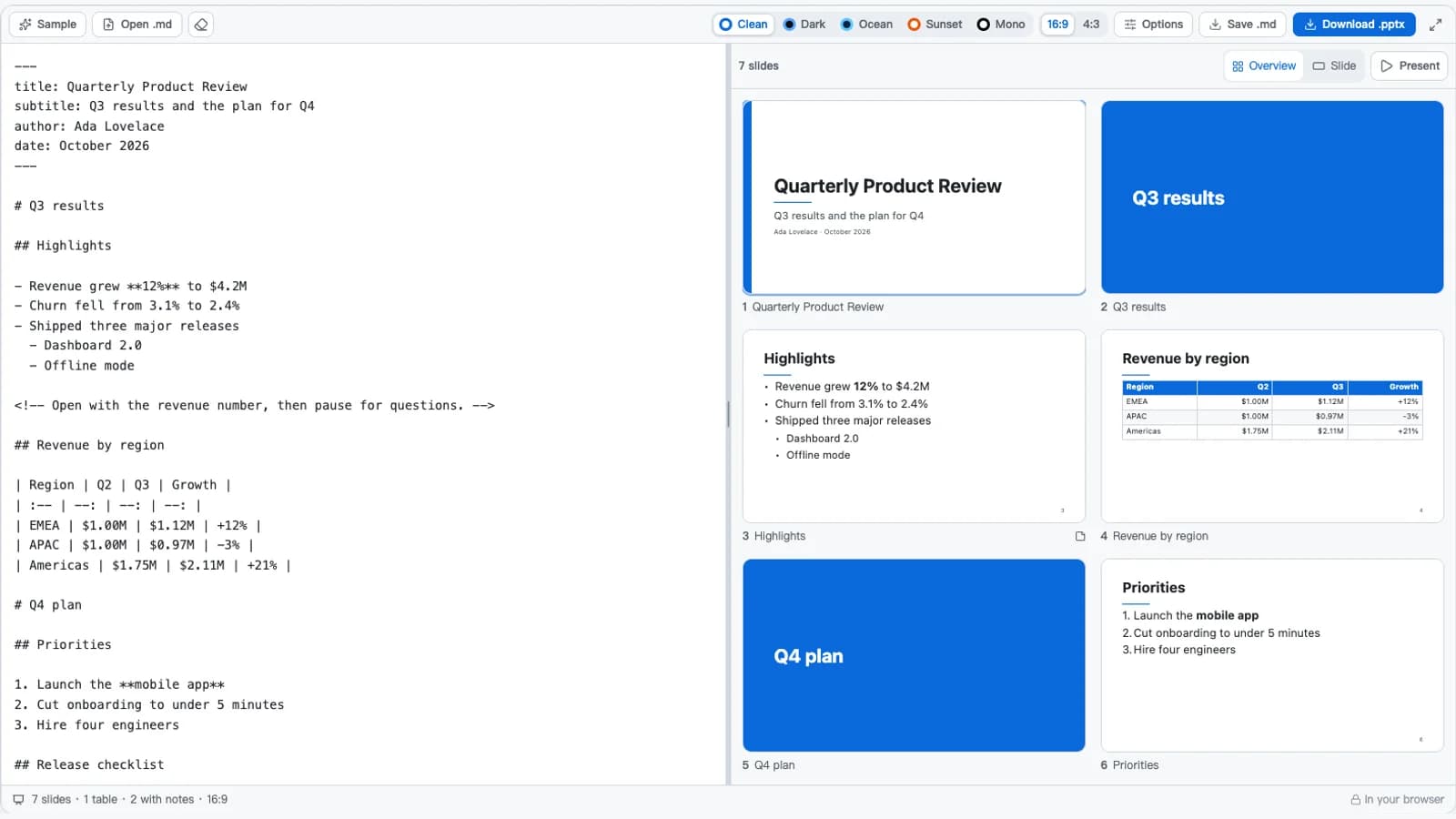
Control the layout and keep the exported deck editable.
Drag the divider to balance your editor and preview. Adjust it with arrow keys or double-click to reset; your preferred width is saved.
Export titles, text, and native tables you can restyle in PowerPoint. Slides are not flattened into screenshots.
Keep nested lists, numbered items, tables, code, quotes, and images. See the syntax reference below for conversion details.
Pick one of five themes, three fonts, and 16:9 or 4:3 slides. Preview changes before exporting.
Text shrinks to fit where possible. Slides that still exceed the estimated capacity are marked Too full.
Write notes in Markdown, inspect them in Slide view, and keep them in the exported PPTX. Present hides them from the audience.
Scan the deck in Overview, check a slide in detail, then rehearse in a clean audience view.
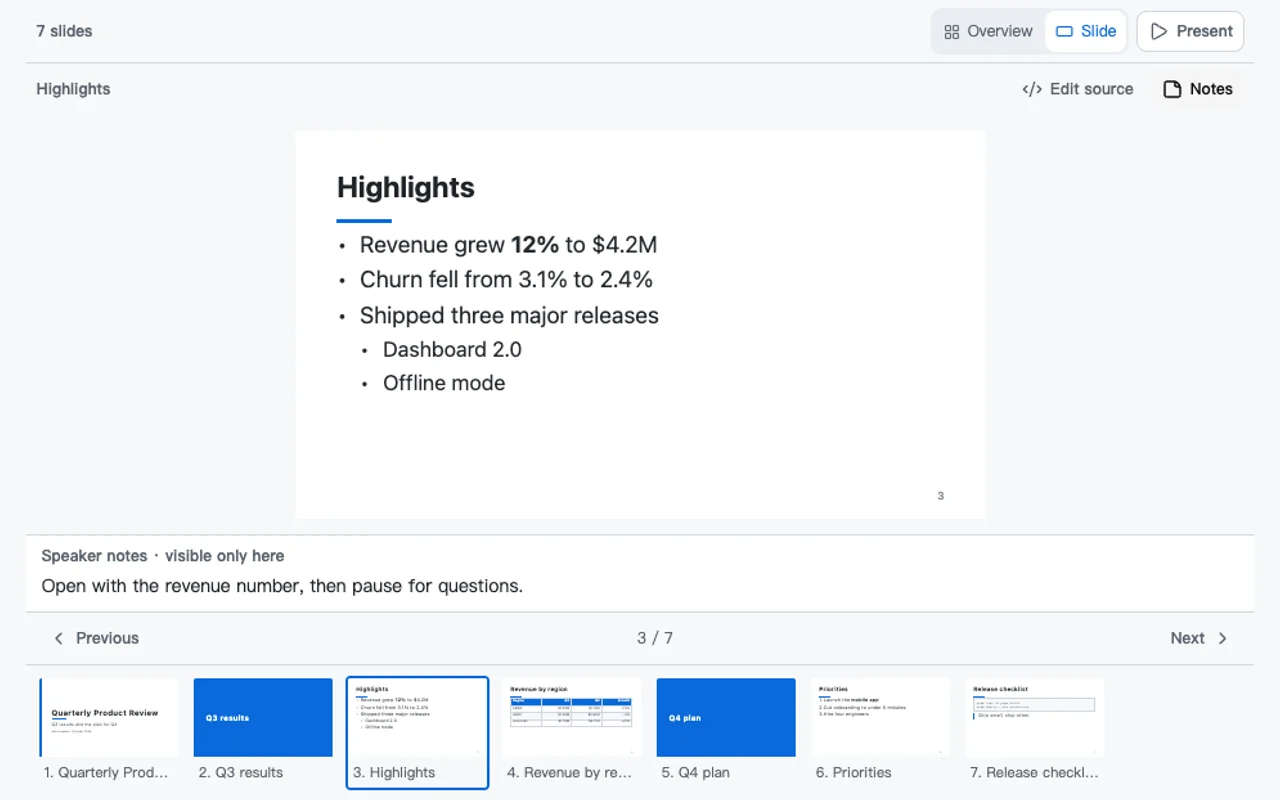
Choose a thumbnail or use Previous and Next. Open Notes to review your talking points; Edit source takes you back to the matching Markdown line.
View full-size screenshot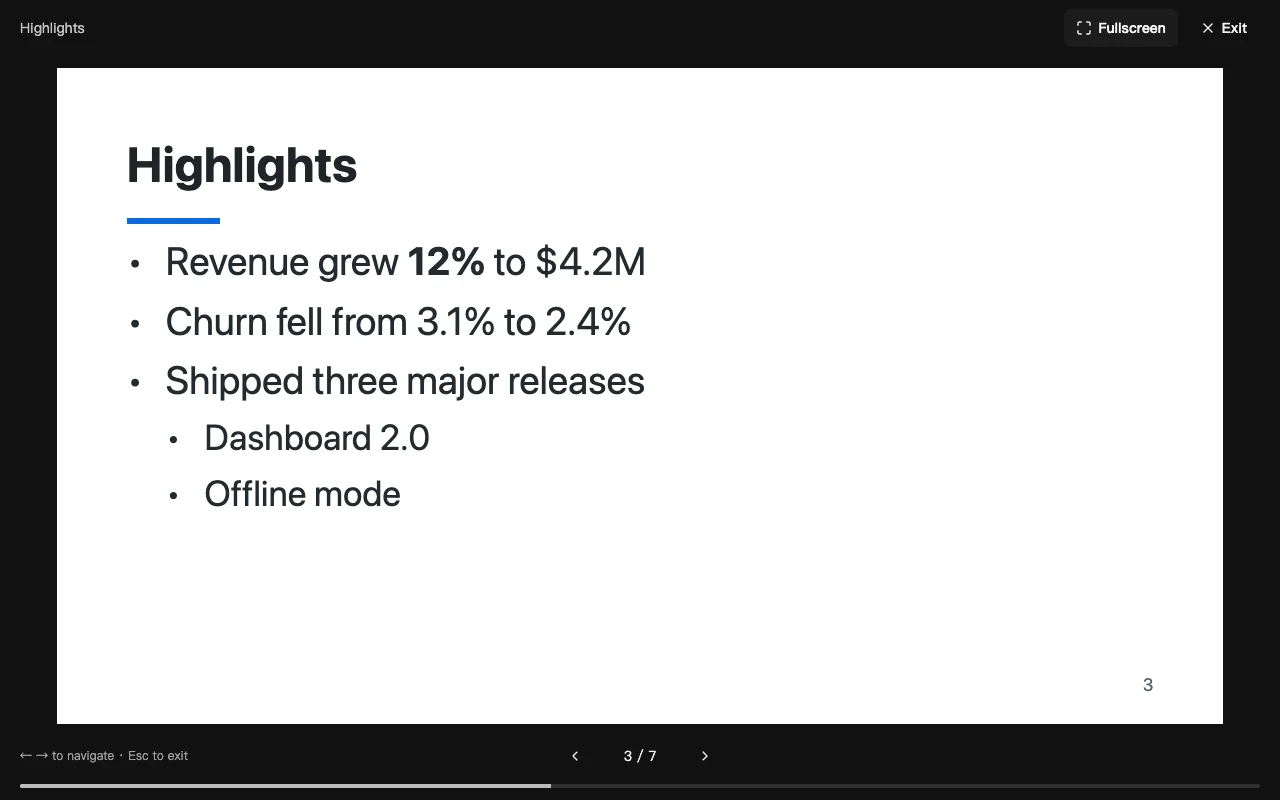
Start from the selected slide. Use arrow keys or Space to advance and Esc to return. Notes stay hidden; optional Fullscreen removes the browser chrome where supported.
View full-size screenshotOn smaller screens, switch between Markdown and Slides. Swipe horizontally in Present, or rotate your phone for a wider view. The browser preview approximates the PPTX layout; check fonts and spacing in your presentation app before sharing.
This example turns one outline into five slides. Use Options to change the heading level, or a blank-separated --- to add a break.
---
title: Quarterly review
author: Ada Lovelace
---

# Results

## Revenue

- Up **12%** year on year
- Churn down to 2.4%

## Roadmap

1. Mobile app
2. Faster onboarding

---

Questions?
Check which elements stay editable and which remain source text.
| In Markdown | In PowerPoint | Conversion note |
|---|---|---|
--- title: … --- | Title slide | Title, subtitle, author, and date from the front matter |
# Part | Section divider | When it is above the slide level |
## Heading | New slide | The heading goes in the title placeholder |
### Detail | Bold sub-heading | When it is below the slide level |
- item · - nested | Bulleted list | Nested levels, with smaller text where needed |
1. item | Numbered list | Keeps the number a list starts at |
- [x] done | Checkbox line | ☑ and ☐ at the start of the item |
| a | b | | Native table | Header row, striped rows, alignment from :--- |
```code``` | Monospace panel | Tinted box with a border, line breaks kept |
> quote | Quote | Italic text beside an accent bar |
 | Embedded picture | Alt text kept; sits beside the text |
<!-- note --> | Speaker notes | Also Note: lines and ::: notes blocks |
$x^2$ | Plain text | This converter does not render LaTeX equations, so it stays as written |
--- | New slide | A horizontal rule breaks the slide |
From an outline to a downloadable deck, without installing software.
Paste an outline or open a .md file. Try Sample to explore lists, tables, code, and speaker notes.
Choose a theme and slide size. Check the deck in Overview or Slide view, and use Present to rehearse before downloading.
Download .pptx for your presentation, or Save .md to keep editing the outline later.
Use the Markdown you already write for presentations you need to deliver.
Turn a README or design document into slides with editable text and code blocks.
Convert lecture outlines into teaching slides. Update the Markdown and export again as the material changes.
Paste an AI-generated Markdown outline, check the content, and export it without rewriting your words.
Present recurring updates with bullets, metrics tables, and speaker notes from one Markdown file.
The same Markdown can become LaTeX slides, a Word document, or a PDF.
Export details, supported content, and privacy.
Review a slide, rehearse with Present, or download the editable PPTX.