Markdown to Text Converter

Paste Markdown — a ChatGPT answer, a README, release notes — and get clean text back. This Markdown to text converter strips every syntax marker while keeping your words and line breaks, or hands you rich text that pastes into Word and Google Docs with its formatting intact.

Drop Markdown files here or

Open several documents at once, paste Markdown, or start with an empty editor. Each file becomes a document in the list.

Converted in your browser — nothing is uploaded

Want to preview the conversion first?

What Is the Markdown to Text Converter?

The Markdown to text converter strips syntax markers out of Markdown and hands back readable prose — or, if you want the formatting to survive the trip, rich text that pastes into Word and Google Docs with its headings intact.

  • Two outputs from one input: Plain text gives you words without a single # or **; rich text keeps headings, bold, links, and tables so a paste into a document looks formatted.
  • You decide what links become: Keep the link text alone, keep text and URL together, or keep the URL only — the right answer differs between an email, a CMS field, and a citation list.
  • Bullets, code, images, tables: Choose a bullet glyph or none at all, keep or drop fenced code, drop image syntax, and flatten tables into aligned columns instead of pipes.
  • It counts what it removed: The status line reports words, characters, and how many characters of syntax came out, so you can see the difference at a glance.
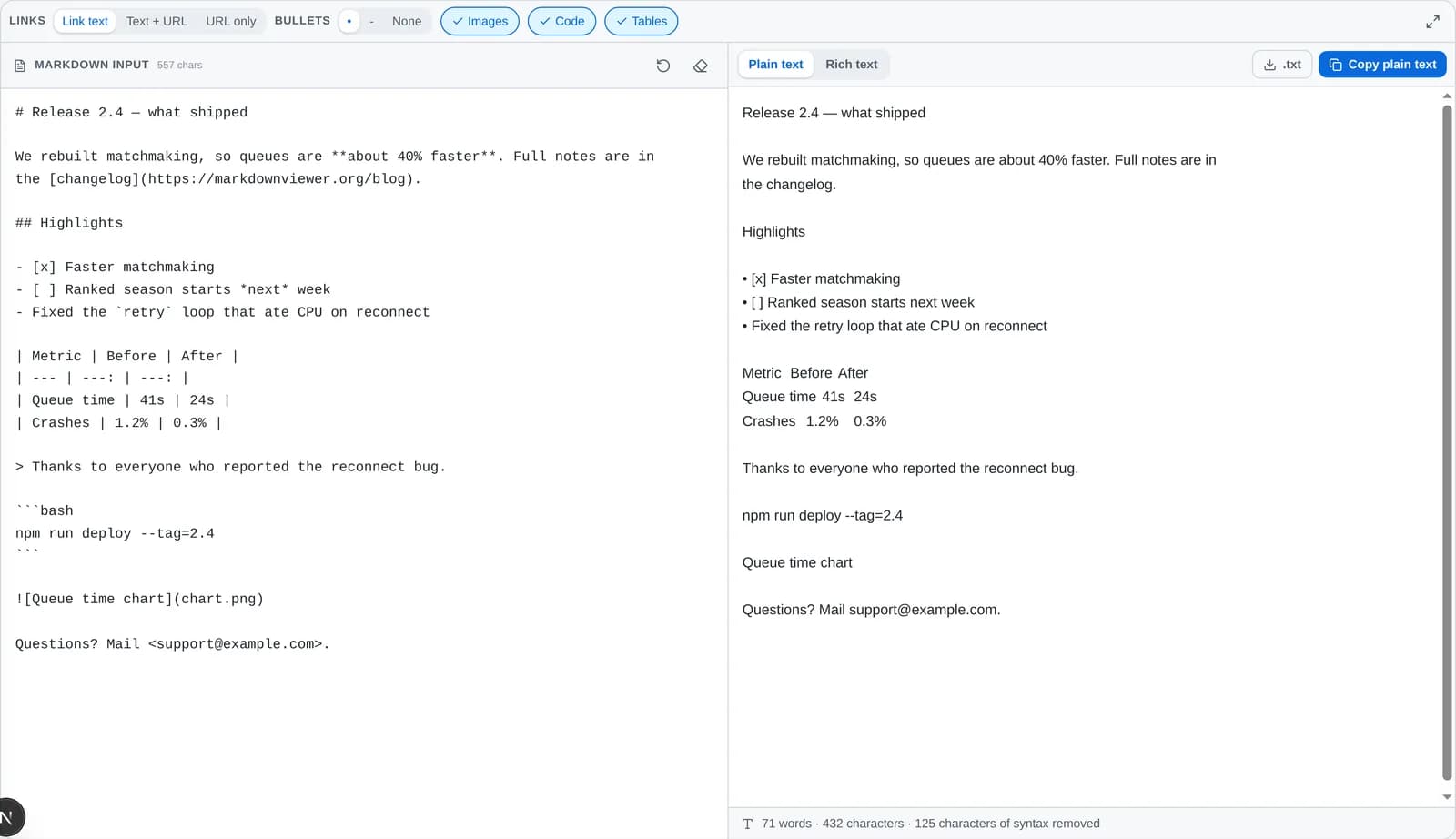
The Markdown to text converter with Markdown source on the left and clean plain text on the right, above a count of removed syntax characters.
Markdown source, the stripped result, and how much syntax was removed.

How Markdown to Text Conversion Works

Stripping Markdown with a few regular expressions is what breaks on code blocks and tables. This runs the document through a real parse first, so syntax inside a fence is left alone.

  1. 1The Markdown is parsed, not scannedThe source is turned into a document tree, so a # inside a fenced code block stays a #, and an asterisk in a URL is never mistaken for emphasis.
  2. 2Each element is given a plain formHeadings drop their hashes but keep their line breaks, emphasis loses its markers, list items take the bullet you chose, and block quotes keep their text without the angle bracket.
  3. 3Links and tables follow your rulesA link becomes its text, its text plus URL, or its URL, and a table becomes space-aligned columns — the two decisions that actually change how the output reads.
  4. 4Spacing is rebuilt for readingBlank lines between blocks are normalised so paragraphs stay apart and lists stay together, then the result is offered as plain text or as rich text for a formatted paste.
Markdown inin
## Highlights

- Fixed the `retry` loop
- See the [changelog](https://example.com/blog)

> Thanks to everyone who reported it.
Plain text outout
Highlights

• Fixed the retry loop
• See the changelog

Thanks to everyone who reported it.

What Markdown to Text Removes, Element by Element

Every piece of syntax and what is left of it afterwards. Anything that carries meaning stays; anything that only marks up the page goes.

MarkdownBecomesNotes
# HeadingHeadingThe hashes go; the line stays on its own so the document keeps its shape.
**bold** *italic*bold italicAsterisks and underscores are unwrapped, including ***both*** and ~~struck~~.
[label](https://…)labelOr “label (https://…)” or the bare URL — your choice in the Links control.
![alt](image.png)altAlt text is words, so it is kept by default. Switch Images off to drop it.
- item / 1. item• itemBullet, dash, or nothing at all. Nesting indentation is preserved.
- [x] done• [x] doneCheckbox state is content, not syntax, so it survives the conversion.
> quotedquotedThe quote marker goes; the quoted sentence stays where it was.
`code` and ```blocks```codeBackticks are removed and the code itself is kept — or dropped entirely.
| a | b |a⇥bCells become tab separated, which pastes into a spreadsheet as columns.
[^1] and [^1]: noteFootnote markers and reference definitions are pure syntax, so both go.
\*escaped\**escaped*An escaped character was always meant to be literal; the backslash goes.
  &space &HTML entities and inline tags are decoded and stripped.

Convert Markdown to Text in 4 Steps

Paste, pick a flavor, adjust what is kept, and copy. Nothing is uploaded on the way.

1

Paste your Markdown

An AI answer, a README, release notes, or the contents of a .md file — anything with Markdown syntax in it.

2

Pick plain text or rich text

Plain text for chat boxes, forms, subtitles, and speech engines. Rich text for Word, Google Docs, and Outlook.

3

Tune what is kept

Choose how links read, whether image alt text and code blocks stay, how bullets look, and whether tables become tab-separated rows.

4

Copy or download

Copy the plain text, copy it as formatted rich text, or download a .txt file. The word and character counts update as you go.

Why People Convert Markdown to Text

Four jobs that all end with the same request: give me the words without the syntax.

Cleaning up AI answers

Take a ChatGPT or Claude response full of ### headings and **bold** and paste it into WeChat, an email, a support ticket, or a form that shows the raw characters.

Email, chat, and forms

Plain-text email clients, SMS, and web forms have no Markdown renderer. Strip the syntax first and the message reads the way you wrote it.

Text to speech

Feed a speech engine clean prose so it never reads out asterisks, hashes, or the URL inside a link.

Search, NLP, and word counts

Indexing, similarity comparison, and word counting all skew when syntax is left in. Markdown to text conversion is the usual preprocessing step.

Markdown to Text Frequently Asked Questions

Straight answers about stripping Markdown, AI output, rich text pasting, .txt files, and the libraries that do the same job in code.

How do I convert Markdown to text?
Paste the Markdown into the converter above. The plain text tab removes every syntax marker — hashes, asterisks, backticks, brackets, pipes — while keeping the words, the line breaks, and the order they were written in. Then copy the result or download it as a .txt file.
How do I remove Markdown formatting from a ChatGPT answer?
Copy the answer and paste it in. Assistants format their replies in Markdown by default, so a copied answer arrives full of ### headings, **bold**, and - bullets that show up as literal characters in WeChat, email, or a form field. The Markdown to text conversion strips them and leaves the sentences and the list structure alone.
Does it keep line breaks and paragraphs?
Yes. Headings stay on their own line, list items stay one per line, and blank lines between paragraphs are preserved — runs of three or more are collapsed to one so the spacing stays even. Nothing is reflowed or rewritten.
What is the difference between plain text and rich text here?
Plain text is the words with the syntax removed — what you want for a chat box, a form, a subtitle file, or a speech engine. Rich text is the Markdown rendered and copied with an HTML flavour on the clipboard, so pasting into Word, Google Docs, or Outlook gives real headings, bold, lists, and tables instead of asterisks.
How do I paste Markdown into Word with its formatting?
Switch the output to the rich text tab and press Copy rich text, then paste into Word, Google Docs, or Outlook. The clipboard carries an HTML version, which those editors read as formatting. Pasting the plain text tab instead gives you unformatted text.
What happens to links and images?
By default a link keeps only its visible text, because that is what reads naturally in prose. Switch the Links control to “Text + URL” to keep the address in parentheses, or “URL only” to keep just the address. Image alt text is kept by default and can be dropped in one click.
What happens to tables and code blocks?
Table cells become tab separated, which pastes into Excel or Google Sheets as real columns, and the delimiter row is dropped. Code blocks keep their contents without the fences by default, or can be removed entirely when you only want prose.
Can I convert a .md file to .txt?
Yes. Open the .md file, copy its contents into the converter, and use the .txt download button. For scripted or bulk conversion, pandoc file.md -t plain -o file.txt does the same job from the command line.
How do I strip Markdown in JavaScript?
The remove-markdown package is a single function that takes a string and returns text. For anything with tricky edge cases, remark with the strip-markdown plugin parses the document properly before flattening it. Both snippets are in the code section above.
How do I strip Markdown in Python?
Python has no single standard stripper, so the common pattern is to render the Markdown to HTML with the markdown package and pull the text out with BeautifulSoup. pypandoc, which wraps Pandoc, is the other route and handles the widest range of input.
Does converting Markdown to text change my words?
No. Only syntax characters are removed. Nothing is summarised, reordered, or rewritten — there is no AI in the loop, so you can diff the input and output and see only markers disappear.
Why does my text-to-speech engine read out asterisks?
Because the Markdown markers are still in the string. Speech engines read what they are given, so **bold** may be spoken as “star star bold star star” and a link URL gets read character by character. Running the text through a Markdown to text pass first removes both problems.
Is this Markdown to text converter free and private?
Yes. It is free and needs no account, and the conversion, preview, copy, and download all run in your browser — nothing is uploaded to a server.

Convert Your Markdown to Text Now

Scroll back up, paste your Markdown, and copy clean text — plain for chat and forms, rich for Word and Docs.