Markdown vs LaTeX: when to use each, and how to move between them.
One is a shorthand for structure, the other is a typesetting program. Here is the same document written in both, what each one cannot do, and the workflow that lets you draft in one and publish in the other.
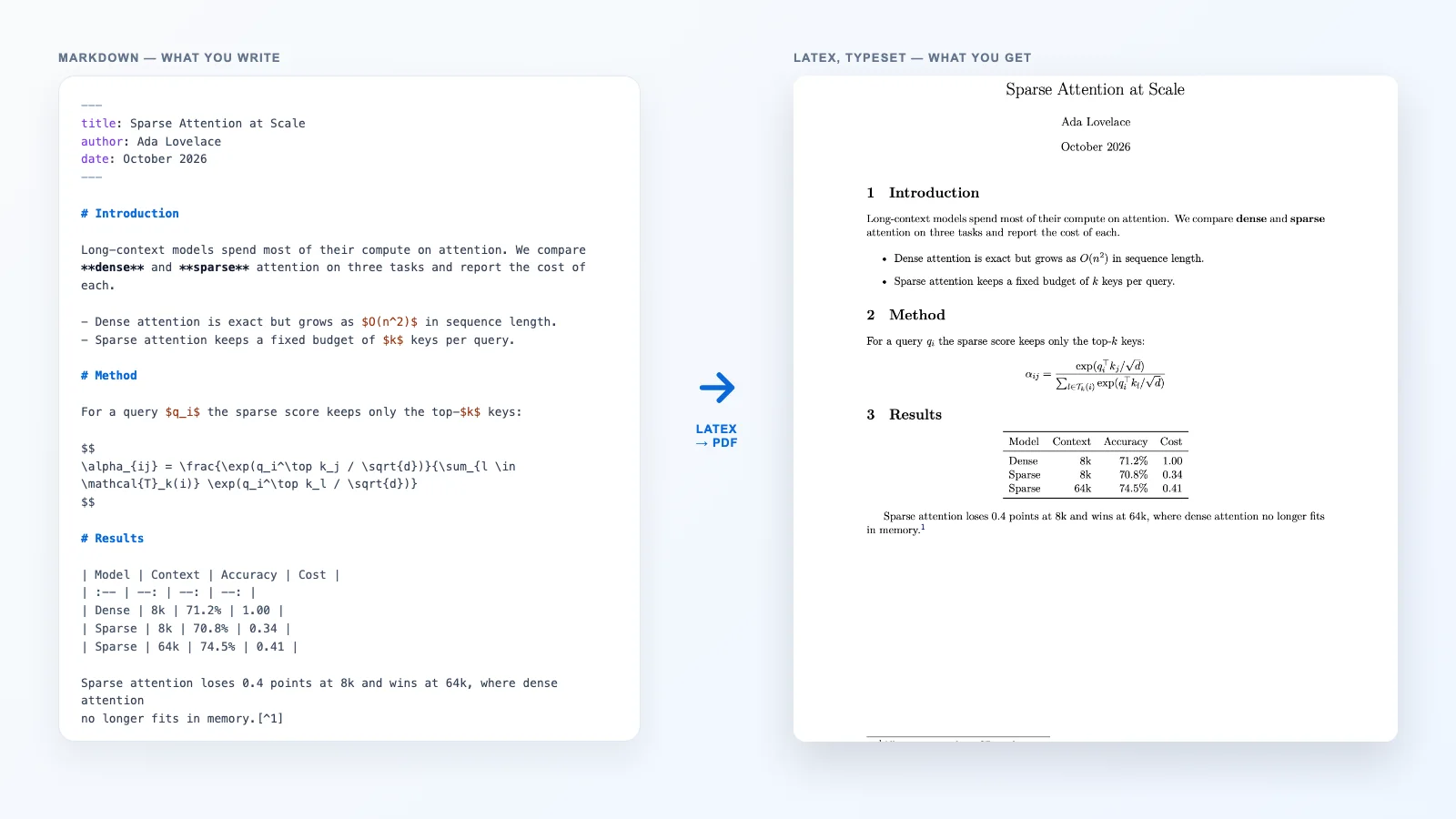
“Markdown or LaTeX?” is usually asked as if the two were rival word processors. They are not. Markdown is a way of writing down the structure of a document so a program can turn it into a web page. LaTeX is a program that sets type, line by line and page by page, from a description of the document. The useful question is not which is better but which output you need, and once you know that, the two work well together.
The short answer
- Use Markdown when the document lives on the web, in a repository, or in a notes app: READMEs, docs, blog posts, meeting notes, anything reviewed in a pull request.
- Use LaTeX when the output is a typeset PDF with rules you do not set: a journal template, a thesis class, a book with cross-referenced figures and a bibliography.
- Use both when you think faster in Markdown but the reader needs a PDF: draft in Markdown, convert once, and finish in LaTeX.
What each one is actually for
John Gruber published Markdown in 2004 with a narrow goal: plain text that reads naturally as it is and converts cleanly to HTML. A # is a heading, a blank line ends a paragraph, a pair of asterisks means emphasis. The original description left many edge cases open, which is why CommonMark later wrote a precise specification, and GitHub extended it with tables, task lists and strikethrough as GitHub Flavored Markdown. Markdown says nothing about fonts, margins or page breaks: that is the renderer’s job, usually a stylesheet.
LaTeX is older and does far more. Donald Knuth wrote TeX in 1978 to typeset mathematics properly; Leslie Lamport built LaTeX on top of it in the 1980s so authors could describe a document’s logic — sections, figures, theorems, references — and let the engine decide line breaks, hyphenation, page breaks and where a float lands. A LaTeX file is a program: it has a preamble that loads packages, environments that open and close, and a compile step that turns it into a PDF.
So the honest comparison is between a markup language and a markup language plus a typesetter. That explains nearly every difference below.
The same section, written twice
Here is one results section — a heading, a table with aligned number columns and a footnote — in both languages. The LaTeX is exactly what our Markdown to LaTeX converter writes for the Markdown beside it.
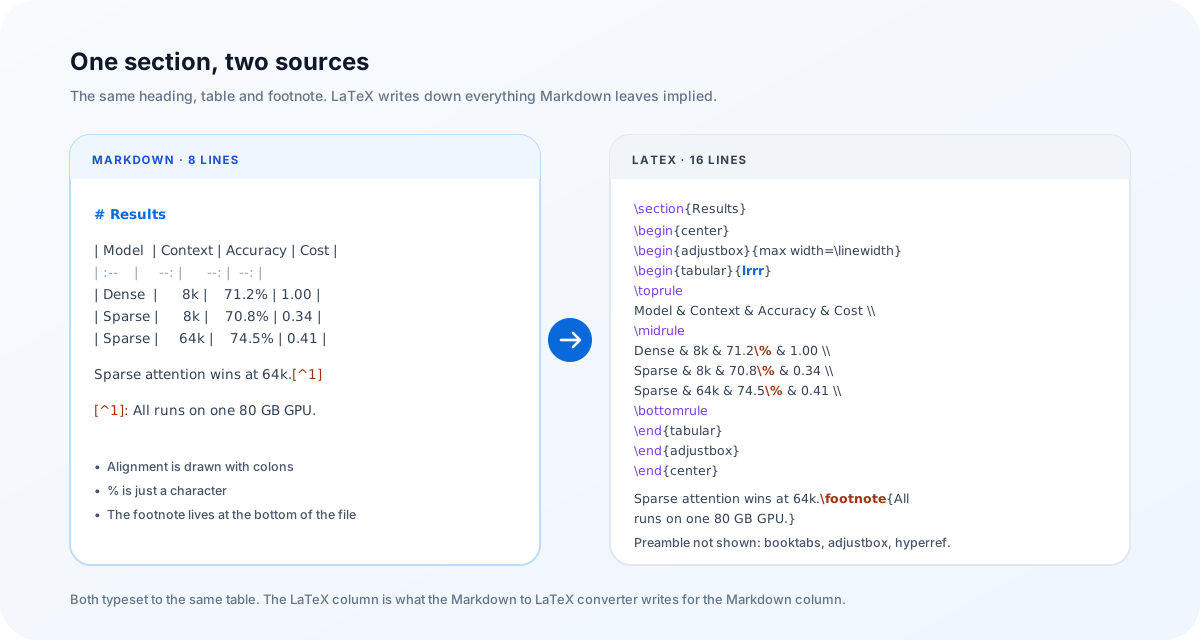
The extra lines are not noise. {lrrr} states the alignment of each column, \toprule and \midrule are the rules a typographer would draw, \% exists because a bare % starts a comment in LaTeX, and the footnote is written where it is referenced. Markdown implies all of this; LaTeX has to be told. That is the trade in miniature: Markdown is faster to write, LaTeX gives you control over every one of those decisions.
Side by side
| Markdown | LaTeX | |
|---|---|---|
| What it is | Lightweight markup for structure | Markup plus a typesetting engine |
| Usual output | HTML; PDF or Word through a converter | |
| Learning curve | Minutes | Days to get going, years to master |
| Math | $…$ rendered by KaTeX or MathJax | Native, with numbering and macros |
| Tables | Simple grids; no merged cells | Anything, with effort |
| Citations and cross-references | None in the core syntax | \cite, \label, \ref, BibTeX |
| Page layout | Left to the stylesheet | Margins, floats, headers, fonts, all yours |
| Errors | None; odd input just renders oddly | Compile errors such as ! Missing $ inserted. |
| Reviewing changes | Clean diffs, readable raw | Readable, but markup-heavy diffs |
Math: the one place they already agree
Markdown has no maths syntax of its own. What GitHub, Obsidian, Jupyter and this site do is find $…$ and $$…$$ in the text and hand the contents to KaTeX or MathJax, both of which read LaTeX math notation. So $\frac{a}{b}$ means the same thing in both worlds, and a formula you type in Markdown survives a conversion to LaTeX untouched.
The agreement stops at the edge of the formula. LaTeX can number an equation and let you write \ref{eq:loss} three pages later; Markdown has no labels. LaTeX lets you define \newcommand{\R}{\mathbb{R}} once and use it everywhere; most Markdown renderers forget macros between formulas. And the delimiters differ in practice: AI tools often write \(…\) and \[…\], which LaTeX accepts but many Markdown renderers do not. Our Markdown cheat sheet lists the maths that renders reliably on the web.
Where Markdown runs out
The limits show up the moment a document has to look like a publication rather than a page:
- Cross-references. “See Figure 3” has to be typed by hand and goes wrong the first time figures move.
- Citations and bibliographies. Core Markdown has no
\citeand no reference list. Pandoc adds a citation syntax as an extension, but it is not portable to other renderers. - Figures and page layout. You cannot ask for an image at the top of the next page, two columns, a running header, or a page break that a renderer is obliged to honour.
- Theorems and numbered environments. Definitions, lemmas and proofs are LaTeX environments; Markdown only has quotes and lists.
- Templates. A journal or university supplies a LaTeX class; there is no Markdown equivalent you can submit.
Where LaTeX gets in the way
LaTeX’s power has a cost that shows up long before the layout matters:
- The first draft is slower. Every list needs
\begin{itemize}, every table a column specification, and you check the result by compiling. - Ordinary characters are special.
%starts a comment,&separates table cells,_and^only work in maths, and#is a macro parameter. Prose pasted from anywhere else breaks the build. - Errors are cryptic. A missing brace on line 12 can surface as
! Missing $ inserted.on line 80. - Collaborators may not know it. A co-author who writes Markdown or Word fluently can still be locked out of a LaTeX source.
- The web is an afterthought. LaTeX is designed for paper; a responsive web page from the same source needs a separate tool.
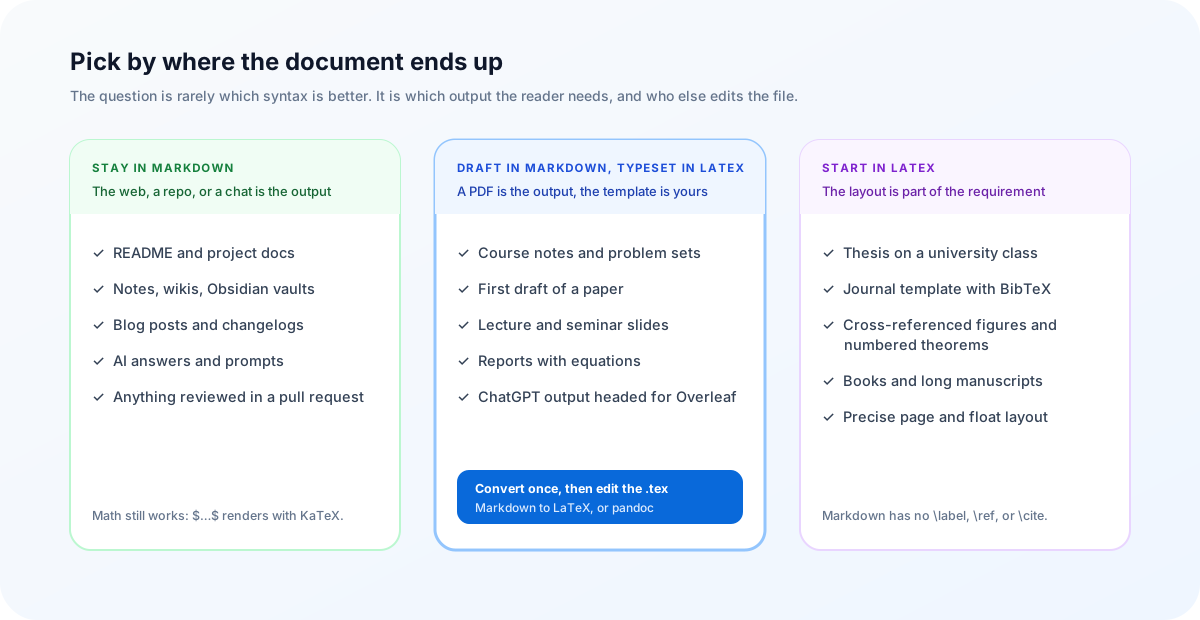
Pick by where the document ends up
Put those two lists together and the decision mostly makes itself. Ask where the document will be read and who else will edit it.
The hybrid workflow: draft in Markdown, typeset in LaTeX
The pattern that serves most technical writers is to keep the thinking in Markdown, where it is quick, and move to LaTeX once, when the structure has settled.
- Write the draft in Markdown. Put the title, author and date in a YAML header so they become a title block later. Write formulas with
$…$. - Convert it. Paste the draft into the Markdown to LaTeX converter. Article writes a complete document; Body only writes just the content, with a comment listing the packages it needs, for pasting into a template you already have.
- Compile. The status bar tells you the engine — pdfLaTeX for Latin text, XeLaTeX for Chinese, Japanese or Korean — or click Open in Overleaf and let it build the PDF.
- Continue in LaTeX. Add the labels, citations and float placement that Markdown could not express. From here the
.texis the source.
That last step matters: the conversion is one way. Going back and forth between Markdown and LaTeX on every edit loses whatever you added on the LaTeX side. If you prefer the command line, Pandoc does the same job:
pandoc draft.md --standalone -o draft.texSlides follow the same route. A Markdown outline maps naturally onto a Beamer deck, and Markdown to Beamer covers how headings become frames.
Going the other way: LaTeX to Markdown
Sometimes the paper already exists and you need it on the web, in a README, or as clean input for an LLM. Pandoc reads LaTeX:
pandoc paper.tex -o paper.mdSections, emphasis, lists, simple tables and maths come through well. Expect to repair the rest by hand: custom macros either expand or vanish, \ref turns into a bare label, multi-row tables flatten, and figure placement is gone because Markdown never had it. Treat the output as a first draft of a web version, not as a second copy of the paper.
The Markdown to LaTeX converter runs in your browser: the draft, the preview and the .tex never leave your device. The one exception is Open in Overleaf, which sends the generated LaTeX to Overleaf when you click it.
Frequently asked questions
Is Markdown easier than LaTeX?
To start, yes. Markdown has about a dozen pieces of syntax and nothing to install, and a file you have never rendered is still readable. LaTeX asks you to learn a document class, environments, packages and a compile step before the first page appears. The gap narrows for documents with a lot of maths, because both use the same LaTeX notation for formulas.
Can Markdown do math like LaTeX?
For writing formulas, mostly. Markdown renderers such as GitHub, Obsidian and this site pass $…$ and $$…$$ to KaTeX or MathJax, which read LaTeX math syntax. What Markdown lacks is the document machinery around formulas: numbered equations you can \ref, theorem environments, and your own \newcommand macros shared across a long document.
Can I write a thesis in Markdown?
You can draft one, and many people do, but most universities and journals supply a LaTeX class with rules for margins, title pages and bibliographies. The practical route is to draft chapters in Markdown, convert them to LaTeX once the structure settles, and finish inside the official template, where citations and cross-references belong.
Is LaTeX still worth learning?
If you publish in mathematics, physics, computer science or economics, yes: the journals, arXiv and most thesis templates expect it. If your output is web pages, documentation or notes, Markdown covers nearly everything, and you can convert to LaTeX on the occasions you need a typeset PDF.
How do I convert Markdown to LaTeX?
Paste the Markdown into a converter such as the Markdown to LaTeX page on this site and download the .tex, or run pandoc notes.md -s -o notes.tex. Headings become \section commands, tables become tabular environments, special characters are escaped, and math is copied unchanged.
Can LaTeX be converted back to Markdown?
Partly. pandoc paper.tex -o paper.md handles sections, emphasis, lists, simple tables and math. Custom macros, cross-references, float placement and complex tables either flatten into text or disappear, so treat the result as a starting point for a blog post or README rather than a faithful copy.
Which is better for notes?
Markdown. Notes change constantly, live in tools like Obsidian or a Git repository, and are read on screen. LaTeX only pays off once the layout of a printed page matters.
Try it
Draft in Markdown, get a .tex that compiles, and keep going in LaTeX.
Open the Markdown to LaTeX converterReferences
- Markdown — John Gruber’s original descriptiondaringfireball.net/projects/markdown
- CommonMark specificationspec.commonmark.org
- GitHub Flavored Markdown specgithub.github.com/gfm
- The LaTeX Project — what LaTeX islatex-project.org/about
- Pandoc user’s guidepandoc.org/MANUAL.html
- KaTeX — supported functionskatex.org/docs/supported.html
- The Markdown to LaTeX convertermarkdownviewer.org/markdown-to-latex