ChatGPT to LaTeX: turning an AI answer into a .tex file that compiles.
The answer is already structured and the maths is already LaTeX. Pasting it into Overleaf still fails on the first heading. Here is why, and the conversion that gets you from chat to PDF without retyping anything.
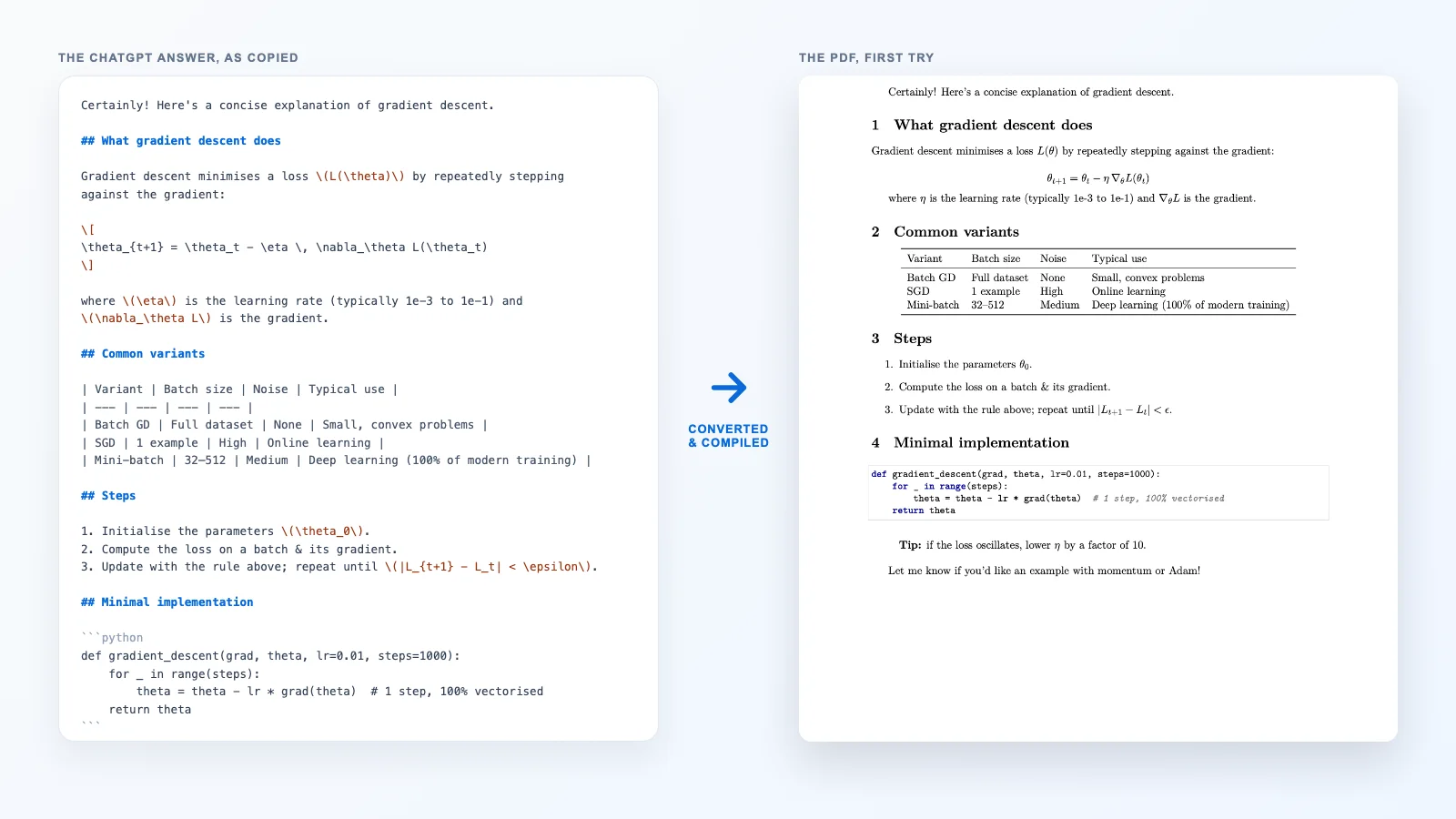
Ask ChatGPT, Claude or Gemini to explain a method and the answer comes back in good shape: section headings, a comparison table, numbered steps, a code sample, and formulas written in LaTeX notation. It looks one paste away from a paper. It is not — the answer is Markdown, and LaTeX reads several of Markdown’s favourite characters as commands. The fix is not to retype it but to convert it, and the conversion is mostly mechanical, which is exactly why it should not be done by hand.
Why pasting the answer into Overleaf fails
We pasted the gradient-descent answer from the picture above straight into an empty LaTeX document. These are the errors LaTeX reported, in the order it hit them:
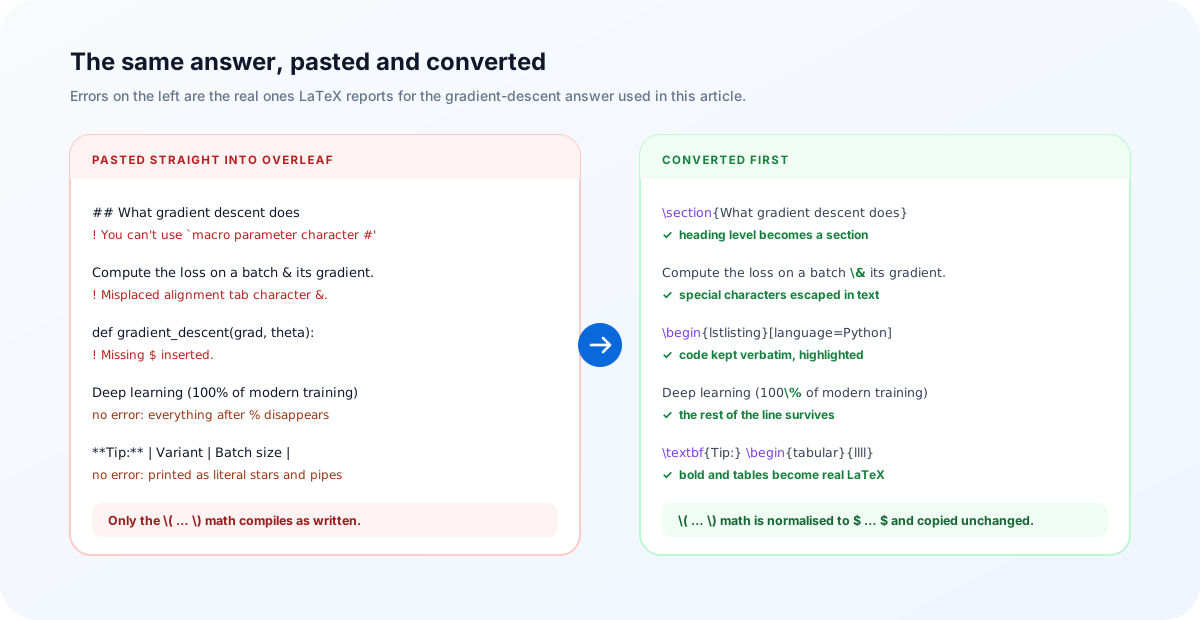
## Heading—#is LaTeX’s macro parameter character, so the very first heading stops the compile.&separates table cells; in a sentence it is a misplaced alignment tab._means subscript and only works in maths, sogradient_descentproduces! Missing $ inserted.%is the worst of the four because it does not fail: it starts a comment, and “100% of modern training” quietly loses everything after the number.**bold**, table pipes and code fences produce no error at all; they print as literal asterisks, pipes and backticks.
The irony is that the maths is the one part LaTeX already understands. \(L(\theta)\) and \[ … \] are perfectly good LaTeX delimiters. Everything around them is the problem.
Why not ask ChatGPT for LaTeX instead?
You can, and for a single equation or a short table it is the quickest route. For a whole answer it has three weaknesses. The model regenerates the content rather than translating it, so the LaTeX version can differ from the answer you read and checked. It guesses at packages, sometimes loading ones the body never uses or forgetting booktabs for the table it just wrote. And it escapes inconsistently — a long answer with percentages, file names and ampersands rarely comes back with every one of them handled.
A converter is boring in the right way: the same Markdown always produces the same LaTeX, every special character in prose is escaped, code and maths are left alone, and the preamble lists only what the body needs. Keep the model for the thinking and the converter for the typing.
The conversion, step by step
- Copy the answer as Markdown. Use the copy button under the response rather than selecting the rendered text; it gives you the Markdown source with the
##headings and the formulas intact. - Trim the conversation. Delete “Certainly! Here’s…” at the top and “Let me know if you’d like…” at the bottom. They are chat, not content.
- Paste it into the converter. Open Markdown to LaTeX, keep Article selected, and check the preview.
- Choose the output. Full document gives you a file that compiles on its own; Body only gives you the content to drop into a paper you already have.
- Compile. Download the
.texand run the engine named in the status bar, or click Open in Overleaf.
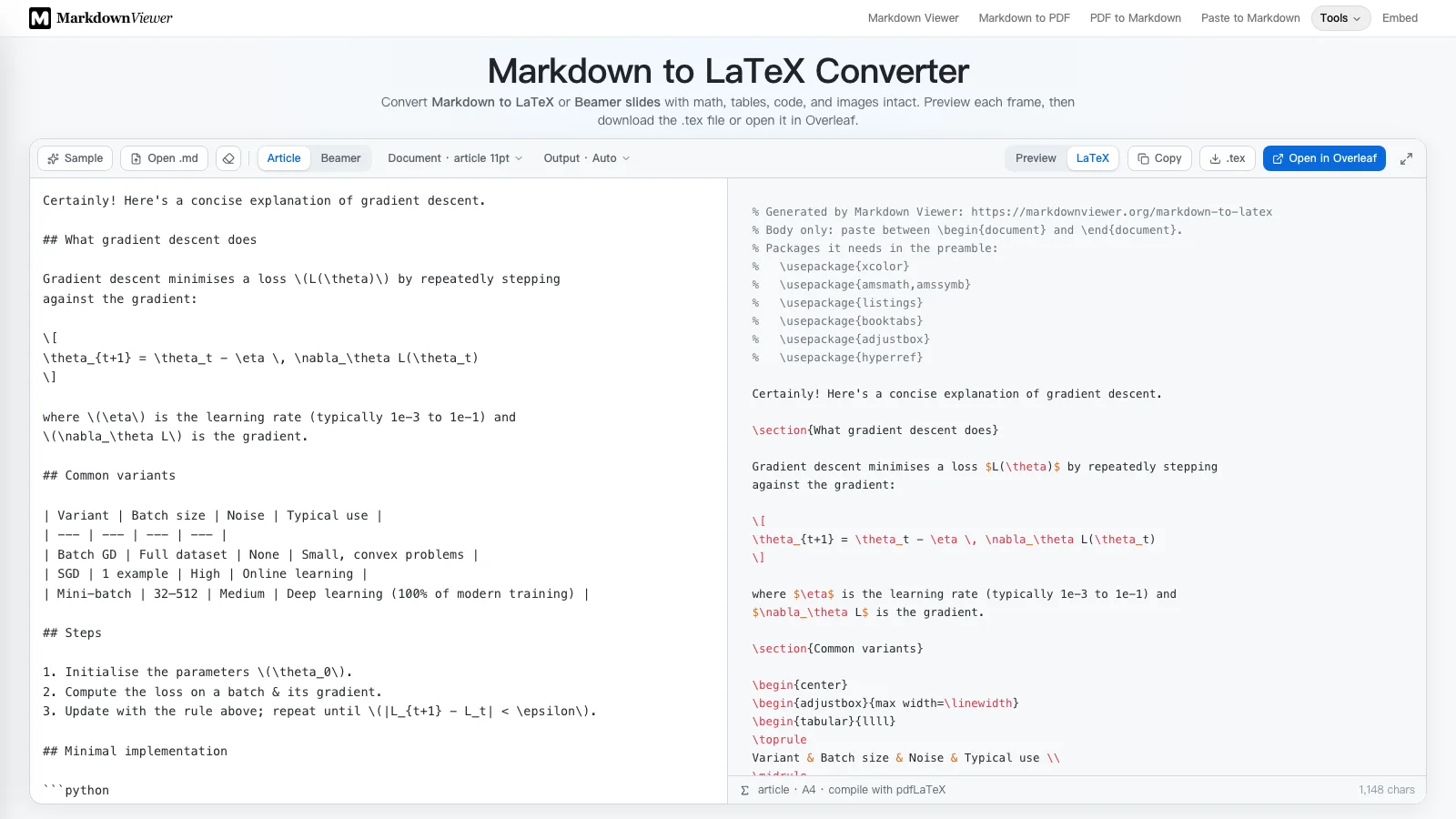
\section, the \(…\) maths is now $…$, and a comment lists the packages your preamble needs.What happens to the maths
Formulas are the part you least want touched, so they are set aside before anything else runs and written back character for character.
\(…\)becomes$…$, and\[…\]becomes a display formula. This happens before the Markdown is parsed, because a Markdown parser would otherwise read\(as an escaped parenthesis and drop the backslash.- A bracket pair only counts as maths when it looks like maths, so an escaped
\[note\]in prose stays text. - A lone dollar sign is safe:
$40to$60stays a price range and comes out as\$40. - Display maths becomes
\[ … \]. If the answer already used an environment such asalign*, it is written as that environment, not wrapped a second time — which would not compile.
Everything else in the answer
| In the answer | In the .tex | Note |
|---|---|---|
## Heading | \section | The shallowest heading in the answer is the section level |
**bold**, *italic* | \textbf, \emph | |
1. / - lists | enumerate / itemize | Nesting and start numbers are kept |
| a | b | | booktabs tabular | Column alignment kept; wide tables scale to the line |
```python | lstlisting | Language set when the listings package knows it |
> Tip: | quote | |
| Links | \href, \url | hyperref is loaded for you |
| Emoji | Kept, with a warning | The default LaTeX fonts have no emoji; delete them |
Adding the answer to a paper you already have
Most of the time the answer is one section of something bigger. Switch Output to Body only. The result has no \documentclass and no preamble; its first lines are a comment naming the packages it uses — typically amsmath, booktabs, listings and hyperref. Add any your preamble lacks, once, and paste the body where it belongs.
Heading levels follow the answer, not your paper: the shallowest heading becomes \section. If the answer should sit under one of your sections, give it a single # heading on top before converting; in Body only mode that becomes the \section and the answer’s ## headings become \subsection.
A prompt that makes the conversion cleaner
The converter handles whatever the model produces, but a little steering removes the clean-up step. Add this to the end of your question:
Answer in Markdown.
Use ## and ### for headings, not bold text.
Write inline math as $...$ and display math as $$...$$.
Tag every code block with its language.
Do not add an introduction or a closing offer.
Real headings matter more than people expect. Models often fake a heading with a bold line, which converts to bold text rather than to a \section — fine on screen, invisible to a table of contents.
Three things to check after compiling
- Citations. Markdown has no
\cite, so any sources the answer names arrive as text. Verify each one — models can name papers that do not exist — and add real BibTeX entries. - Equation numbers. Display maths is unnumbered
\[ … \]. Change the ones you refer to intoequationenvironments with a\label. - Wide tables. Tables shrink to fit the text width rather than overflow. If one shrinks too far to read, shorten the cell text or transpose it.
If the destination is Word rather than LaTeX, the same workflow applies with a different converter: ChatGPT to Word covers it. And for slides from an AI outline, see Markdown to Beamer.
The answer you paste is converted in your browser and is not uploaded. Open in Overleaf is the only action that sends the generated LaTeX anywhere, and only when you click it.
Frequently asked questions
How do I convert a ChatGPT answer to LaTeX?
Copy the answer with ChatGPT’s copy button, which gives you Markdown, paste it into the Markdown to LaTeX converter, and download the .tex or open it in Overleaf. Choose Body only if you are adding the answer to a paper you already have.
Why does Overleaf show errors when I paste ChatGPT output?
Because the answer is Markdown, not LaTeX. # is a macro parameter character, & separates table cells, _ only works in maths, and % starts a comment that silently deletes the rest of the line. A converter escapes those characters and turns the Markdown structure into LaTeX commands.
Does ChatGPT’s \( \) math work in LaTeX?
In LaTeX itself, yes: \( … \) and \[ … \] are valid math delimiters. The trouble is in Markdown tools, which read the backslashes as escapes and print the brackets. The converter recognises both forms, rewrites them as $…$ and $$…$$ before parsing, and writes the formula back unchanged.
Can I ask ChatGPT to answer in LaTeX directly?
For a single equation or a short snippet, that works well. For a whole answer, a deterministic conversion is safer: the content stays exactly what you read, special characters are escaped consistently, and the preamble lists only the packages the body uses.
How do I paste the result into an existing paper?
Choose Output → Body only. You get the content without \documentclass or a preamble, plus a comment listing the packages it needs. Add those packages to your preamble once and paste the body where the section belongs.
Are the equations numbered?
Display maths is written as \[ … \], which LaTeX does not number. To number one, change it to an equation environment and add a \label so you can \ref it. An align* or other environment the answer already used is kept as it is.
Are ChatGPT’s citations converted into \cite?
No. Markdown has no citation syntax, so references arrive as text or links. Check every source the model names — they can be wrong or invented — and add real BibTeX entries in LaTeX.
Try it
Paste the answer, get LaTeX that compiles, and keep the maths exactly as written.
Open the Markdown to LaTeX converterReferences
- Overleaf — the “Missing $ inserted” erroroverleaf.com/learn/latex/Errors
- Overleaf — Learn LaTeX in 30 minutesoverleaf.com/learn
- amsmath — display maths environmentsctan.org/pkg/amsmath
- booktabs — publication-quality tablesctan.org/pkg/booktabs
- The Markdown to LaTeX convertermarkdownviewer.org/markdown-to-latex
- Markdown vs LaTeX — when to use eachmarkdownviewer.org/blog/markdown-vs-latex