CSV to Markdown Table Converter

Convert CSV to Markdown tables from a .csv, .tsv, or pasted text. Pick the delimiter and encoding, keep quoted commas and pipes in their cells, and copy clean GFM — privately in your browser.

What Is the CSV to Markdown Converter?

The CSV to Markdown converter reads delimited text — comma, semicolon, tab, or pipe — and writes a GitHub Flavored Markdown pipe table. Quoted commas and line breaks stay inside their cells, and the file is decoded in your browser instead of being uploaded.
  • Strict about quotes: An unclosed or misplaced quote stops the export with an explanation instead of silently shifting columns.
  • Source you can override: Detection picks the delimiter; the Source menu changes it or re-reads the file as Windows-1252 or UTF-16LE.
  • Preview before you copy: Check the rendered CSV to Markdown table, switch to the pipe source, then copy Markdown or download .md.
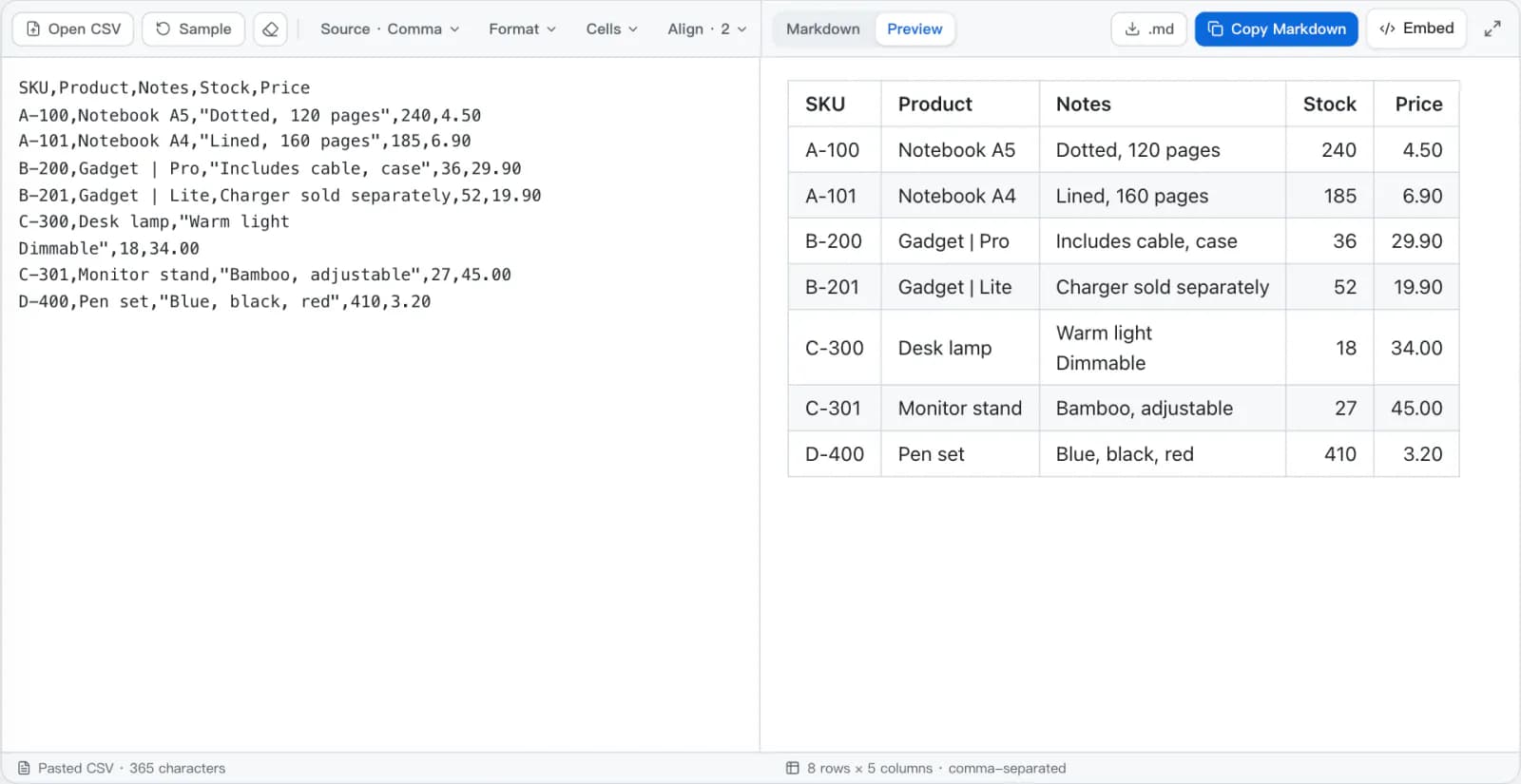
The CSV to Markdown converter with a product inventory CSV on the left and the rendered Markdown table on the right, its Stock and Price columns right-aligned, under the Source, Format, Cells, and Align menus.
CSV on the left, the CSV to Markdown table rendered on the right, option menus above both.

How CSV to Markdown Conversion Works

Every CSV to Markdown conversion runs the same four steps, from raw bytes to a pipe table, each time you type or change a setting.

  1. 1The bytes are decodedAn opened file is read as UTF-8, Windows-1252, or UTF-16LE, and a byte-order mark is dropped. Pasted text is already decoded by the browser.
  2. 2Quotes are checked, then fields splitThe delimiter is detected from the first 20 lines unless you set one. Unclosed quotes and text after a closing quote are rejected; then quoted commas, doubled quotes, and line breaks stay inside their fields.
  3. 3The grid is squared offShort rows are padded to the widest row and empty rows and columns at the edges are trimmed. Values stay text, so 00123 is still 00123.
  4. 4Cells are escaped and written outPipes become \|, Markdown characters are escaped unless you turn that off, line breaks follow the Cells setting, and alignment goes into the delimiter row.
CSV with quotes and a pipein
Product,Notes,Price
"Gadget | Pro","Includes cable, case",29.90
Notebook,"First line
Second line",4.50
Markdown table outout
| Product       | Notes                     | Price |
| ------------- | ------------------------- | ----- |
| Gadget \| Pro | Includes cable, case      | 29.90 |
| Notebook      | First line<br>Second line | 4.50  |

A CSV to Markdown Converter for Real Exports

CSV to Markdown stays accurate on the files spreadsheets and databases actually produce: quoted fields, regional delimiters, older encodings, and wrapped text.

Quoted Fields Read Correctly

CSV to Markdown follows RFC 4180 quoting: a comma or line break inside quotes stays in its cell and a doubled quote becomes one. An unclosed quote stops the export instead of shifting every later column.

Delimiter Detection You Can Override

CSV to Markdown detects comma, semicolon, tab, and pipe delimiters from the first lines of the file. The Source menu shows which one was chosen and lets you set it by hand.

Encodings for Older Exports

Read files as UTF-8, Windows-1252, or UTF-16LE. Changing the encoding re-reads the opened file, and bytes that are invalid for it raise an error rather than turning into replacement characters.

Column Alignment

Set each column to default, left, center, or right from the Align menu, or switch on Auto-align numbers to right-align every column whose values are numeric.

Multi-Line Cells Handled

A Markdown table row is one line. A cell that spans lines becomes a <br>, a space-joined sentence, or just its first line — chosen from the Cells menu.

Private CSV to Markdown

The file is decoded and converted in this browser tab. It is not uploaded to a conversion server or stored by this site.

CSV to Markdown Examples

Four inputs that break a naive find-and-replace, and the exact CSV to Markdown table this converter writes for each with its default settings.

Commas inside quotes

Quotes enclose the whole field, so CSV to Markdown treats the comma in “Cable, case” as data rather than a new column. A doubled quote inside a field becomes one literal quote.

CSVin
Product,Notes
Gadget,"Cable, case"
Markdownout
| Product | Notes       |
| ------- | ----------- |
| Gadget  | Cable, case |

Two columns in, two columns out.

Pipes stay in one column

A pipe means nothing in a comma-separated file but separates Markdown columns. CSV to Markdown always escapes it, so a product name with a pipe stays one cell.

CSVin
Product,Price
Gadget | Pro,29.90
Markdownout
| Product       | Price |
| ------------- | ----- |
| Gadget \| Pro | 29.90 |

GFM renders \| as a literal pipe inside the cell.

Line breaks need a choice

A quoted CSV field can span lines; a Markdown row cannot. The default writes <br>. The Cells menu can join the lines with a space or keep only the first.

CSVin
Task,Notes
Review,"First line
Second line"
Markdownout
| Task   | Notes                     |
| ------ | ------------------------- |
| Review | First line<br>Second line |

Use the space option when the destination strips inline HTML.

Semicolons and decimal commas

Exports from locales that write 29,90 separate fields with semicolons. Detection counts separators outside quotes and reads this file as semicolon-separated; set it in the Source menu if a short file is misread.

CSVin
Product;Price
Notebook;29,90
Markdownout
| Product  | Price |
| -------- | ----- |
| Notebook | 29,90 |

The value stays text — 29,90 is not converted to a number.

Delimiter and Encoding, Under Your Control

A CSV file does not record which character separates its fields or how its text is encoded. The CSV to Markdown Source menu shows what detection chose and lets you change either one.
  • Semicolon exports keep a decimal comma such as 29,90 inside one value.
  • Tab-separated text pasted from a spreadsheet is detected as TSV.
  • Accents look wrong? Re-read the opened file as Windows-1252 without opening it again.
  • Bytes that are invalid for the chosen encoding raise an error instead of becoming replacement characters.
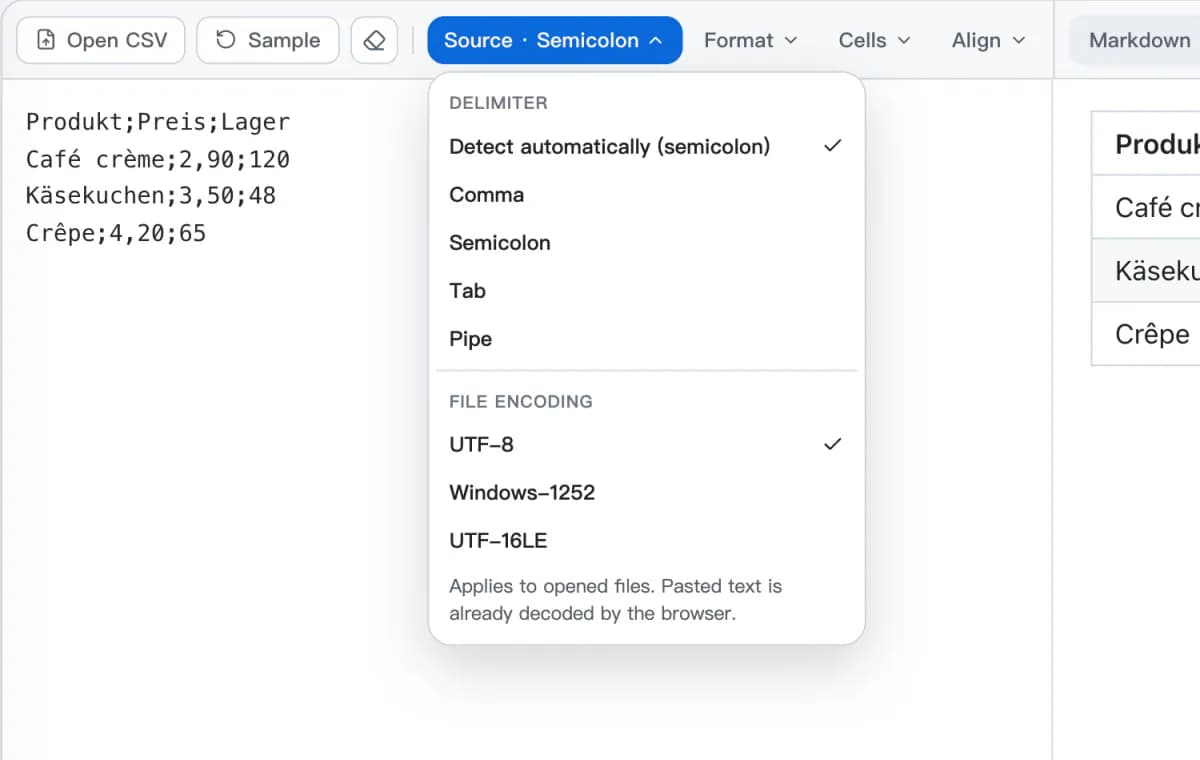
The CSV to Markdown Source menu open over a semicolon-separated price list, with automatic detection set to semicolon above the comma, semicolon, tab, and pipe choices, then UTF-8, Windows-1252, and UTF-16LE encodings.
The Source menu: delimiter and file encoding.

What CSV to Markdown Preserves

How each kind of CSV content comes out of CSV to Markdown with the default settings, and what is worth checking.

In the CSVIn MarkdownWhat to check
First row| Product | Price | | --- | --- |Turn off Header row to get Column 1, Column 2 and keep every row as data.
"Cable, case"Cable, caseQuoted commas stay in one cell; a doubled quote becomes one quote.
Gadget | ProGadget \| ProPipes are always escaped.
*note* or snake_case\*note\* or snake\_caseEscaped so they stay literal; turn off Escape in the Format menu to keep them as Markdown.
Quoted line breakFirst line<br>Second lineOr a space, or the first line only. <br> needs a renderer that allows inline HTML.
00123 · =SUM(B2:B9)00123 · =SUM(B2:B9)Values are text: nothing is rounded, reformatted, or evaluated.
Blank rows at the edges(removed)Leading and trailing empty rows and columns are trimmed; spaces around values too.

Where a CSV Table Needs a Second Look

Workbooks are not CSV

Use Excel to Markdown rather than CSV to Markdown for .xlsx files. A workbook carries sheets, date formats, and merged cells that a CSV export drops, and renaming .xlsx to .csv does not convert it.

Long tables

Up to 5,000 rows and 100 columns are accepted, but a table that long is rarely readable in a README. Publish the relevant rows and link to the full dataset.

The destination's renderer

Pipe tables are a GFM extension. GitHub renders them; a strict CommonMark renderer may show the raw pipes, and some sites strip the <br> used for line breaks.

Specifications behind these rules

Convert CSV to Markdown in 3 Steps

Convert CSV to Markdown from a file or a paste, check the table, and copy it into your documentation.

1

Drop, open, or paste CSV

Drop a .csv, .tsv, or .txt file onto the CSV to Markdown converter, choose Select CSV file, or paste delimited text with Ctrl+V.

2

Check the source and format

Confirm the delimiter and encoding in the Source menu, the header row in Format, and column alignment in Align while the preview updates.

3

Copy or download

Choose Copy Markdown to paste the CSV to Markdown table into a README, issue, or wiki, or download it as a .md file.

CSV to Markdown Questions

Answers about CSV to Markdown delimiters, encodings, quotes, alignment, limits, and privacy.

How do I convert CSV to Markdown?
Drop a .csv file onto the converter, choose Select CSV file, or paste delimited text. The table appears in Preview straight away. Check the delimiter in the Source menu and the header row in Format, then choose Copy Markdown or download a .md file.
Can I convert CSV to a GitHub table?
Yes. CSV to Markdown writes GitHub Flavored Markdown pipe-table syntax with the required delimiter row. Paste it into a README, issue, pull request, wiki, or any editor that renders GFM tables.
Why does everything appear in one column?
Detection chose the wrong delimiter, or the file genuinely has one column. Open the Source menu and pick Semicolon, Tab, or Pipe. Exports from locales that write decimals with a comma usually separate fields with semicolons.
Why do accented letters look garbled?
The file is probably not UTF-8. Choose Windows-1252 — common for older Excel exports on Windows — or UTF-16LE in the Source menu. The opened file is read again with that encoding; you do not need to open it twice.
Why does the converter refuse my CSV?
It stops on an unclosed quote, or on text after a closing quote, because guessing would move every later cell into the wrong column. The message says which problem it found: enclose the whole field in quotes and double any quote inside it.
Will leading zeros or prices change?
No. CSV to Markdown treats cells as text, so 00123 and 29,90 stay exactly as written and nothing is rounded. If a spreadsheet already removed the zeros before exporting, they cannot be recovered here.
What happens when rows have different lengths?
Short rows are padded with empty cells so the table is rectangular, and fully empty rows and columns at the edges are removed. Missing values can also be a sign that the delimiter is wrong.
Can I convert TSV or semicolon-separated files to Markdown?
Yes. CSV to Markdown reads comma, semicolon, tab, and pipe delimiters. Tab-separated text — including cells copied from a spreadsheet — is detected as TSV, and you can set the delimiter by hand in the Source menu.
How do I right-align numbers in a CSV to Markdown table?
Switch on Auto-align numbers in the Format menu to right-align every column whose values are numeric, or set any column by hand in the Align menu. The table's delimiter row then carries ---: for those columns.
Should I use CSV to Markdown or Excel to Markdown?
Use this page for plain delimited text, especially when you need to set the delimiter or encoding. Use Excel to Markdown for .xlsx workbooks: it reads several sheets, date formats, and merged cells, which a CSV export does not contain.
Is my CSV uploaded or saved?
No. CSV to Markdown conversion runs in your browser's memory; the file is not uploaded to a conversion server or saved by this tool. Copy or download the result before closing the tab. The privacy policy describes the site's separate analytics.
What are the limits?
The CSV to Markdown converter accepts files up to 1 MB, pasted text up to 1 million characters, 5,000 rows, and 100 columns. A table that large is better published as a dataset with a short Markdown summary than embedded in full.

More Table Tools

Start from a workbook, edit the table after converting it, or take a Markdown table back to a spreadsheet.

Convert CSV to Markdown Now

Drop a CSV or paste delimited text, and CSV to Markdown gives you a clean GitHub Flavored Markdown table to copy.