EPUB to Markdown Converter

Convert EPUB to Markdown in your browser. Open a DRM-free book to get its chapters in reading order, preview them with their images, and download one Markdown file or a ZIP with every chapter.

What Is the EPUB to Markdown Converter?

An EPUB is a ZIP of XHTML chapters plus a package file that lists their reading order. The EPUB to Markdown converter opens that package in your browser, follows the order it declares, and turns each chapter into Markdown — keeping headings, lists, quotes, links, and images.
  • Reading order, not file order: Chapters are listed in the book's spine order, whatever their file names.
  • A preview with the pictures: Check each chapter rendered with its images before you export anything.
  • One file or the whole set: Export a chapter or the whole book as .md, or a ZIP with every chapter, a contents page, and assets/.
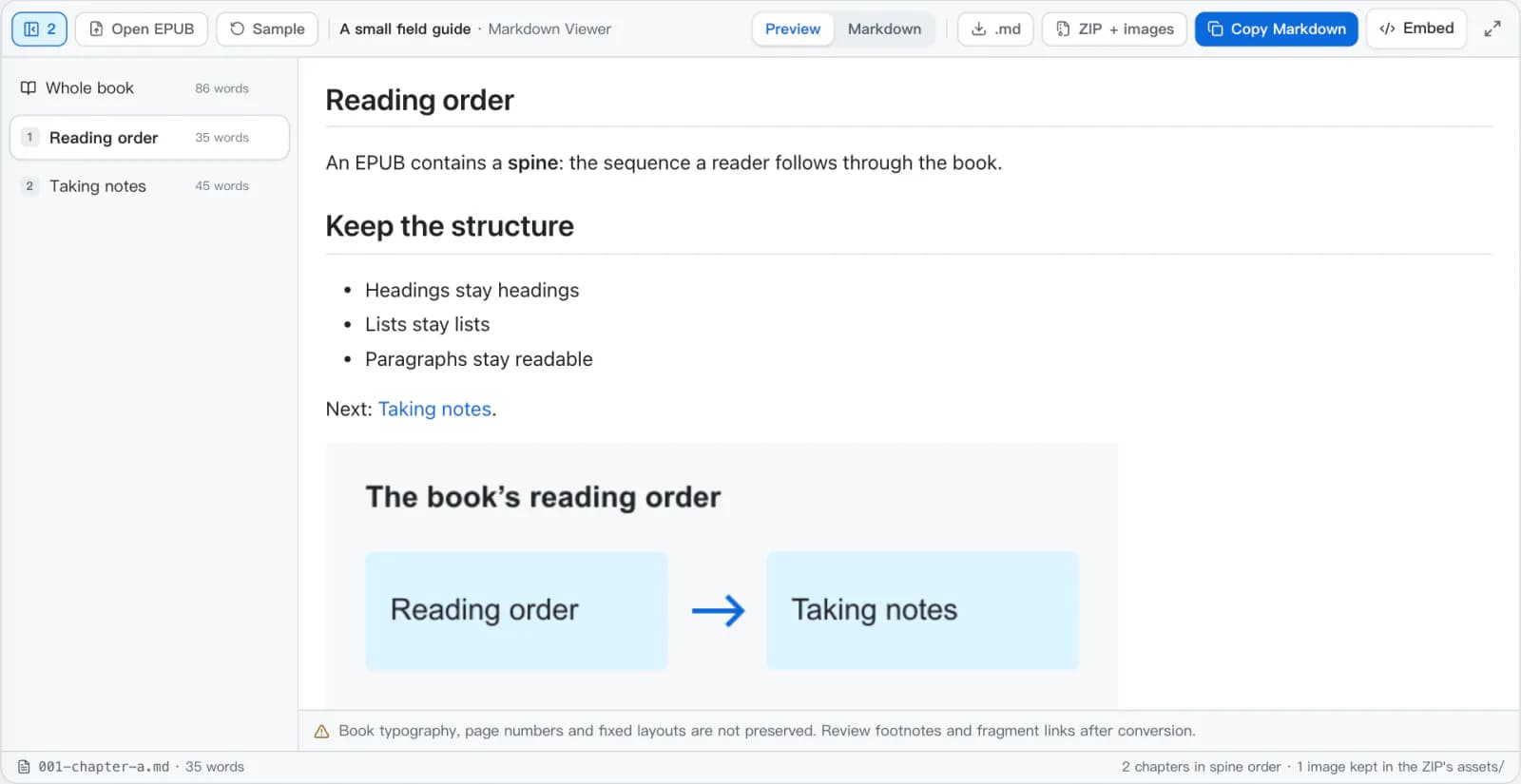
The EPUB to Markdown converter with the sample book open: a chapter list with word counts on the left and the first chapter rendered with its reading-order diagram on the right.
The EPUB to Markdown chapter list on the left, the selected chapter rendered with its image on the right.

How EPUB to Markdown Conversion Works

EPUB to Markdown reads the book once, when you open it, in four steps that run entirely in the browser.

  1. 1The archive is opened with limitsThe ZIP is read in memory, up to 2,000 entries and 60 MB expanded. Encrypted resources, paths that point outside the archive, and XML entity declarations are refused.
  2. 2The package sets the orderMETA-INF/container.xml points to the package document. Its manifest lists the files and its spine sets the reading order; non-linear items are skipped.
  3. 3Chapters become MarkdownScripts, styles, forms, and embedded objects are removed, then each chapter's XHTML goes through the same HTML-to-Markdown engine as HTML to Markdown. A chapter is named after its first heading.
  4. 4Images and links are rewiredRaster images are copied into assets/ and links between chapters point at the exported files. SVG, external, and missing images become their alternative text.
Chapter XHTML (excerpt)in
<h1>Reading order</h1>
<p>An EPUB contains a <strong>spine</strong>:
  the sequence a reader follows through the book.</p>
<p>Next: <a href="chapter-b.xhtml">Taking notes</a>.</p>
<p><img src="images/reading-order.png"
        alt="Reading order then Taking notes"/></p>
001-chapter-a.mdout
# Reading order

An EPUB contains a **spine**: the sequence a reader follows through the book.

Next: [Taking notes](002-chapter-b.md).

![Reading order then Taking notes](assets/image-1.png)

An EPUB to Markdown Converter That Respects the Book

EPUB to Markdown keeps a book's order, structure, and images, and is cautious with files it did not write.

Spine Order, Not File Order

EPUB to Markdown follows the reading order the book's package declares, not the order of files in the archive or their names. Items marked non-linear are left out.

Chapter by Chapter

EPUB to Markdown lists every chapter with its word count. Select one to preview, copy, or download it on its own, or select Whole book for everything in one file.

Images Kept Byte for Byte

PNG, JPEG, GIF, WebP, and AVIF images are copied into assets/ without recompression, and the preview shows them in place before you export.

A ZIP Ready for a Notes Folder

book.md, a linked contents.md, one numbered file per chapter, and the assets folder — unzip it into Obsidian or any folder-based notes app.

Careful With Untrusted Books

Chapter scripts never run and external resources are never fetched. Encrypted, malformed, or oversized packages are refused with a reason.

Private EPUB to Markdown

EPUB to Markdown unzips and converts the book in this browser tab. It is not uploaded to a conversion server or stored by this site.

EPUB to Markdown Examples

Taken from the sample book on this page: what the EPUB contains, and what EPUB to Markdown writes for it.

Reading order comes from the spine

The sample lists chapter B before chapter A in its manifest; the spine puts A first. The EPUB to Markdown export follows the spine and numbers the files to match.

package.opf (excerpt)in
<manifest>
  <item id="second" href="chapter-b.xhtml" …/>
  <item id="first" href="chapter-a.xhtml" …/>
</manifest>
<spine>
  <itemref idref="first"/>
  <itemref idref="second"/>
</spine>
Files in the ZIPout
001-chapter-a.md   # Reading order
002-chapter-b.md   # Taking notes

Structure becomes Markdown

Headings, quotes, and lists are converted from the chapter's XHTML. Fonts, margins, and colors come from the book's CSS and do not carry over.

chapter-b.xhtml (excerpt)in
<h1>Taking notes</h1>
<blockquote>
  <p>Keep the idea, then add your own connection.</p>
</blockquote>
<ol>
  <li>Read the converted chapter.</li>
  <li>Check links and footnotes.</li>
</ol>
002-chapter-b.mdout
# Taking notes

> Keep the idea, then add your own connection.

1.  Read the converted chapter.
2.  Check links and footnotes.

Images move to assets/

The image file is copied unchanged into the ZIP and the reference is rewritten to point at it. Keep assets/ next to the Markdown files after unzipping.

chapter-a.xhtmlin
<img src="images/reading-order.png"
     alt="Reading order then Taking notes"/>
001-chapter-a.mdout
![Reading order then Taking notes](assets/image-1.png)

A .md download on its own does not include the image file — use the ZIP.

Links follow the export

A link to another chapter points at that chapter's file in the per-chapter export, and at the chapter's heading anchor in the combined book.md.

chapter-a.xhtmlin
<a href="chapter-b.xhtml">Taking notes</a>
001-chapter-a.md, then book.mdout
[Taking notes](002-chapter-b.md)
[Taking notes](#taking-notes)

One Book, Every Way You Need It

Select a chapter or Whole book in the list: Copy Markdown and .md act on the selection, and the EPUB to Markdown ZIP always contains everything.
  • book.md — the whole book, with links between chapters turned into in-page anchors.
  • contents.md — a linked list of the chapter files.
  • 001-….md, 002-….md — one file per chapter, numbered in reading order.
  • assets/ — the extracted images, referenced from the Markdown.
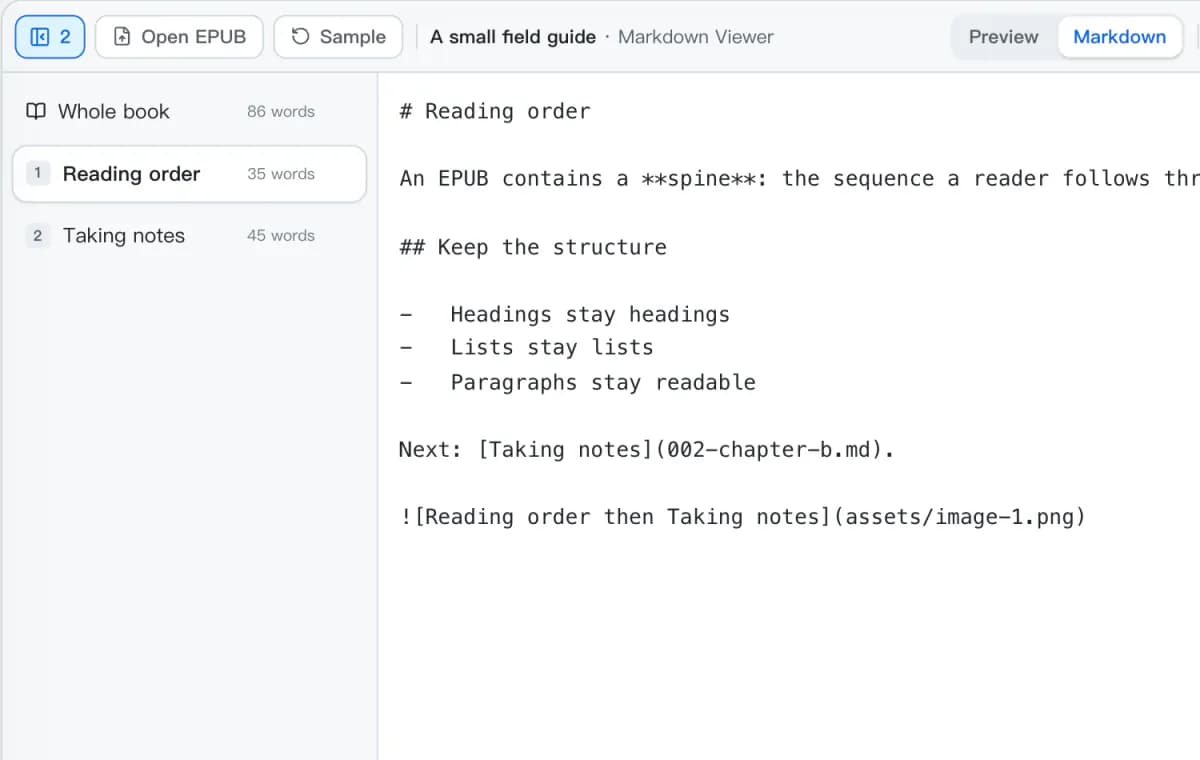
The EPUB to Markdown converter's Markdown tab for the Reading order chapter, showing the link to 002-chapter-b.md and the image reference to assets/image-1.png.
A single chapter's Markdown, with its chapter link and image path.

What EPUB to Markdown Preserves

How each part of an EPUB comes out of EPUB to Markdown, and what is worth checking after conversion.

In the EPUBIn MarkdownWhat to check
<h1> – <h6># … ######The first heading also names the chapter.
<strong>, <em>, <a href>**bold**, *italic*, [text](url)External links are kept as written.
<ul>, <ol>, <blockquote>- item, 1. item, > quoteNesting is kept.
<table>| a | b | or HTMLTables with merged cells stay as HTML.
PNG, JPEG, GIF, WebP, AVIF![alt](assets/image-1.png)Original bytes in the ZIP; nothing is recompressed.
SVG, external, or missing imagesAlternative textNot fetched and not embedded.
Links between chapters[…](002-chapter-b.md)Fragment IDs from the book may not match Markdown heading IDs.
Title and creator# Title, then the authorRead from the package metadata; missing metadata cannot be recovered.
CSS, fonts, page numbers(dropped)Markdown has no layout; fixed-layout books lose their page geometry.

Keep the Meaning, Review the Layout

EPUB is not PDF

An EPUB stores chapters as XHTML with a declared order, so its structure can be read directly. A PDF stores positioned page content — use PDF to Markdown for those; renaming .pdf to .epub converts nothing.

Footnotes need a second look

EPUB notes are usually linked HTML fragments. They are not turned into GFM footnotes, and Markdown renderers generate heading IDs differently, so check notes and back-links.

Only books you may convert

EPUB to Markdown does not remove DRM or bypass encryption. Use it for unencrypted books you are allowed to convert, and keep the original EPUB for its layout and metadata.

Specifications behind these rules

Convert EPUB to Markdown in 3 Steps

Convert an EPUB to Markdown, review the chapters with their images, and export them the way your notes are organized.

1

Open a DRM-free EPUB

Drop an .epub up to 25 MB onto the EPUB to Markdown converter or choose Select EPUB — or try the two-chapter sample book.

2

Review the chapters

Pick chapters from the list to check them in Preview with their images, or switch to Markdown to read the source.

3

Copy or export

Copy or download the selected chapter or the whole book as .md, or download the ZIP with every chapter and its images.

EPUB to Markdown Questions

Answers about EPUB to Markdown with Obsidian, images, chapter names, DRM, footnotes, limits, and privacy.

How do I convert EPUB to Markdown?
Drop a DRM-free .epub onto the EPUB to Markdown converter or choose Select EPUB. The chapters appear in reading order; preview them, then copy the Markdown, download the selected chapter or the whole book as .md, or download the ZIP with every chapter and its images.
Can I use the result in Obsidian?
Yes. Unzip the EPUB to Markdown export into a folder in your vault and keep assets/ beside the Markdown files. contents.md links to every chapter file. Check footnotes and other in-book links afterwards, because the book's own fragment IDs may not match the heading IDs Obsidian generates.
Does EPUB to Markdown keep the images?
Local PNG, JPEG, GIF, WebP, and AVIF images are included in the ZIP, and the Markdown points to them in assets/. SVG illustrations and external images are not fetched or embedded; their alternative text is kept instead. A .md download on its own does not contain image files.
Can I convert an EPUB to a single Markdown file?
Yes. Select Whole book in the EPUB to Markdown converter and choose .md to download one combined file: the title and author, then every chapter in reading order, with links between chapters turned into in-page anchors. A .md file cannot hold images, so download the ZIP to keep them.
Does EPUB to Markdown work with EPUB 2 and EPUB 3?
Yes, for reflowable books. Both versions list XHTML chapters in a package spine, which is what the converter reads. Fixed-layout books still convert in reading order, but their page geometry is lost and a note says so.
Why do the chapter names differ from the file names?
Each chapter is named after its first heading. Exported files are numbered in reading order and named after the source file — 001-chapter-a.md, 002-chapter-b.md — so they sort correctly even when the book's own file names do not.
Can it convert Kindle books or DRM-protected EPUBs?
No. MOBI, AZW, and KFX files are not EPUB, and EPUBs with encrypted resources — including obfuscated fonts — are refused. This tool does not remove DRM. Export an unencrypted EPUB from a source you are allowed to convert, such as your own manuscript.
What happens to footnotes and internal links?
In the EPUB to Markdown export, links between chapters point to the chapter files in the ZIP, and to in-page anchors in book.md. EPUB footnotes are usually linked HTML fragments; they are not turned into GFM footnotes, so check notes and back-links before relying on them.
Will my EPUB be uploaded?
No. EPUB to Markdown unzips, converts, previews, and builds the ZIP in your browser, and the book is not sent to a conversion server or saved by this tool. Export what you need before closing the tab.
What are the size limits?
EPUB to Markdown accepts books up to 25 MB, with at most 2,000 files inside and 60 MB once expanded. Large illustrated books can be slow on a phone; use a desktop browser or split the publication.

More Ways Into Markdown

Start from a different document format, or check the Markdown syntax your notes use.

Convert EPUB to Markdown Now

Open a DRM-free book, and EPUB to Markdown gives you its chapters as Markdown with the images kept.