Slack Markdown Emphasis
**bold** becomes *bold*, *italic* becomes _italic_, and ~~strike~~ becomes ~strike~ — the single-character marks mrkdwn expects.
The Slack Markdown converter rewrites standard Markdown into mrkdwn, the Markdown-like syntax Slack reads in message text from apps and in Block Kit text objects. It draws the result as a message, says what Slack Markdown cannot show, and converts mrkdwn back to Markdown — all in your browser.
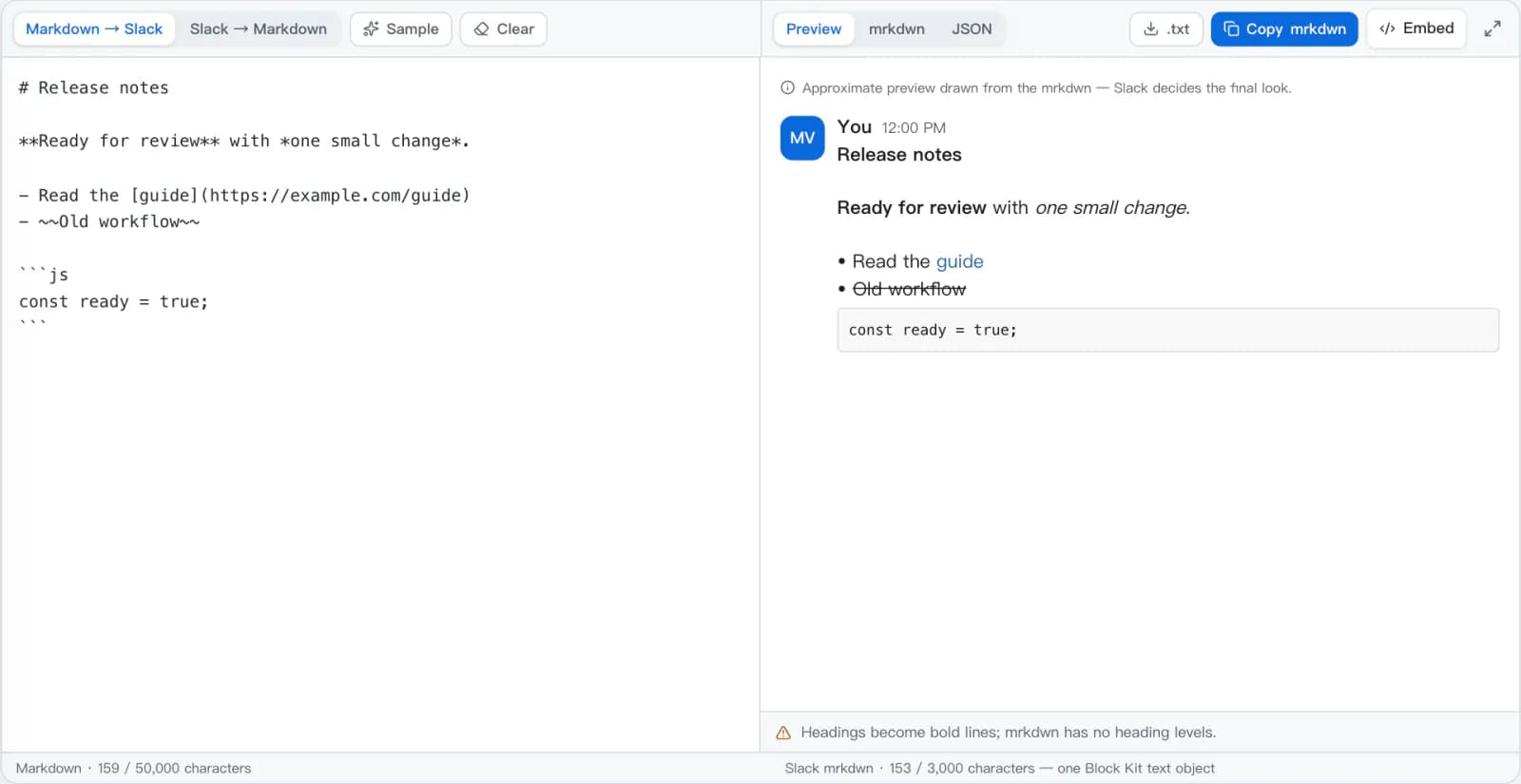
mrkdwn — Slack's own spelling, with the vowels left out — is Slack's Markdown dialect: a small markup language inspired by Markdown that Slack parses in message text. It is not a typo. It looks familiar but differs where it matters: one asterisk makes *bold*, underscores make _italic_, one tilde strikes through, and links are written <https://example.com|like this>. Standard Markdown links and # headings are not mrkdwn syntax, which is why Markdown needs converting before Slack shows it as intended.
The text of a message posted through chat.postMessage, chat.update, or an incoming webhook is read as mrkdwn unless the app turns formatting off.
A text object with "type": "mrkdwn" — in a section, context, or other block — is formatted as mrkdwn. "type": "plain_text" shows the characters exactly as typed.
Messages written in the Slack app are formatted by its composer — the toolbar, or markup when that preference is on — separately from mrkdwn sent through the API.
Slack's newer markdown block accepts standard Markdown instead of mrkdwn. Use this converter when the field you fill in expects mrkdwn.
The Slack Markdown converter parses Markdown into structure first, so each element is rewritten deliberately instead of by search and replace.
# Release notes

**Ready for review** with *one small change*.

- Read the [guide](https://example.com/guide)
- ~~Old workflow~~*Release notes*
*Ready for review* with _one small change_.
• Read the <https://example.com/guide|guide>
• ~Old workflow~The converter handles the differences that make standard Markdown look broken in a Slack message.
**bold** becomes *bold*, *italic* becomes _italic_, and ~~strike~~ becomes ~strike~ — the single-character marks mrkdwn expects.
[label](https://…) becomes <https://…|label>. Relative links stay readable text with a note, and unsafe schemes such as javascript: are never turned into links.
Inline code and fenced blocks keep their contents untouched by emphasis rules. The fence's language label is dropped, since mrkdwn code blocks have none.
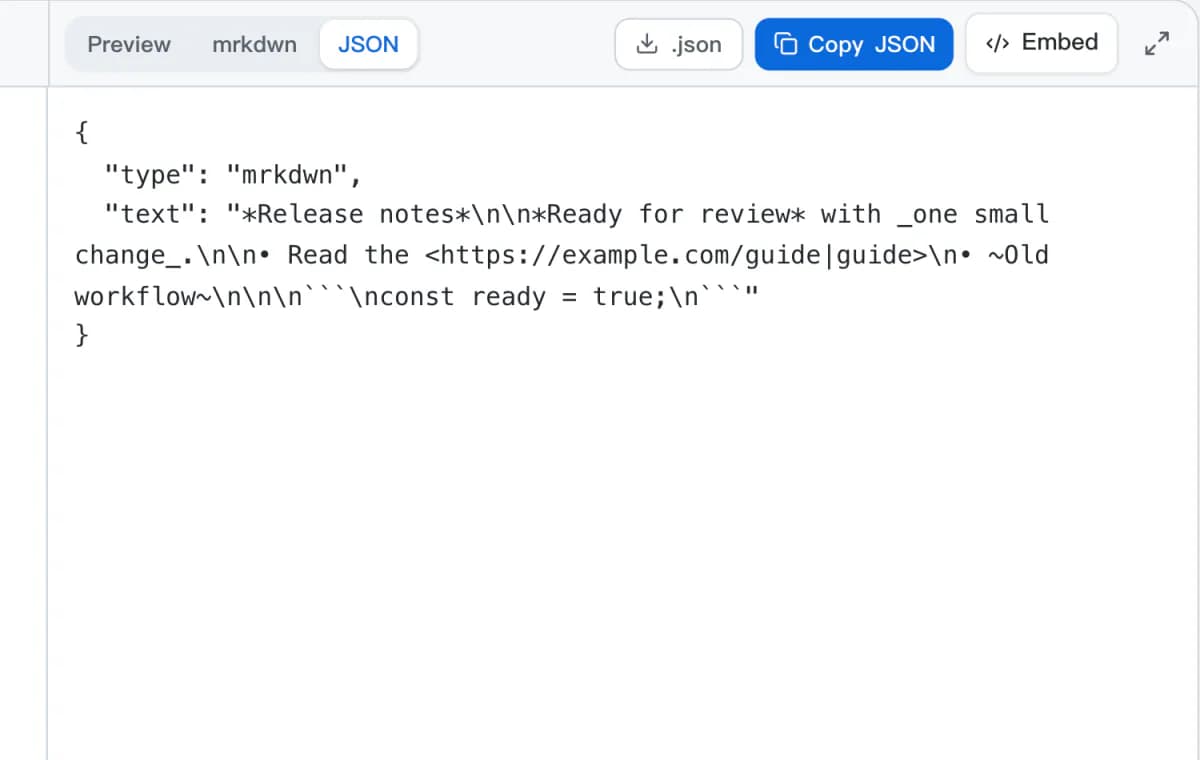
The JSON view wraps the result as { "type": "mrkdwn", "text": … } and counts it against the 3,000-character limit of one text object.
Paste mrkdwn to get standard Markdown: emphasis, <url|label> links, • bullets, and code are converted, and mentions are kept as readable text.
Conversion runs in your browser. It never asks for a Slack token, never connects to a workspace, and never posts a message.
For an API call, the text usually sits inside a block. The JSON view wraps the converted mrkdwn as a text composition object you can drop into that block.
The exact Slack Markdown this converter writes for four common pieces of Markdown.
Markdown bold is two asterisks; mrkdwn bold is one. Italic switches to underscores and strikethrough to a single tilde.
**Ready for review**
*One small change*
~~Old workflow~~*Ready for review*
_One small change_
~Old workflow~mrkdwn links go inside angle brackets with the URL first, then a pipe and the label. Use absolute https:// links: a relative path has nothing to resolve against in Slack.
[Read the guide](https://example.com/guide)<https://example.com/guide|Read the guide>The angle brackets are Slack link syntax, not HTML.
Fenced code keeps its contents. The language label after the opening fence is dropped, because mrkdwn code blocks do not take one.
```js
const ready = true;
``````
const ready = true;
```Slack Markdown has no tables. The cells are written inside a code block, separated by pipes, so the columns stay readable in a monospace font.
| Task | Owner |
| --- | --- |
| Review | Maya |```
Task | Owner
Review | Maya
```Alignment and column widths are not kept.
Turn Markdown into Slack Markdown — or mrkdwn back into Markdown — and copy the format your workflow needs.
Markdown → Slack turns Markdown into Slack Markdown for an API message or bot reply; Slack → Markdown brings mrkdwn back into docs and notes.
Paste the text, then check the Slack-style preview and the notes under it for headings, tables, or links that changed.
Copy the mrkdwn, or switch to JSON and copy a Block Kit text object. Downloads are available as .txt, .json, or .md.
What each piece of standard Markdown becomes in Slack Markdown, as this converter writes it.
| Markdown | Slack Markdown (mrkdwn) | Note |
|---|---|---|
**bold** | *bold* | Single asterisks. |
*italic* or _italic_ | _italic_ | Underscores. |
~~strike~~ | ~strike~ | A single tilde. |
[label](https://example.com) | <https://example.com|label> | Relative links stay as text: label (/path). |
`code` and ```js fences | `code` and ``` fences | Contents kept; the fence language is dropped. |
- item / 1. item | • item | Ordered lists become bullets; numbering is not kept. |
> quote | > quote | Quotes keep their prefix. |
# Heading | *Heading* | mrkdwn has no heading levels. |
| A | B | table | ``` A | B ``` | Plain text in a code block, no alignment. |
 | Chart: https://…/chart.png | Images are not embedded. |
<div>raw HTML</div> | (removed) | Convert HTML to Markdown first if it matters. |
A & B < C | A & B < C | Control characters are escaped. |
mrkdwn is for API fields and text objects. Slack's message box has its own rich-text editing, so pasted mrkdwn may not format the same way there.
Slack also documents rich_text blocks and a markdown block that take different input. This tool writes mrkdwn; check which field your API call expects.
@Maya in Markdown is plain text. Slack mentions use workspace IDs such as <@U123>; the converter does not look them up or notify anyone.
Answers about Slack mrkdwn, the composer, tables, Block Kit text objects, reverse conversion, and privacy.
Write Markdown for another chat app, start from rich text, or remove the formatting altogether.
Paste Markdown, check the Slack preview, and copy mrkdwn or a Block Kit text object.