Chrome Extension · v2.1.0 · 55 Languages

Markdown Viewer & Editor for Chrome

Read local .md files and project folders, edit beside live preview with aligned line numbers, format GitHub Raw pages, and render Markdown inside Google Translate—100% locally.

Markdown Viewer Chrome Extension split-screen live editor with line numbers

Every Markdown Workflow in One Extension

Built for developers, technical writers, and researchers who live in Markdown across local folders, GitHub, and Google Translate.

01 · Local Files & Folders

Read Local Markdown Files & Project Folders Instantly

Open single .md files or an entire documentation folder right in Chrome. The resizable sidebar builds a collapsible folder tree and heading outline, resolves relative images and cross-file links, and automatically refreshes when you save changes in VS Code or any external editor.
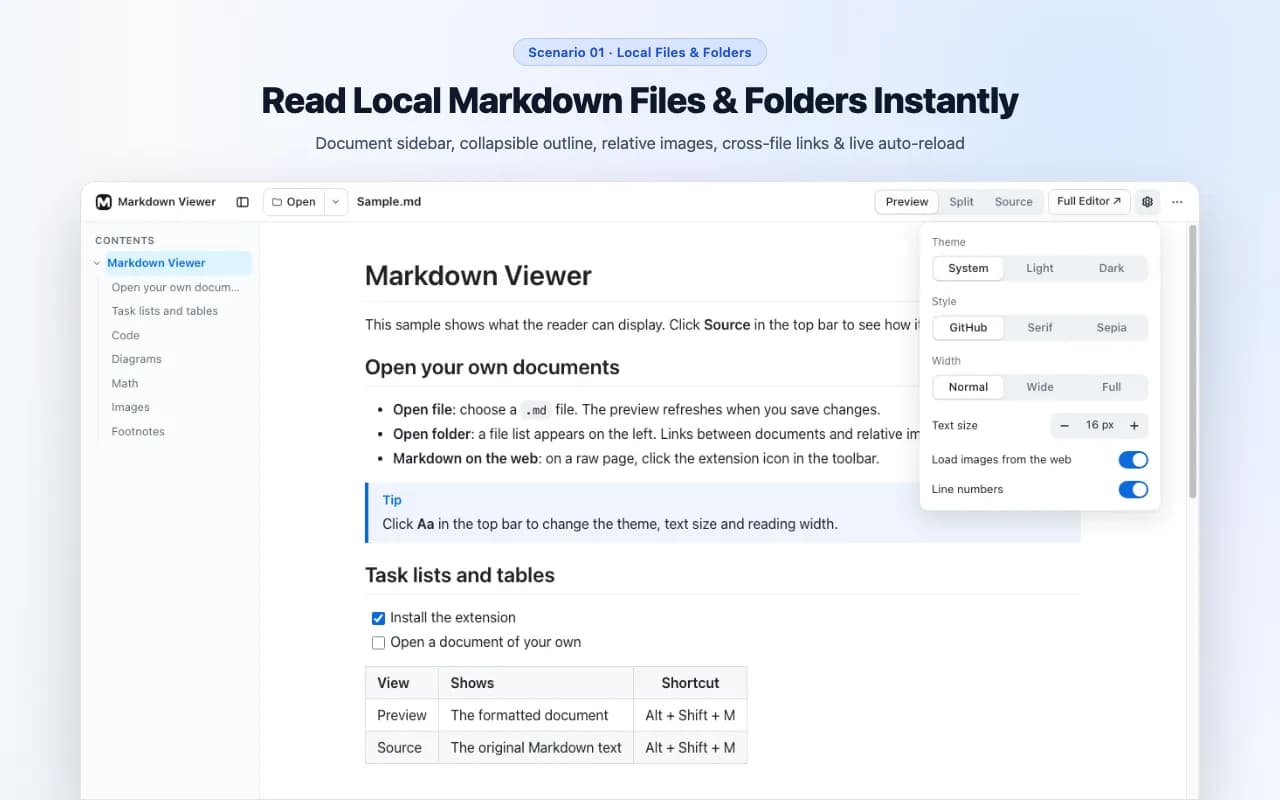
Markdown Viewer Chrome Extension reading a local file with outline sidebar and settings menu
02 · Split Live Editing

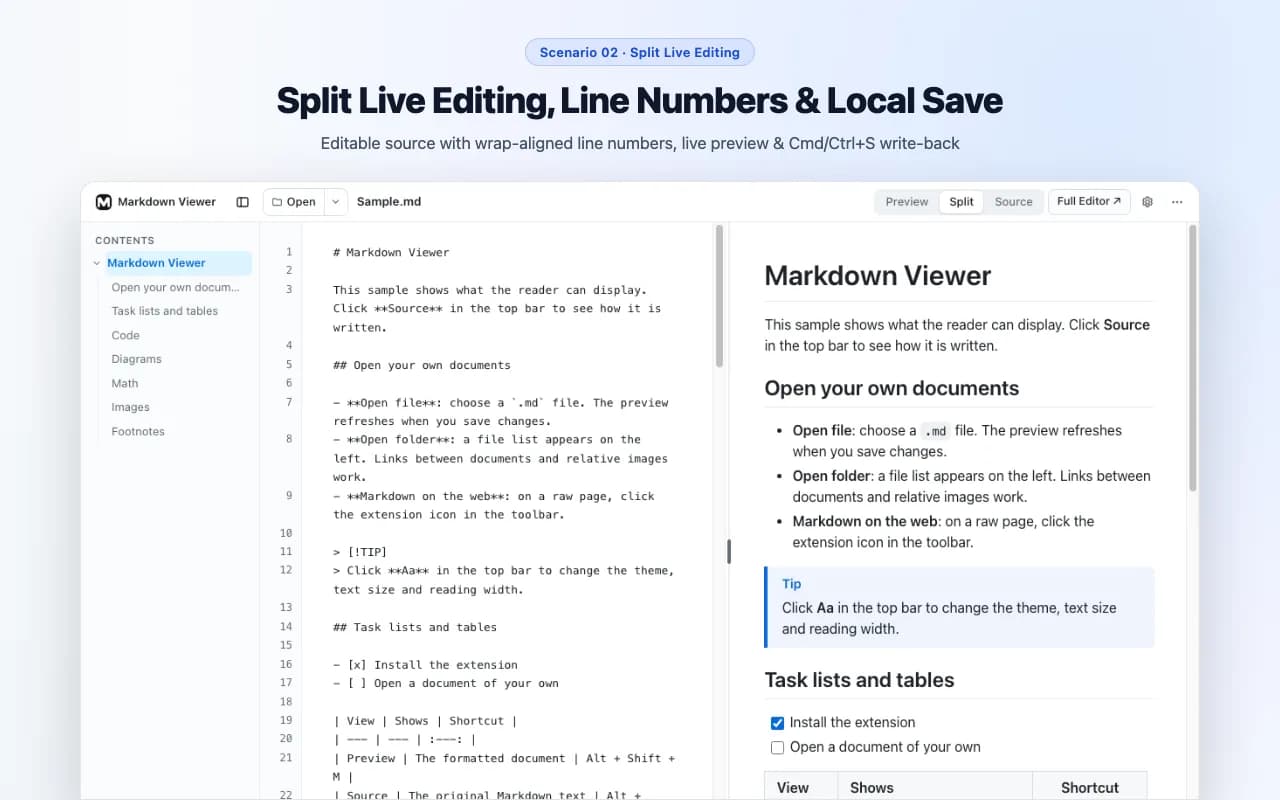
Edit Beside Live Preview with Aligned Line Numbers & Local Save

Switch to Split or Source mode to edit Markdown directly in your browser. Soft-wrap-aligned line numbers stay synchronized with long paragraphs (toggleable in settings), and pressing Ctrl/Cmd+S writes changes back to your original local file with explicit browser permission.

Markdown Viewer Chrome Extension split mode with wrap-aligned line numbers and live preview
03 · Start Page & GitHub Raw

Drag-and-Drop Workspace & One-Click Web Raw Preview

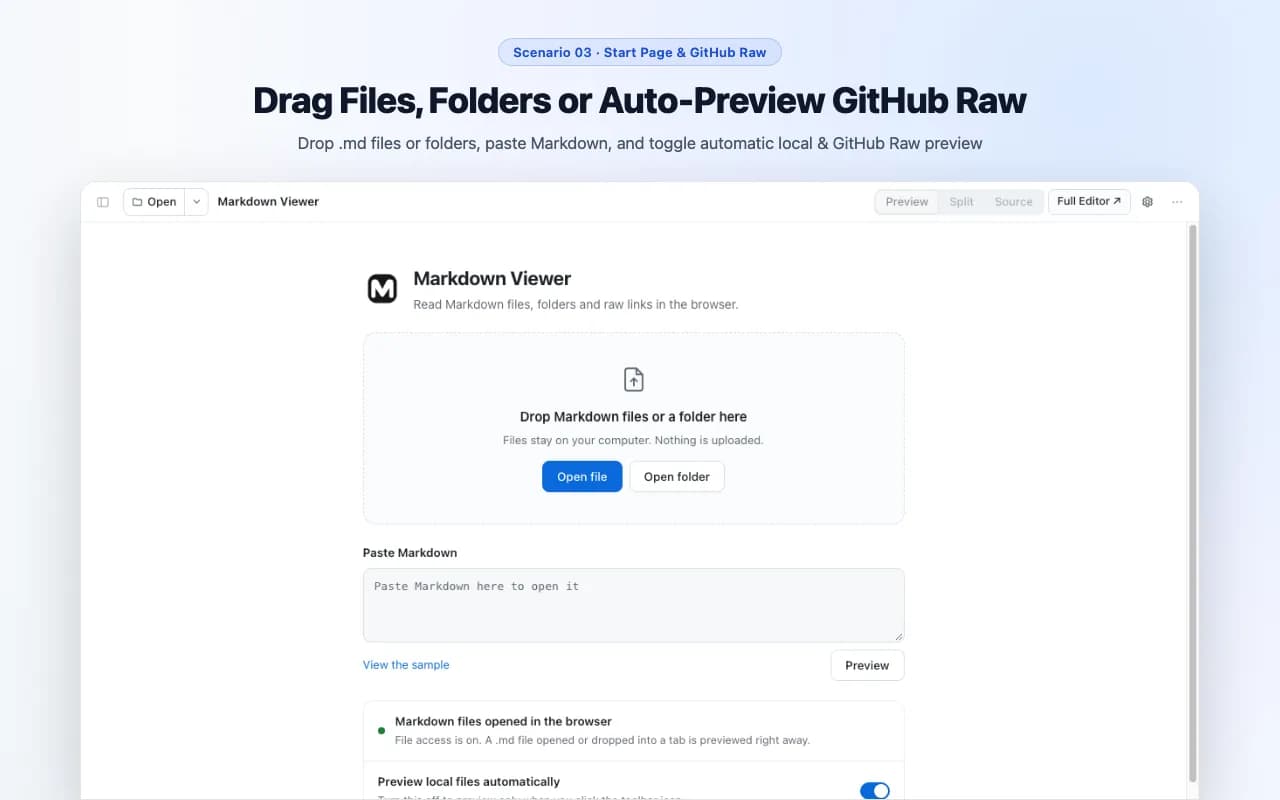
Drop files or folders onto the start page, paste Markdown snippets, or enable automatic preview for local file:// URLs and GitHub Raw pages (raw.githubusercontent.com and gist.githubusercontent.com) with zero server uploads.

Markdown Viewer Chrome Extension start page with drag-and-drop and auto-preview toggles
04 · Google Translate

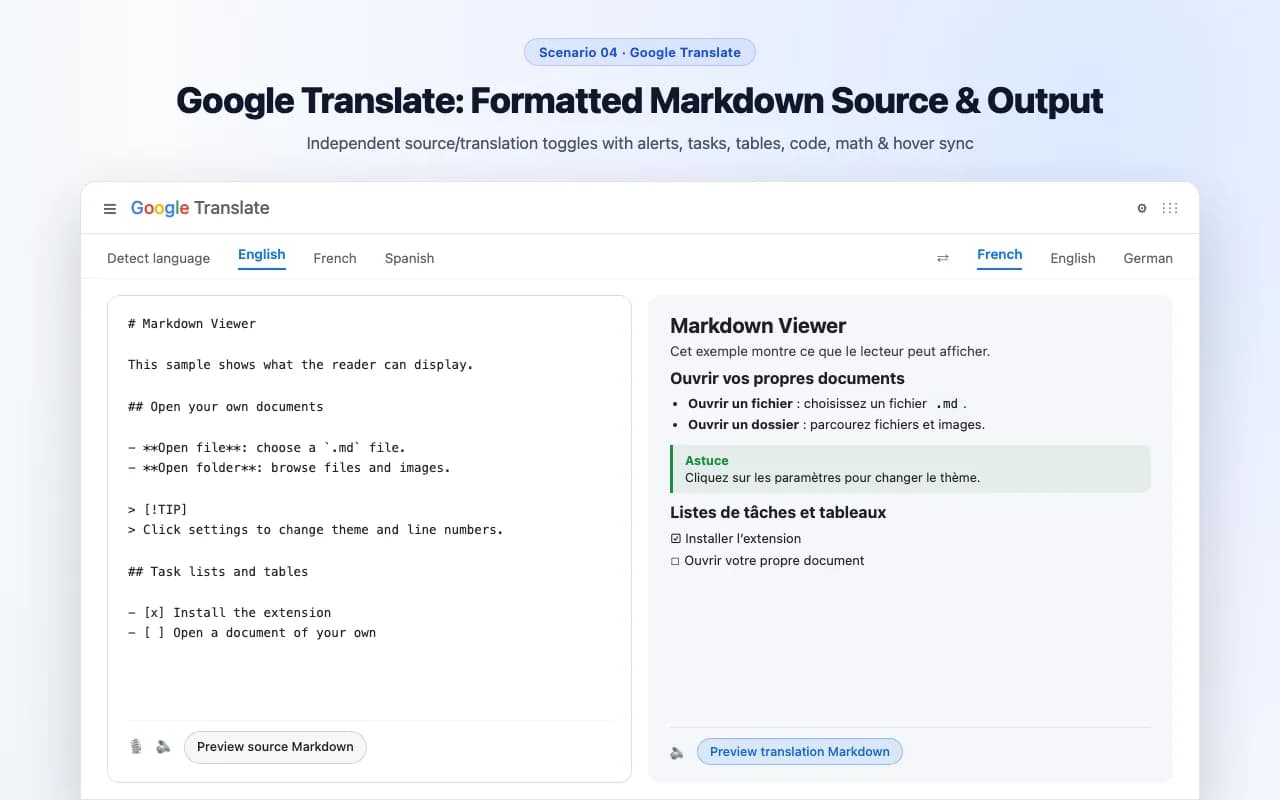
Formatted Markdown Inside Google Translate

Paste Markdown into Google Translate (translate.google.com or translate.google.cn) and inspect both source and translated output with independent toggles, task checkboxes, GitHub Alerts, KaTeX math, Mermaid diagrams, and sentence hover highlight sync.

Markdown Viewer Chrome Extension rendering formatted Markdown inside Google Translate
05 · Full Online Workspace

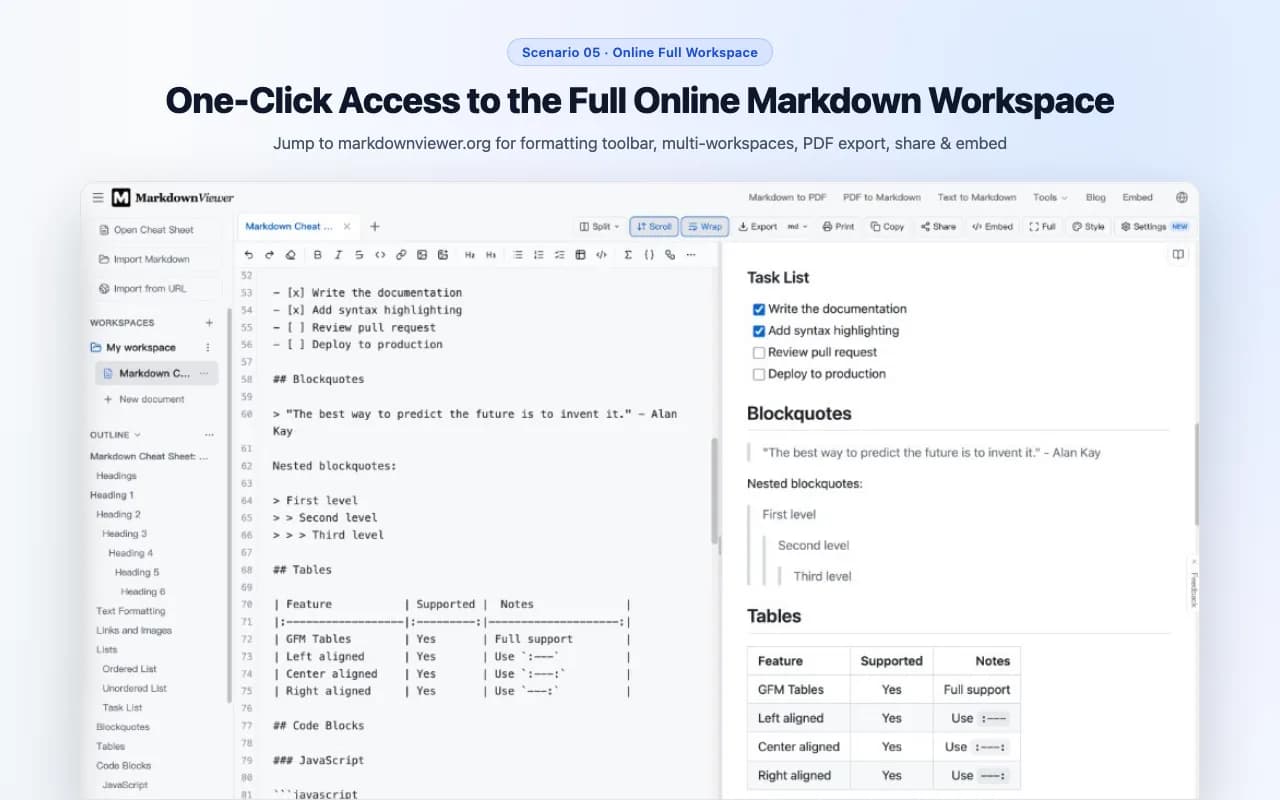
Jump to the Full Online Workspace Anytime

Need multi-tab workspaces, PDF export, Word/LaTeX/PowerPoint conversion, or shareable embed links? Open markdownviewer.org in one click from the extension top bar or popup.

Markdown Viewer full online workspace with formatting toolbar and export tools

Built for Real Technical Markdown

Everything you expect from a dedicated Markdown reader and editor—lightweight, fast, and 100% client-side.

Folders, Links & Relative Images

Browse nested folders in a resizable sidebar. Relative image paths and links between local .md files resolve automatically.

Split Editing & Ctrl/Cmd+S Save

Edit Markdown in Split or Source mode with wrap-aligned line numbers and explicit permission-based local file write-back.

Live Auto-Reload

Keep reading while editing in VS Code or Obsidian. The extension watches your open file and refreshes the preview on save.

Google Translate Markdown

Render translated Markdown cleanly with independent source/output switches and synchronized sentence hover highlighting.

Mermaid Diagrams & KaTeX Math

Fenced Mermaid flowcharts render to crisp SVG and LaTeX math delimiters render via KaTeX MathML—100% locally.

GFM, Alerts & Code Copy

Supports GitHub Flavored Markdown tables, interactive task checkboxes, syntax-highlighted code blocks, and GitHub Alerts.

Light, Dark, Sepia & Serif

Customize theme, typography (GitHub, Serif, Sepia), font size, reading width, and line numbers from the settings menu.

55 Chrome Web Store Languages

Localized UI and RTL support across 55 Chrome Web Store languages, automatically matching your browser language.

Standalone HTML & Print to PDF

Copy rich text, copy raw Markdown, export a clean standalone HTML file, or print directly to PDF.

100% Local Processing & Zero Tracking

Every file, folder, and translation stays in your browser. Markdown Viewer never uploads document text, runs no analytics or ads, and only writes to local files when you explicitly click Save (Ctrl/Cmd+S) and grant browser permission. Read the full Extension Privacy Policy.

  • No account, no cloud upload, no telemetry
  • Explicit permission required for local file write-back
  • Auto-reload only reads the file you selected
  • Google Translate images stay as alt-text for privacy
100% in your browser

Chrome Extension Frequently Asked Questions

Answers about local file access, split editing, saving back to disk, Google Translate, and privacy.

What does the Markdown Viewer Chrome extension do?
Markdown Viewer is a free, privacy-first Chrome extension for reading, split-editing, and saving local .md files and folders, formatting raw web and GitHub Markdown pages, and rendering Markdown inside Google Translate.
Does editing in the extension modify my local files automatically?
No. Edits stay in memory in the current tab until you explicitly click Save (or press Ctrl/Cmd+S) and grant write permission in Chrome. Unsaved changes are indicated by a dot next to the file name.
How do I preview local file:// Markdown files opened directly in Chrome?
Open chrome://extensions, select Markdown Viewer, and enable 'Allow access to file URLs'. Once enabled, dragging or opening any local .md file in Chrome renders it immediately.
How does Google Translate Markdown preview work?
On translate.google.com and translate.google.cn in Text mode, the extension adds clean toggle buttons below the source and translation boxes so you can read formatted headings, lists, alerts, tables, math, and Mermaid diagrams.
Does the extension upload my documents or track my activity?
Never. All Markdown parsing, Mermaid diagrams, and KaTeX math rendering run 100% locally in your browser. Zero analytics, zero ads, and zero document uploads.

Try Markdown Viewer in Chrome or Online

Install the lightweight Chrome extension for local files and Google Translate, or open the full online workspace right away.