Clean mode: turning a webpage into Markdown an LLM can actually use.
You wanted the article. The page also contains a nav bar, a cookie banner, a newsletter box and a footer sitemap. Here are the three layers of filtering that separate the two — and the places where filtering is the wrong instinct.
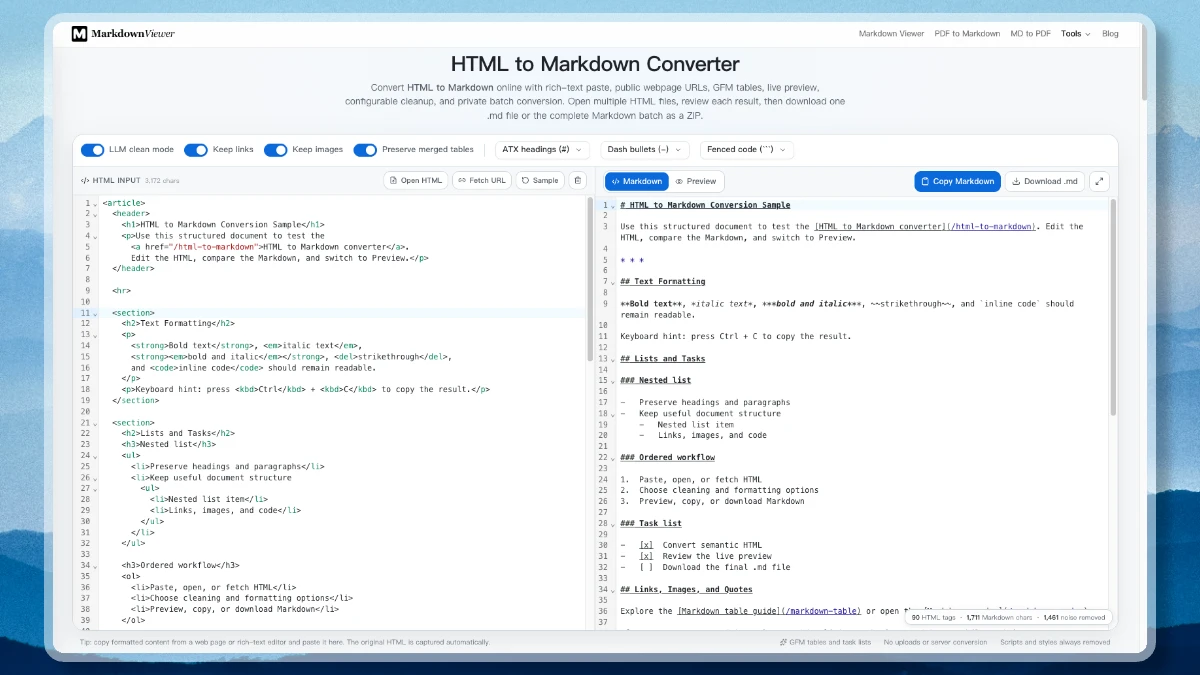
Feed a raw webpage into a retrieval pipeline and you do not index an article. You index an article plus a navigation menu, a cookie notice, two subscribe prompts, a related-links sidebar and a footer sitemap — and because that furniture appears on every page, every chunk carries the same text. Retrieval starts matching on boilerplate. The HTML to Markdown converter has a clean mode for exactly this, and it is worth knowing what it removes, what it deliberately keeps, and where it can be wrong.
Why Markdown, and not just stripped text
Plain-text extraction solves the tag problem and creates a worse one: it throws away the document’s shape. Markdown is the useful middle position, for two concrete reasons.
It is cheaper. Tags are pure overhead — <p class="prose-lg mt-4">…</p> costs you characters that carry no meaning for a model. The converter counts the tags in your input, which is a useful way to see the size of the overhead you are about to delete.
It is chunkable. This matters more. A ## at the start of a line is an unambiguous section boundary, in every document, with no site-specific rules. A <div class="section-heading"> is a convention you would have to learn per site. Splitting on heading levels gives you chunks that correspond to what the author considered a section — which is usually the right unit for retrieval.
The three layers of removal
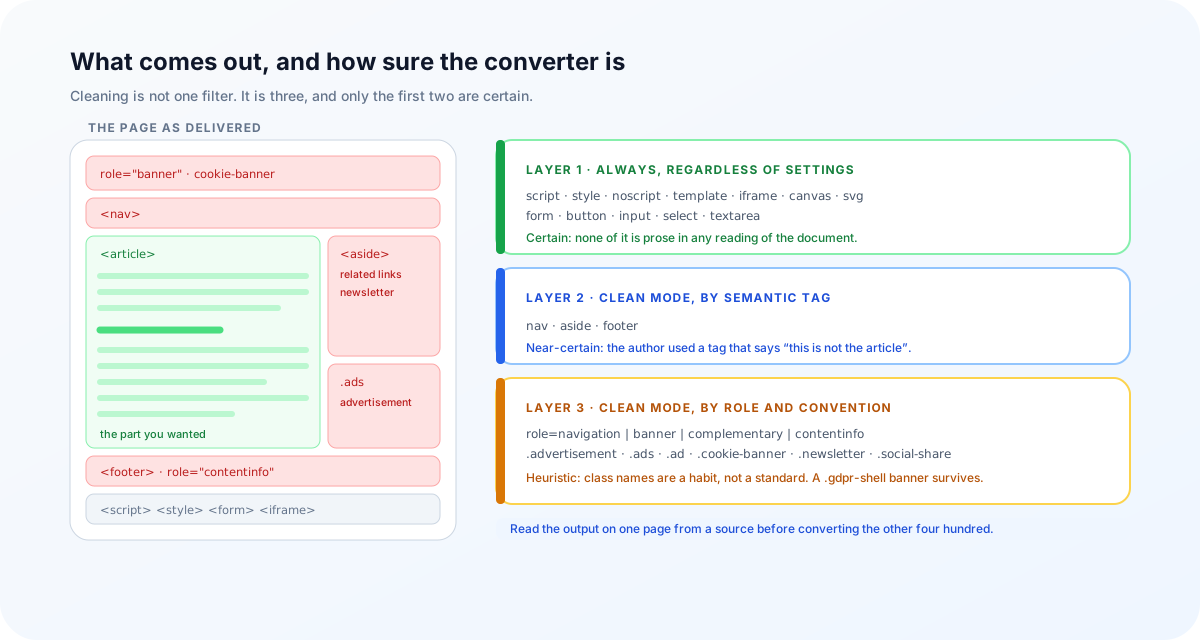
Cleaning is not one filter; it is three, applied with decreasing confidence.
Layer 1 — always removed, regardless of settings
script, style, noscript, template, iframe, canvas, svg, form, button, input, select, textarea. None of these are prose. A stylesheet rendered as text is a wall of braces; a form is a set of controls that mean nothing once flattened. There is no reading of the document in which they help.
Layer 2 — clean mode, by semantic tag
nav, aside, footer. These are the strongest possible signal, because the page author used a tag whose entire purpose is to say this is not the article. Removing them is close to risk-free on any site written after HTML5 settled.
Layer 3 — clean mode, by landmark role and convention
Plenty of markup predates the semantic tags, or ignores them. So clean mode also removes elements carrying the ARIA landmark roles navigation, banner, complementary and contentinfo — the accessibility vocabulary for the same four regions — and then falls back to the class names the web has converged on: .advertisement, .ads, .ad, .cookie-banner, .newsletter, .social-share.
Class names are a habit the web fell into, and habits have exceptions. A site that calls its cookie banner .gdpr-shell or its ad slot .promo-unit-b will keep it. Read the output on one page from a source before you convert a thousand.
What is deliberately kept
A cleaner that removes too much is worse than one that removes too little, because you cannot tell what is missing. Headings, nested lists, task lists, blockquotes, tables, images and fenced code all survive as GFM. Two of them are choices you should make on purpose:
- Links. Dropping them keeps the anchor text and discards the URLs — usually right for embedding, where a URL full of tracking parameters is noise. Keep them when the destination is part of the answer: documentation, citations, anything a reader will follow.
- Images. Keep them and you get
, where the alt text is often genuinely informative and the URL is not. Drop them for a text-only corpus.
Code blocks, and the “Copy” button problem
Copy a code sample from a documentation site and you often get the code block’s user interface along with it: a language label, a “Copy” button, sometimes line numbers — landing in the middle of your code as though they were part of the program. There is a rule that removes those wrappers (.mv-code-header, .code-block-header, .code-language, .code-lang) before conversion begins.
The language itself is worth recovering rather than discarding. Highlighters record it in a handful of conventional places — class="language-ts", lang-python, a data-language attribute, or a visible label next to the block — and those get normalised through an alias table so js becomes javascript, sh becomes bash, yml becomes yaml. The result is a fence with a real tag on it:
<div class="code-block-header">
  <span class="code-lang">TS</span>
  <button>Copy</button>
</div>
<pre><code class="language-ts">
const x = 1;
</code></pre>
```typescript
const x = 1;
```
This is not cosmetic. A fence tagged typescript tells your chunker not to split mid-block and tells a model what it is reading; a bare fence tells it nothing.
Tables: the case for keeping some HTML
Markdown has no rowspan or colspan. When a page contains a table with merged cells, a converter has to pick a way to be wrong — or decline to flatten it.
| Region | Q1  | Q2  |
| ------ | --- | --- |
| EMEA   | 41  | 48  |
| APAC   | 33  | 39  |
<table>
  <tr><th colspan="2">H1 2026</th></tr>
  <tr><td>EMEA</td><td>89</td></tr>
</table>
Preserving is the default, and for an ingestion pipeline it is usually the better trade: a language model reads an HTML table perfectly well, whereas a flattened merge is data that has become subtly untrue. The preserved markup is cleaned first — scripts, styles, inline event handlers and javascript: URLs are all stripped, and only the table structure remains.
Batch, and where the work happens
One page is a paste. A corpus is a queue: up to 50 HTML files at 5 MB each, one set of rules applied across all of them, each result inspectable as source or rendered preview, and a ZIP assembled in your browser. Pasted content and local files never leave the tab — there is no conversion server to send them to.
The one exception: fetching a URL
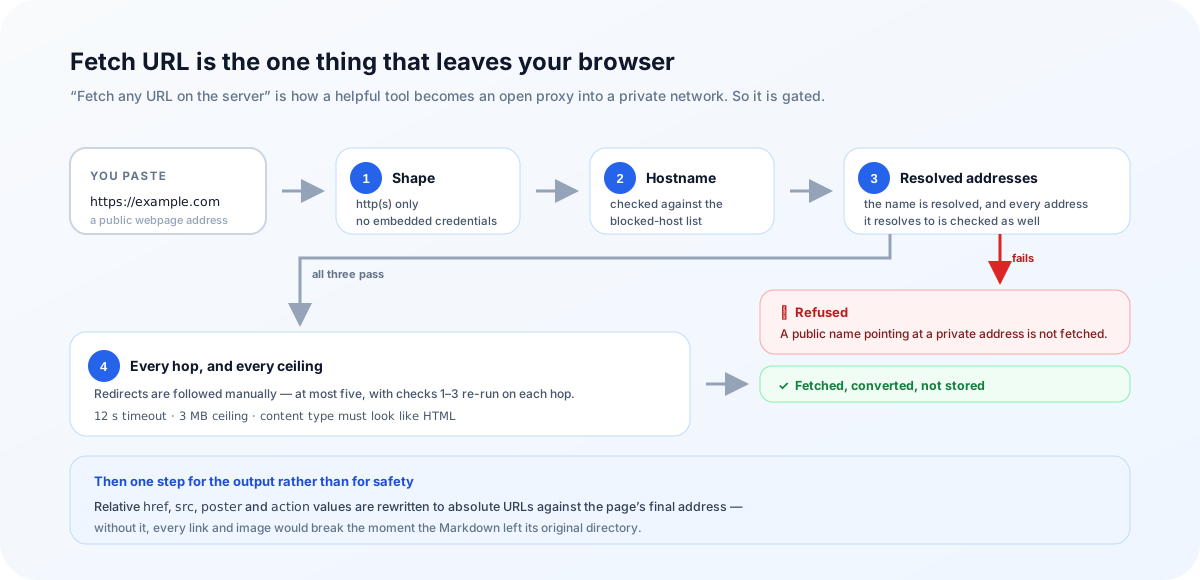
Converting a page you have not saved requires someone to download it, and a browser cannot fetch most cross-origin pages itself. So there is a server route — and “fetch an arbitrary URL on the server” is precisely the feature that turns a helpful tool into an open proxy into a private network. It is worth being specific about what that route does before it fetches anything:
- only
httpandhttps; no credentials embedded in the URL; - the hostname is checked against a blocked list, and then resolved — the resolved addresses are checked too, so a public name pointing at a private address is refused;
- redirects are followed manually, at most five, with the same checks re-run on every hop;
- a 12-second timeout, a 3 MB ceiling, and a content type that has to look like HTML;
- the response is converted and returned, not stored.
Then one more step that matters for the output rather than for safety: relative href, src, poster and action values are rewritten to absolute URLs against the page’s final address. Without it, a fetched article’s links and images would all be broken the moment the Markdown left its original directory.
Pasted HTML and local files are converted entirely in your browser. Fetch URL necessarily sends that one public address to the guarded route above. If the page is sensitive, save it and convert the file instead.
When conversion is not the problem
| What you are pointing at | What to do |
|---|---|
| An article in semantic HTML | Clean mode, convert, spot-check the first result |
| A page rendered entirely by JavaScript | Copy the rendered markup from the element inspector, or fetch with a headless browser |
| Chrome that uses unconventional class names | Expect leftovers; trim them, or add a pre-pass of your own |
| A page behind a login or paywall | Save the page while signed in, convert the file |
| A PDF or a Word file | PDF to Markdown or Word to Markdown first |
And one habit that saves a lot of re-indexing: convert one page from a source, read the Markdown top to bottom, and only then point the batch at the other four hundred. Cleaning rules are heuristics, and heuristics are cheap to check on a single document and expensive to discover in a vector store.
Grep the output for the site’s navigation labels and its cookie copy. If either appears in most files, layer 3 missed that site’s markup and every chunk is carrying the same boilerplate.
Frequently asked questions
Why convert HTML to Markdown before sending it to a model?
Two reasons. Tags are overhead — the same prose costs far fewer characters as Markdown, and characters are what you pay for. And structure becomes explicit: a heading is a line starting with ##, which is a natural boundary for a chunker, whereas a div with a class name is a guess.
Is clean mode on by default?
Yes. So is preserving complex tables. Both are the setting most people want most of the time, and both can be switched off — turn clean mode off when you want the page as-is, including its navigation.
Why is there still HTML in my Markdown?
Almost always a table with merged or nested cells. Markdown has no rowspan or colspan, so the converter keeps the original table markup — sanitized — rather than flattening it into cells that misstate the data. A language model reads an HTML table perfectly well; it cannot recover a merge that was thrown away.
Should I keep links for a RAG pipeline?
Usually not. Dropping links keeps the anchor text and removes the URLs, which are mostly tracking parameters and noise in an embedding. Keep them when the destination is part of the answer — documentation, citations, anything where a user will want to follow through.
Can I convert a whole folder of saved pages?
Up to 50 HTML files, 5 MB each. They queue up, one set of rules applies to all of them, you can inspect each result, and the ZIP is built in your browser rather than on a server.
Does clean mode work on any site?
It works well on pages that use semantic HTML or conventional class names, which covers most publishing platforms and documentation generators. It is heuristic by nature: a site that calls its cookie banner .gdpr-shell keeps that banner. Read the output before you ingest a few thousand pages.
What about pages rendered entirely by JavaScript?
If the article is not in the HTML, no converter can find it. Copy the rendered markup from your browser’s element inspector and paste that instead, or fetch the page with a headless browser first.
Try it
Paste a page, switch clean mode on, and see how much of it was never the article.
Open the HTML to Markdown converterReferences
- Turndown — the HTML to Markdown engine, with GFM pluginsgithub.com/mixmark-io/turndown
- MDN: ARIA roles, including the landmarksdeveloper.mozilla.org/en-US/docs/Web/Accessibility/ARIA/Roles
- OWASP: Server-Side Request Forgery preventioncheatsheetseries.owasp.org
- GitHub Flavored Markdown specificationgithub.github.com/gfm
- The HTML to Markdown convertermarkdownviewer.org/html-to-markdown