Translate Markdown in Google Translate with Full Formatting

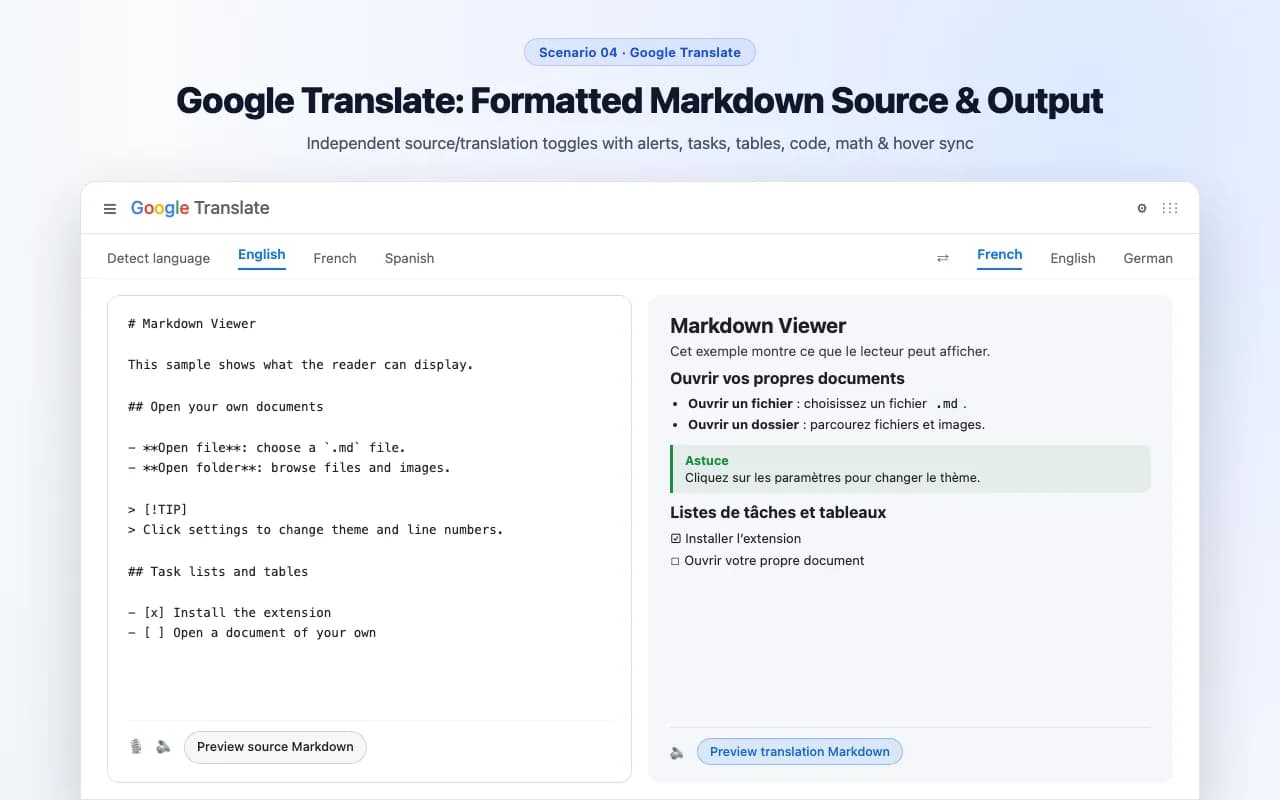
Send any .md document from the Markdown Viewer workspace or Chrome extension straight to translate.google.com—or paste Markdown directly on Google Translate to view rendered tables, code blocks, KaTeX math, and Mermaid diagrams.

Chrome extension is optional for raw translation; required to render Markdown styles inside Google Translate.

Translate Markdown in Google Translate with rendered headings, tables, code blocks, and Mermaid diagrams

How to Translate Markdown Without Breaking Formatting

Launch Google Translate in one click from an open Markdown file, or paste Markdown directly into translate.google.com.

One-Click Translate from the Web Workspace or Extension

Translate any Markdown (.md) document directly from the markdownviewer.org online workspace or the Markdown Viewer Chrome extension without copying and pasting.

  1. 1Install the Markdown Viewer Chrome extension (optional for raw translation; enables formatted Markdown rendering inside Google Translate).
  2. 2Open your .md file, README, or notes in the Chrome extension reader or the markdownviewer.org online editor.
  3. 3Click the Translate button in the top-right toolbar (next to Settings) to open translate.google.com with your Markdown pre-filled and rendered.
Web Workspace
Chrome Extension

Paste Markdown Directly on translate.google.com

Translate Markdown snippets directly inside Google Translate in Text mode and inspect the styled output without switching tabs.

  1. 1Install the free Markdown Viewer Chrome extension from the Chrome Web Store.
  2. 2Open translate.google.com or translate.google.cn in Text mode and paste your raw Markdown text.
  3. 3Read the formatted Markdown translation immediately, or toggle between rendered preview and raw Markdown syntax below either panel.

Built for Translating Technical Markdown

Translate READMEs, API docs, and Markdown notes in Google Translate while preserving structure and visual clarity.

One-Click Google Translate Launch

Send any Markdown document from the online workspace or Chrome extension straight to translate.google.com with your target language selected.

Rendered Markdown in Translation Results

View translated headings, GFM tables, bullet lists, task checkboxes, blockquotes, and GitHub Alerts as clean formatted HTML instead of raw syntax.

Hover Sentence Highlight Sync

Point at any translated sentence in the formatted Markdown preview to highlight the matching source sentence in the original document.

KaTeX Math & Mermaid Diagrams

Technical Markdown elements—including LaTeX math equations (KaTeX) and fenced Mermaid flowcharts—render cleanly inside Google Translate.

Independent Source & Output Toggles

Switch formatted Markdown preview on or off independently for the source and result boxes whenever you need to edit or copy raw Markdown.

Automatic Long-Document Handoff

Translate longer .md files effortlessly: the Chrome extension transfers long Markdown documents into Google Translate without URL length limits.

100% Local Markdown Rendering & Privacy

The Markdown Viewer extension parses GitHub Flavored Markdown tables, code blocks, KaTeX math, and Mermaid diagrams entirely inside your browser tab—with zero intermediary servers, zero analytics, and zero document storage. Explore all Chrome Extension features.

  • Works on both translate.google.com and translate.google.cn
  • Zero third-party servers between your Markdown and Google Translate
  • Optional Chrome extension — raw translation works even without installing
100% in your browser

Markdown Translate Frequently Asked Questions

Answers about translating .md files, using Google Translate with Markdown, and the optional Chrome extension.

How do I translate a Markdown file without losing formatting?
Open your .md file in Markdown Viewer (web workspace or Chrome extension) and click Translate to send it to translate.google.com. With the Markdown Viewer Chrome extension installed, Google Translate renders the translated Markdown headings, tables, code blocks, KaTeX math, and Mermaid diagrams directly in the result pane.
Is the Chrome extension required to use the Translate button on markdownviewer.org?
No, installing the extension is optional. Clicking Translate on markdownviewer.org always opens translate.google.com with your Markdown text and chosen target language. Installing the Markdown Viewer Chrome extension adds formatted Markdown rendering inside Google Translate.
Can I translate local .md files or GitHub READMEs?
Yes. With the Markdown Viewer Chrome extension, you can open local .md files, project folders, or GitHub Raw Markdown pages and click the Translate button in the reader toolbar to translate them in Google Translate.
Can I paste Markdown directly into translate.google.com?
Yes. After installing the Chrome extension, paste any Markdown text into translate.google.com or translate.google.cn in Text mode. The extension automatically renders the translated Markdown and adds toggle buttons below both the source and result boxes.
Does Markdown Translate send my files to a third-party server?
No. All Markdown parsing and preview rendering happen 100% locally in your browser. Text is only sent directly to Google Translate when you click Translate or paste into translate.google.com.

Start Translating Formatted Markdown

Click Translate from the online workspace right now, or install the free Chrome extension to render styled Markdown inside Google Translate.