How Image to Markdown works: local OCR, then document reconstruction.
The Image to Markdown page loads Tesseract only after you add an image, runs OCR inside the browser, then turns word positions into headings, lists, tables, and editable Markdown.
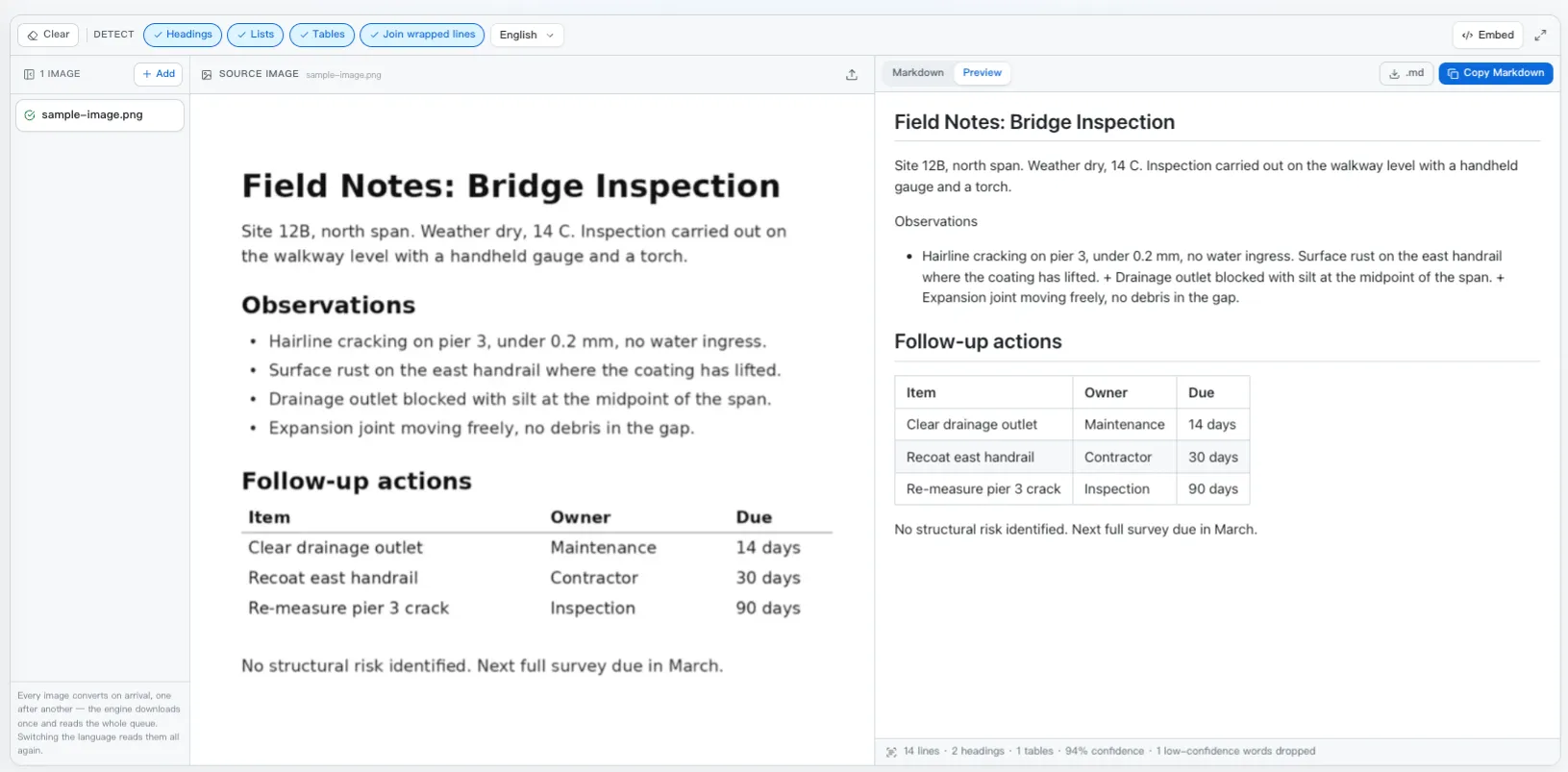
The Image to Markdown converter is not an upload form around a remote OCR API. Adding an image starts a local pipeline: one Tesseract worker recognises text and coordinates, then a separate layout pass rebuilds document structure and keeps it adjustable in the interface.
The page is a four-stage local pipeline
- Input: paste, drop, or select up to twelve PNG, JPG, WebP, or GIF images. Each image joins one queue and conversion starts automatically.
- Recognition: the page dynamically loads Tesseract.js, creates one worker for the selected language, and asks it for text plus layout blocks.
- Reconstruction: word confidence and bounding boxes become a small page model; relative size, indentation, gaps, and repeated columns become Markdown structure.
- Review and export: the page renders a preview, reports confidence, lets detection options rebuild the result, and copies or downloads individual Markdown files or a ZIP.
Stage 1: Tesseract OCR runs in the tab
The engine is tesseract.js: a WebAssembly build of Tesseract. The page runs it through a browser worker, away from the main UI thread, so progress can update while a screenshot or scan is being read.
It is not loaded with the page. The WASM core and the language model are relatively heavy, so neither is part of the initial page bundle. The import happens only after the first image joins the queue:
const { createWorker } = await import('tesseract.js');
const worker = await createWorker('eng', 1, { logger });
The browser can cache those assets after the first fetch, which is why later conversions usually start faster. The converter is also built around a queue rather than a button: loading the engine costs far more than reading a page does, so twelve screenshots share one worker and pay that price once between them. Images dropped while a run is going join the same queue rather than starting a second engine.
An OCR tool has exactly one thing to do with a picture. A button between dropping the image and reading it was a step that never had a reason to say no, so adding an image now is the request: it joins the queue, the worker picks it up, and a scan line sweeps whichever image you are looking at while it is being read.
Stage 2: text, word boxes, and confidence
The recognition call requests plain text and layout blocks. The Markdown pass uses the richer tree — blocks, paragraphs, lines, and words with bounding boxes and confidence scores. Flattened to the page model used by the converter, one line looks like this:
{
  text: "Follow-up actions",
  confidence: 94,
  bbox: { x0: 372, y0: 557, x1: 861, y1: 595 },
  words: [ { text: "Follow-up", bbox: {…}, confidence: 96 }, … ]
}
Two numbers in there do most of the work later. y1 - y0 is the line height, which is how type size is measured without knowing anything about fonts. x0 is the left edge, which is how indentation and columns are found.
Confidence is used before either. Words scoring under 40 are dropped and counted, and that filtering happens first — a smear of noise along the edge of a scan is often recognised as a tall garbage word, and if it survived into the next step it would drag the page's median line height upward and quietly stop every real heading from being detected. The count of what was thrown away is reported next to the output rather than hidden, because a conversion that dropped two hundred words is telling you to rescan.
Stage 3: geometry becomes Markdown structure
With clean lines in reading order, the reconstruction is a small set of rules, each one deliberately expressed as a ratio rather than a pixel count. Resolution changes everything measured in pixels and nothing measured in ratios, and the same page arrives here as a 900-pixel screenshot and a 5,000-pixel scan.
1. Type size becomes heading level
The median line height across the page is taken as the body text. A line at least 1.18× that is an ###, 1.42× is an ##, and 1.75× is a #. One guard stops the obvious failure: a “heading” longer than 120 characters is a paragraph set in large type, not a title, and is left as body text.
2. Wide gaps become columns
Inside a line, a gap wider than 0.9× the line height splits the words into separate cells. The threshold is deliberately tied to line height rather than to the line's own median gap, and the reason is worth stating because it is the sort of bug that looks like a tuning problem: in a table whose cells each hold one word, every gap is a column gap, so the median gap is the column gap and no multiple of it will ever be exceeded. Line height is independent of the gap distribution — and since a space is roughly a third of the line height, anything approaching a full line height is several spaces wide.
3. Repetition becomes a table
One line splitting into cells means nothing. Three or more consecutive lines splitting into the same number of cells at the same x positions is a table, and is emitted as a GFM pipe table with the first row as the header. Two rows was tried and is not enough evidence: a section heading with a page number beside it satisfies it perfectly.
4. Vertical space becomes paragraphs
A gap between two lines wider than 0.9× the body height ends the block. Otherwise the lines are joined with a space, because a line that ends at the right margin is a wrapped sentence rather than a new one — and a word split by a hyphen at that margin is rejoined rather than left as reconstruc- tion.
"Follow-up actions"  h=38  y=557
"Item" "Owner" "Due"  h=21  y=599
   x0 = 372, 723, 938
"Clear drainage"  …    h=21  y=641
   x0 = 372, 726, 938
"Replace filter"  …    h=21  y=683
   x0 = 371, 723, 940
## Follow-up actions

| Item | Owner | Due |
| --- | --- | --- |
| Clear drainage | Maintenance | 14 days |
| Replace filter | Facilities | 30 days |
Because the reconstruction reads a stored page model rather than the image, the Headings, Lists, Tables, and Join wrapped lines switches do not run OCR again. They re-derive the document from the same coordinates; only a change of language requires reading the picture again.
Stage 4: review the result and export Markdown
Each queued image keeps its own source, OCR page model, Markdown, confidence, and status. Selecting a row switches the source and output together, so the preview can be checked against the exact image that produced it while the worker continues through the rest of the queue.
A completed result can be copied or downloaded as .md. When several images finish, the page creates a ZIP entirely in the browser, with one Markdown file named after each source image. No server-side conversion job or document store sits behind those controls.
Where it stops, and why
Every limit below follows from the same fact: this pipeline reads text and positions, and nothing else.
| In the picture | What comes out |
|---|---|
| Screenshots and high-resolution scans of print | Clean Markdown, little to fix |
| Column-aligned tables with real whitespace | A pipe table — check it against the image |
| Dense tables, merged headers, tight columns | Often paragraphs; the gaps never reached the threshold |
| Code | Text, but not a fenced block: l/1 and O/0 confusions, indentation lost |
| Mathematical formulas | An approximate line of characters, not LaTeX |
| Handwriting, skewed or shadowed photos | Unreliable — straighten and re-capture first |
When the text is uncertain, word boundaries move — and word boundaries are what the column detection measures. That is why a poor scan does not degrade gently into slightly wrong text: it degrades into a table that silently became three paragraphs. Read the confidence figure before you read the output.
The one setting that is not on the page
Nothing in the interface improves a conversion as much as pixels per character. A character rendered across twenty pixels is read almost perfectly; the same character across eight is a guess, and no amount of toggling headings or lists will recover it.
Capture at 2× · crop to the region you actually want · straighten a tilted photo · avoid a shadow across the page · pick the matching language rather than English · convert a table on its own rather than as part of a full page.
Where the picture goes
Nowhere. Recognition, the reconstruction, the rendered preview and the ZIP of .md files for a batch are all built in the tab; there is no conversion API behind this page. The precise version is worth stating: the engine and language data are fetched from a public CDN on first use and cached afterwards, and that request contains no part of your image. Once cached, the converter works offline.
A contract scan, a payslip, a whiteboard from an internal planning session — the documents most worth converting are usually the ones you would not paste into a hosted OCR service. The same reasoning shapes the PDF converter and the Word converter, which solve the same problem from formats that carry their own structure.
Frequently asked questions
Does my image get uploaded to a server?
The image does not. Recognition runs on a WebAssembly build of Tesseract inside your own tab, so the pixels never leave the machine. One request does leave: the first conversion fetches the engine and the language data from a public CDN, after which the browser caches both. That request asks for a program and a data file and carries no part of your picture.
Why is the first conversion slower than the rest?
Because it pays for the engine. The WASM core and one language model are several megabytes, and they are downloaded before any recognition starts. Every image after that reuses the cached copy, which is also why the converter reads a whole queue with a single worker rather than starting one per image.
How does it decide something is a heading?
By ratio, not by pixels. The median line height across the page is taken as the body text, and a line at least 1.18× that becomes an H3, 1.42× an H2, and 1.75× an H1. Ratios survive a change of resolution, so the same rule works on a phone photo and a 600 DPI scan. A "heading" longer than 120 characters is treated as large body text instead.
How are tables detected without any gridlines?
A gap between two words wider than 0.9× the line height is read as a column break, which splits each line into cells. When three or more consecutive lines split into the same number of cells at roughly the same x positions, that run becomes a GFM pipe table. Two rows is not enough evidence — a heading with a page number beside it would qualify.
Why can it not produce LaTeX or fenced code blocks?
Both need something text OCR does not provide. A formula is a two-dimensional layout whose meaning depends on superscripts, fractions and delimiters, which is a different class of model. Code needs exact characters and exact indentation, and OCR reliably confuses l with 1 and O with 0 while collapsing runs of spaces. The text comes through in both cases; the semantics do not.
Do the heading, list, and table switches run OCR again?
No. The page keeps Tesseract's word boxes in memory and rebuilds the Markdown from that stored geometry when a detection switch changes. Only changing the recognition language queues the images for another OCR pass because the worker needs a different language model.
Try it
Paste a screenshot and turn local OCR results into editable Markdown.
Open the Image to Markdown converterReferences
- tesseract.js — the WebAssembly port that runs in the tabgithub.com/naptha/tesseract.js
- Tesseract OCR — the engine itselfgithub.com/tesseract-ocr/tesseract
- Improving the quality of the output — official guidancetesseract-ocr.github.io/tessdoc
- GitHub Flavored Markdown specificationgithub.github.com/gfm
- The Image to Markdown convertermarkdownviewer.org/image-to-markdown