Real Word Heading Styles
The converter writes # through ###### as the built-in Heading 1–6 styles, not bold text at a bigger size. Word's navigation pane, automatic table of contents, and outline view all work on the result.
Free markdown to docx conversion in your browser. Paste Markdown or open a .md file and download a genuine Word document with real heading styles, editable tables, highlighted code, embedded images and LaTeX equations — no upload, no account.
Drop one or more Markdown files here, or choose another way to create an editable DOCX file.
Your Markdown stays in this browser. Nothing is uploaded.
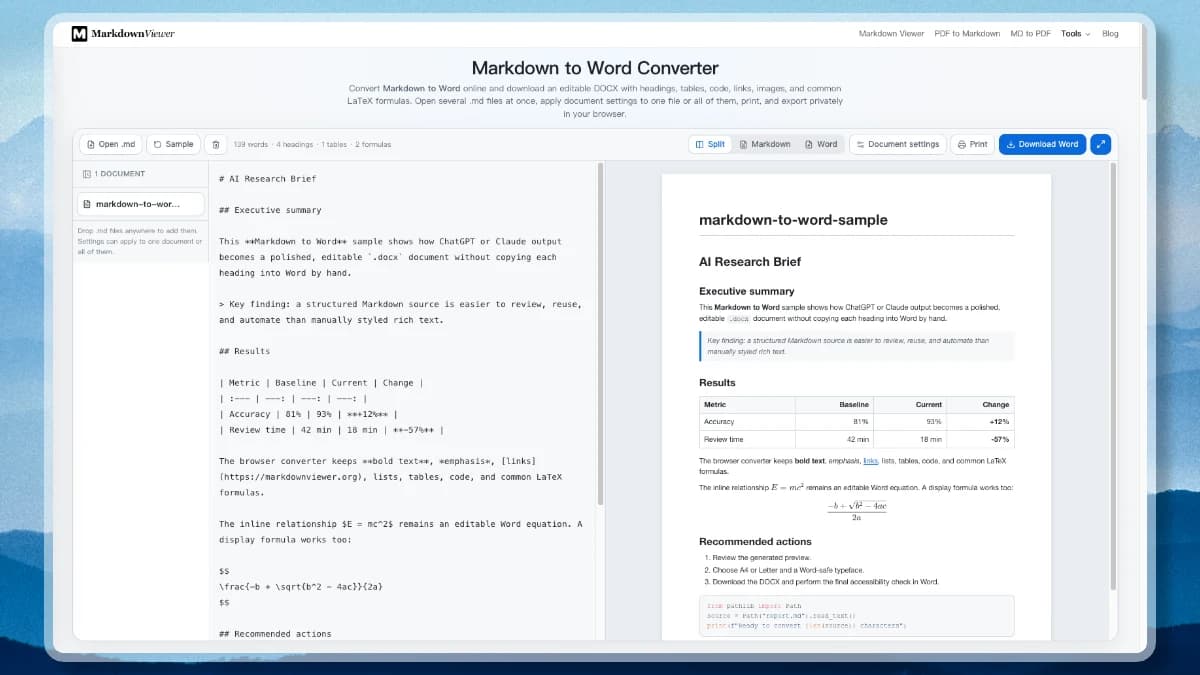
Going from markdown to docx means building an Office Open XML package: a ZIP containing the document body, a style definition table, numbering rules, relationships, and any embedded media. Doing it properly is the difference between a file Word can outline and one it merely displays.
Plenty of converters produce a file with the right extension. These are the details that decide whether the result is a working Word document or a formatting cleanup job.
The converter writes # through ###### as the built-in Heading 1–6 styles, not bold text at a bigger size. Word's navigation pane, automatic table of contents, and outline view all work on the result.
GFM pipe tables become genuine DOCX tables with a styled header row, ruled cells, and the left, centre, or right alignment your delimiter row asked for — resizable in Word rather than pasted as a picture.
A fenced block keeps its language colouring inside the Word file. Keywords, strings, and comments stay distinguishable in a framed, line-by-line block instead of collapsing into one grey paragraph.
Common inline and display math converts to Word's own OMML equation objects — fractions, roots, superscripts, subscripts, Greek letters, operators — so a reviewer can click and edit them, not just look at them.
ChatGPT and Claude answer in Markdown; your organisation reads .docx. Paste the reply, convert it, and hand over a formatted report without an hour of manual restyling.
Data URLs and CORS-accessible remote images are downloaded and embedded at a sensible size. When one image cannot be fetched, a labelled placeholder appears instead of the export failing outright.
Choose A4 or US Letter, normal or narrow margins, a Word-safe typeface, body size, title, author, an optional contents page, and a page break before each H1. Save the combination and reuse it next time.
Open a set of .md files, switch between them in the list on the left, apply one page setup to all of them, and export the whole batch in a single action.
The .docx is packaged locally in your browser. There is no upload, no conversion queue, and no copy of your document sitting in someone else's storage bucket.
The markdown to docx mapping in full, so you know what to expect when the file opens in Word.
| In the Markdown | In the .docx | Notes |
|---|---|---|
# … ###### | Heading 1 – Heading 6 | Drives the navigation pane and TOC |
**bold** _italic_ ~~del~~ | Character formatting | Applied as real runs |
[label](url) | Clickable hyperlink | Opens from inside Word |
- item / 1. item | List paragraphs | Nesting levels preserved |
| a | b | | Native Word table | Column alignment carried over |
```lang | Framed code block | Language colouring retained |
 | Embedded picture | Scaled to the text column |
$x^2$ and $$…$$ | OMML equation | Editable in Word's equation tools |
> quote | Quote style | Indented with a rule |
From a plain .md file to a document you can email to someone who has never heard of Markdown.
Bring in text from ChatGPT, Claude, Obsidian, Typora, or VS Code, or open local Markdown files. The source stays fully editable in the left pane.
Pick page size, margins, font, body size, title, and author, and decide whether you want a table of contents and a page break before each chapter. Split view shows the Word page as you change it.
Build the Markdown to DOCX file locally and open it in Microsoft Word, Google Docs, or LibreOffice — or print the identical styled page straight from the browser.
This page stays at the format level. Two neighbours pick up where it stops.
The same converter written for the deadline: turning a ChatGPT answer into something you can hand over, page setup, fonts, and printing.
Unpack a .docx the other way — style table to Markdown hierarchy, OMML to LaTeX, word/media extracted to an assets folder.
Answers on real Office Open XML output, heading styles, tables, equations, corporate templates, Pandoc, and privacy.
Scroll back to the converter, paste your Markdown, choose a page setup, and download an editable Word document.